Physical Media Tracking
Every drive, camera card, USB stick and LTO tape in your facility — where it is, what is on it, and which step of ingest it has reached.
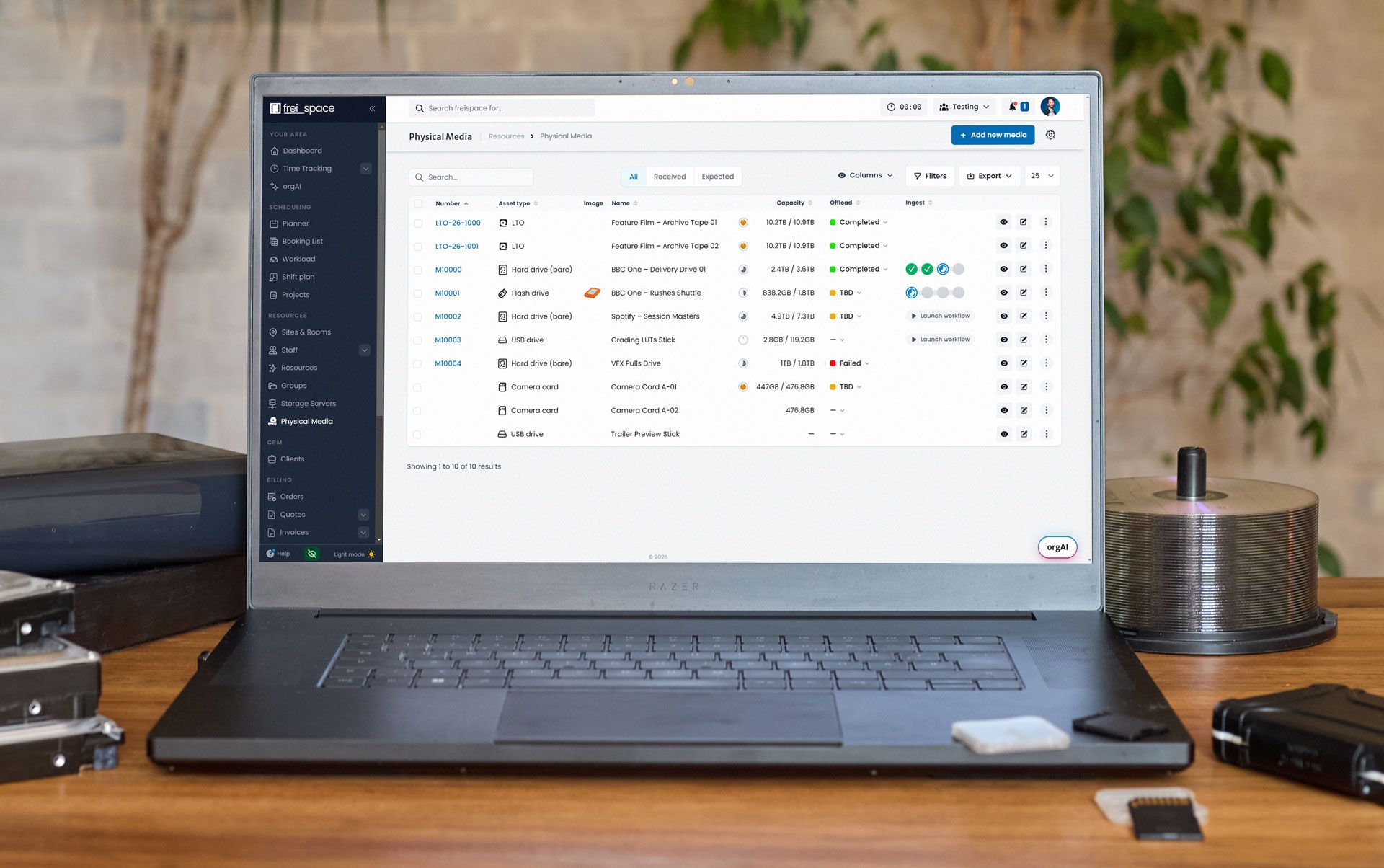
Does freispace have a media library? Yes — a physical one.
Our physical media library is the register of what material arrives and leaves your facility: every client delivery drive, bare hard drive, camera card, USB and flash drive and LTO tape in one inventory.
Track media states with custom statuses (e.g. Ingest: QC, Offload: Failed), record the location of each media item, and document a drive's state via attached images and files.
Versioning allows to see the history of a hard drive, and the threaded comment section with @mentions keeps condition notes on the record rather than in an inbox.
As a module of freispace, not a separate application or bolt-on, your records are linked to bookings, projects and clients.
What is actually on this drive?
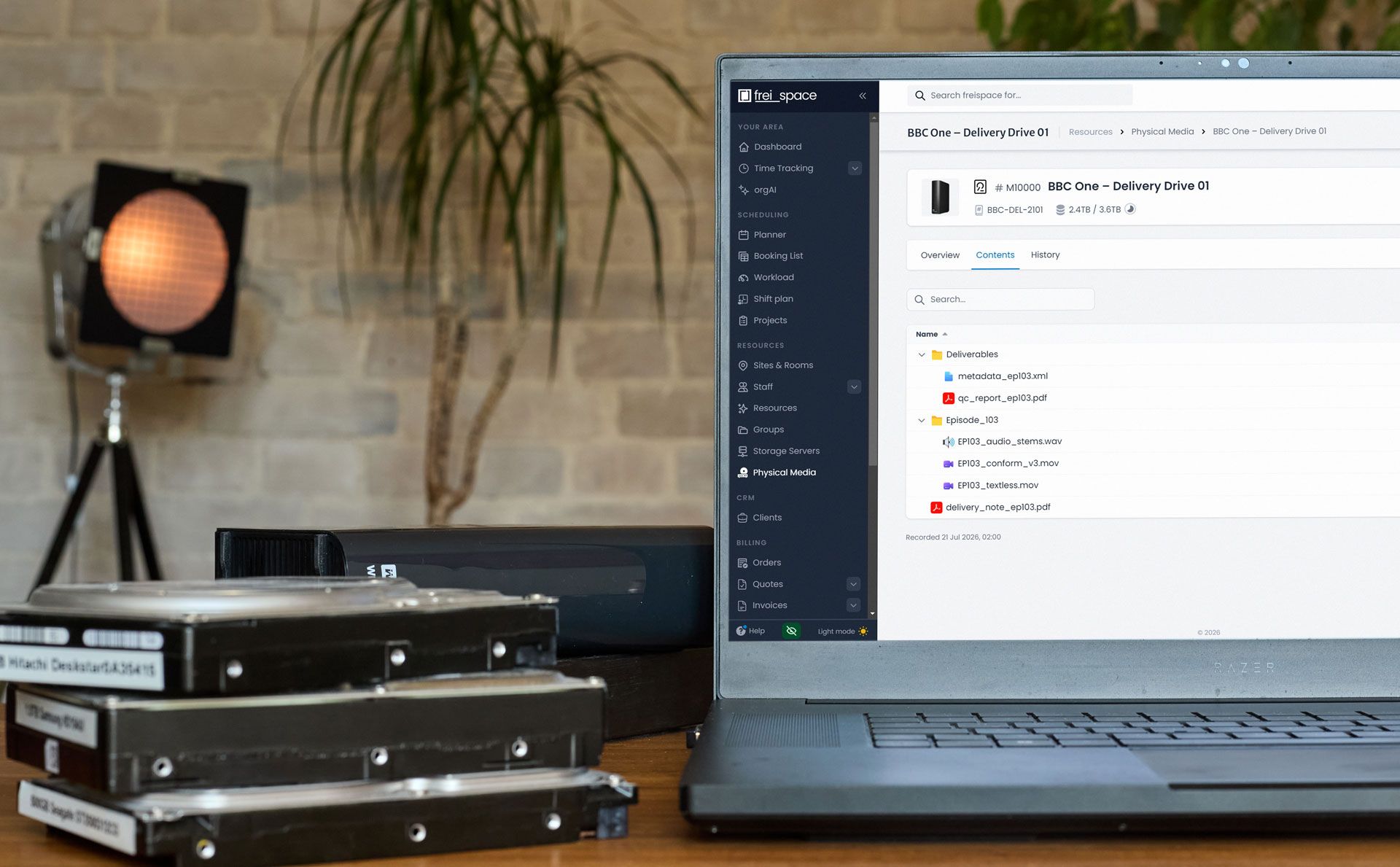
Open any physical media record and search its file list: the contents tab holds what was recorded on it, and also shows historic entries.
Nobody pulls the drive off the shelf, and nobody mounts the volume.
It is a contents list attached to a media item — a manifest, not an asset store. freispace does not hold, transcode or play back your media; the material stays on your own drives, tapes and storage.
Your custom workflows, fully supported
Define your own ingest pipelines with multi-step workflows, automatic triggers and notifications at each step change.
Scan drives to automatically advance workflow steps, with a full log of who's done what and when.
A commenced or completed step can automatically update a media item's state, location, statuses, and more – for less text entry and a controlled process.
One record structure, every asset type
LTO tape, hard drive (bare), flash drive, USB drive and camera card all use the same record: numbers, capacity, owner, location, images, documents and a contents list.
Capacity is recorded as used of total — 2.4TB / 3.6TB — enough to tell a coordinator whether an outgoing drive has room before it leaves.
Physical Media Tracking in detail
Open a section for the workflow, the boundaries, the cost and the migration.
How does a client drive get from reception to the LTO archive?
Through a workflow your facility defines. freispace supports multi-step ingest pipelines with automatic triggers and notifications, so an item moves through named steps — offload, QC, whatever else you add — with step dots and offload status (Completed, TBD, Failed) visible from the list. A typical run looks like this.
- The drive arrives at reception, is scanned in or created with Add new media, and appears under Received.
- Base information goes on the record: owner, asset type, capacity, the project it belongs to, and the password if the drive is encrypted.
- A photo of the label and any paperwork are uploaded to Images and Documents & Files.
- Launch workflow starts the facility’s ingest pipeline and the item picks up the first step.
- The offload runs and the offload status moves from TBD to Completed — or to Failed, which is equally visible from the list.
- The file list is recorded against the item and carries the time it was recorded, so the Contents tab answers what was on it.
- QC and any further steps follow, each step change firing its own notification.
- Anything odd goes in the comment thread with an @mention — “Drive was missing card A004” — so the note lives on the media item.
- The drive is dispatched back to the client: location updated, a new version captured, and the deliverables written to LTO as their own media item, LTO-26-1000.
The steps are named by the facility, not by freispace. What stops an item sitting between two people is the trigger and the notification at each change.
Where is that drive right now, and what does its record hold?
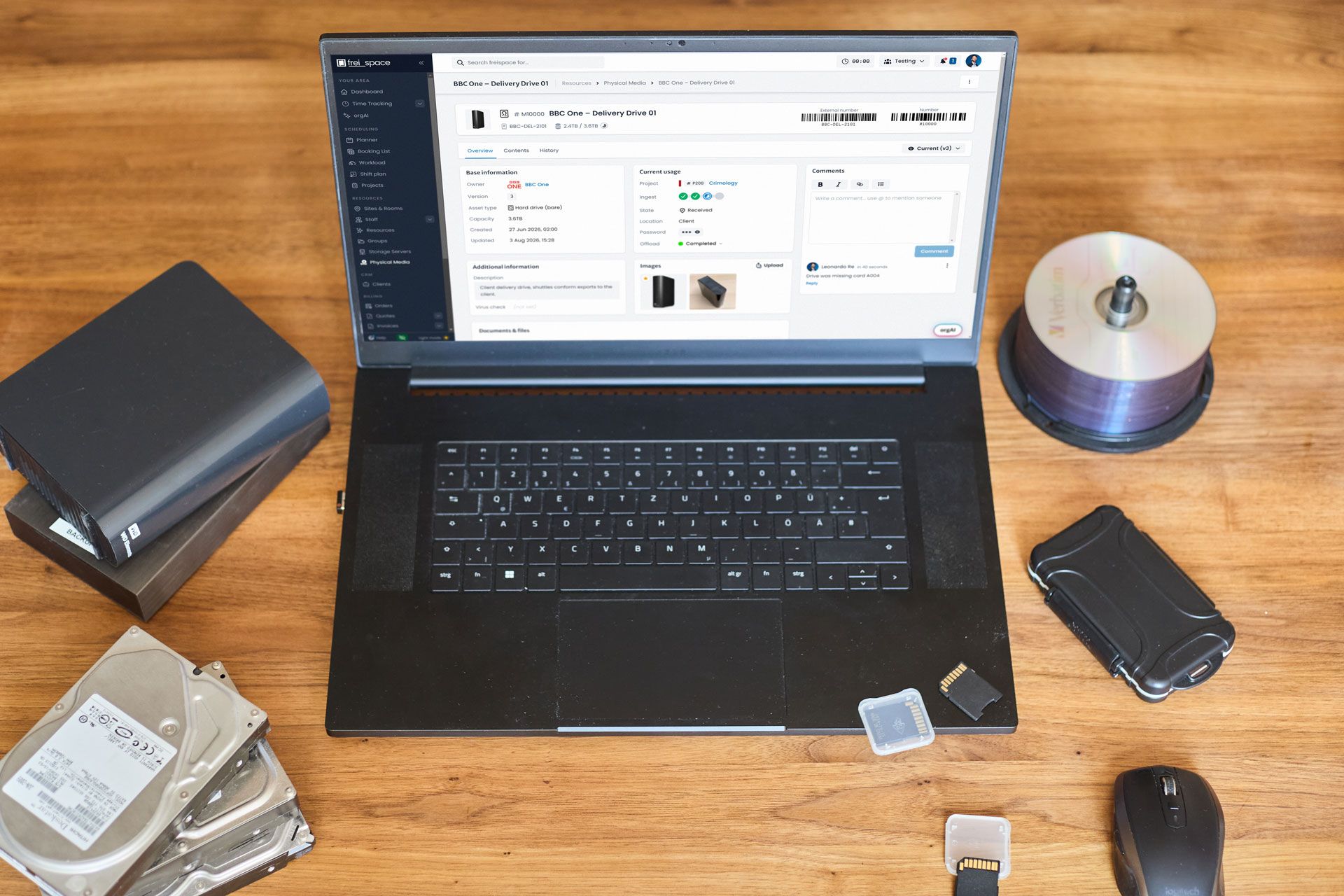
Each media item opens on an Overview tab, beside Contents and History, with the client’s external number and the internal freispace number barcoded at the top.
- Base information — owner, version, asset type, capacity, and the created and updated timestamps.
- Current usage — the project the item belongs to (P208 Crimology), the ingest step dots, State: Received, Location: Client, the password if the drive is encrypted, and Offload: Completed.
- Additional information — a description, user-defined custom fields (e.g. "Last virus check") and metadata.
On the list side, tabs split All, Received and Expected, while Columns, Filters and Export shape the view and Add new media creates an item. Location and state are recorded fields, not detected ones. That is why custom statuses matter: each facility can organize its own media lifecycle in its own words.
What gets tracked for an LTO tape versus a camera card?
The same record either way. Workflow steps are defined by each facility, so the chains below are examples a post house might build, not steps supplied with the module.
| Asset type | Typical use at a post house | Number held in freispace | What the contents list gives you |
|---|---|---|---|
| LTO tape | Archive and long-term retention of masters and deliverables | Internal number plus the tape’s own label, e.g. LTO-26-1000 | Which tape holds a given deliverable, six months after delivery |
| Hard drive (bare) | Client ingest and rushes delivered in a caddy or bare | Internal number M10000 plus the client’s own reference | The folder tree that arrived, with the time the listing was recorded |
| Flash drive | Rushes shuttles and media moving between client and facility | Internal number, plus client reference where one exists | What the drive held at each handoff, version by version |
| USB drive | Small deliverables, LUTs, session data and paperwork | Internal number | Which stick holds the grading LUTs or the delivery note |
| Camera card | Original camera media arriving from shoot before offload | Internal number, plus the card’s own identifier, e.g. Camera Card A-01 | Confirmation that every card in the shoot’s set was accounted for |
- LTO tape — write → verify → shelve
- Hard drive (bare) — receive → offload → QC → return
- Flash drive — receive → offload → dispatch
- USB drive — receive → offload
- Camera card — receive → offload → verify → wipe
Asset types come from a set vocabulary in the product, and capacity is recorded as used of total rather than discovered by freispace.
What happens to the record when a drive leaves the facility?
It gets versioned. For media in circulation freispace keeps a version history of what was on the drive at each handoff — the item header shows Current (v3), with earlier versions selectable. Location and state update on dispatch, and the comment thread keeps condition notes attached to the item rather than to an email.
This answers the risk a Head of Post actually carries: a client drive comes back three times in a year and nobody can say which pass held which cut. Versioning is built for that case — drives that move in and out keep a complete history of what was on them at each handoff.
Around it sits the rest of the record. Earlier versions stay under the History tab. Threaded comments with @mentions hold the human detail, Images take label and condition photographs, and Documents & Files take the delivery note and the QC report.
In the product: version 3 of M10000, at Location: Client, with “Drive was missing card A004” on the record where the next person will find it.
A returned drive with a disputed contents list is an argument about chargeable hours, and a much shorter one when there is a dated record of what went out.
How does it connect to bookings, projects and invoicing?
Physical Media Tracking sits in the sidebar under Resources, beside Sites & Rooms, Staff and Storage Servers. In farmerswife the equivalent feature area is called Media Library. The naming here is deliberate: this module tracks the media itself and an inventory of its contents, not files as assets.
Because it is one module of the freispace platform rather than a separate application, a media item is assigned to the same project your bookings, tasks and invoices already hang off — P208 Crimology in the screenshots. The full capability list is in the launch announcement.
- The schedule the media belongs to — resource management
- The plan the ingest sits inside — project planning
- Who runs the offload and signs off the QC — task management
- What gets charged when the job wraps — billing and invoicing
- Where passwords and client data are held — GDPR compliance and EU hosting
- Moving off an on-premise system — farmerswife alternative and ScheduALL alternative
Media records leave freispace through the Export control on the media list; schedules, plans and invoices have their own export and sharing options.
What does Physical Media Tracking cost?
$500 per month as an add-on to a freispace subscription. Like everything else on the platform it is priced per facility rather than per seat, so the figure does not change with the number of people who use it or the amount of physical media tracked. The pricing page carries the current figures and terms.
The published bullets for the module are these four:
- Manage and track physical media (e.g. drives, cards, LTO)
- Scan in & out operations
- Track media workflows step by step (e.g. offload, QC)
- Dispatch media & track locations
The module requires an active freispace subscription and is not included in any tier. The figure is flat and monthly, and does not change with the annual billing toggle that applies to the plans themselves. There is published pricing for every plan and module, and the whole feature set sits alongside it.
We track drives in a spreadsheet — what does switching involve?
Decide your asset types and custom statuses, create items for the media currently on site, and let numbers, barcodes and contents lists build as media moves. Nothing has to be backfilled before you start: archive tapes can join the library the next time somebody touches them, rather than in a migration weekend.
Past a few dozen drives and tapes, a spreadsheet fails in four familiar ways. Two people edit different copies. There is no record of where a drive went when it left the building. The contents column was accurate the day it was typed and never again. And finding which drive holds one deliverable means opening every sheet.
- Audit what is physically on site.
- Agree the asset types and the statuses that describe your own lifecycle.
- Create the items, label them and scan them in.
- Run one project’s ingest through a workflow before rolling it out.
The items you need on day one are the ones physically in the building, and the library grows as media moves. Ask us about bulk import before you start — what transfers depends on how your sheet is structured.
Frequently asked questions
Does freispace have a media library feature?
Yes — a physical media library. The module is called Physical Media Tracking, and it holds a record of every piece of physical media your facility handles: client delivery drives, bare hard drives, camera cards, USB and flash drives and LTO tapes. Each record carries owner, asset type, capacity used and total, assigned project, location, offload status, images, documents and a searchable list of the files recorded on it.
It is available from September 2026 as a paid add-on to a freispace subscription. See the pricing page for the current monthly figure in your currency, or read the launch announcement.
Is Physical Media Tracking a MAM or a DAM?
No, and it is not trying to be. A media asset management or digital asset management system manages the files themselves — indexing, proxies, search across assets. freispace tracks the physical media those files sit on: the tape, the bare drive, the camera card.
- What freispace holds: the media record — asset type, internal and external number, barcode, owner, capacity used and total, location, state, credentials, custom statuses, version history, ingest workflow step, comments, images and attached documents, plus the file list recorded on the drive, tape or card.
- What freispace does not hold: the media itself. No transcoding, no proxies, no playback.
Facilities commonly run both: freispace records the media item and its contents list, the MAM holds the files.
Can we track LTO tapes and our archive?
Yes. LTO is one of the asset types in the module, alongside hard drive (bare), flash drive, USB drive and camera card. Each tape carries its own number — LTO-26-1000 in the product screenshots — plus capacity used and total, owner, location, images and documents, and its own contents list. Checking what a tape holds becomes a look at its record rather than a trip to the shelf.
Can we see what is on a drive without mounting it?
Yes. Each media item has a Contents tab holding the file list recorded from the drive or tape, with the time it was recorded shown underneath it. Search that list for a conform, a textless or an audio stem and you can see what was on it without pulling the drive off the shelf or mounting the volume. The list is a manifest of what was recorded, not an index of the media itself.
The tree appears as it was captured: a Deliverables folder holding metadata_ep103.xml and qc_report_ep103.pdf, an Episode_103 folder with EP103_audio_stems.wav, EP103_conform_v3.mov and EP103_textless.mov, and delivery_note_ep103.pdf beside them — recorded 21 Jul 2026, 02:00.
Does it support barcode scanning media in and out?
Yes. Every media item carries a barcode with two numbers: the client’s own external reference and the internal freispace number, M10000. The module supports scan in and out operations and dispatch with location tracking, so the label on the drive and the record in freispace stay the same object.
The client’s own reference stays on the record, so their delivery note and your inventory never have to be reconciled by hand, while the internal number is what the facility labels and scans. Dispatch works in reverse: the module covers dispatching media and tracking locations, so media leaving the building leaves a record behind it, and the Received and Expected tabs turn the usual chase into a filter. Reception, the machine room and the producer all look at the same record, inside the same platform as the live schedule.
Can we define our own ingest workflow?
Yes. Facilities build their own workflows as multi-step pipelines — offload, QC and whatever else the job needs — with automatic triggers and notifications at each step change. Progress shows as step dots in the Ingest column of the media list, and a workflow is started from the item with Launch workflow. Offload has its own status: Completed, TBD or Failed.
What happens when a media item changes step?
Workflows fire automatic notifications on each step change, so the change is announced rather than discovered. Alongside that, every item has a threaded comment section with @mentions, which is where condition notes belong — “Drive was missing card A004” stays on the media item instead of in somebody’s inbox. Who runs each step is planned in task management.
Can we store the password for an encrypted drive?
Yes. Passwords and credentials are part of the metadata held on a media item, and the field is masked in the item view with a reveal control. Where that data lives and how it is protected is covered on the data safety and GDPR page.
How is this different from freispace storage and server management?
They answer different questions. Storage Server Planning covers required server space per project across on-premise and cloud servers — it is a separate feature, listed on the pricing page. Physical Media Tracking covers the drives, cards and tapes you can pick up and hand to a courier. Server capacity and physical media are two separate items in the sidebar, and a project usually needs both — capacity on the server, and a record of the drive the rushes arrived on.
How does this compare with the farmerswife Media Library?
Both cover the same job — keeping track of the physical media a post house holds — and both sit inside a wider bookings and resource scheduling system. What a buyer can check without a demo is how each product is delivered and priced.
- Delivery. farmerswife publishes client installers and offers a perpetual on-premise license. freispace runs entirely in the browser: nothing to install.
- Pricing. freispace publishes its prices, including this module, on its pricing page. Compare that with what each vendor lists publicly.
- Scope of the record. Feature depth is best judged against current vendor documentation and a demo — ask both vendors to show you the same drive going through the same ingest workflow.
More on the wider comparison: freispace as a farmerswife alternative. Reflects publicly available product information as of August 2026; capabilities vary by edition and configuration.
We use ScheduALL for media management — what replaces it?
ScheduALL is no longer marketed as a current product line. Xytech acquired ScheduALL from Net Insight in February 2021 and, following its merger with Fabric, stated publicly in February 2026 that it had “discontinue[d] support of ScheduALL” and is giving “longtime ScheduALL customers a clear path forward” onto the Xytech platform (fabricdata.com, 2 February 2026).
Facilities that used the ScheduALL media management module generally need two things from a replacement: the bookings system itself, and the physical media register that hung off it. freispace covers both — resource management and bookings plus Physical Media Tracking as an add-on module. See freispace as a ScheduALL alternative.
freispace is a cloud-based post-production scheduling and resource management platform for post houses, broadcasters, production companies and in-house post departments. Physical Media Tracking adds the physical media library to it — the drives and tapes, not the files. Available at $500 per month as an add-on; see the pricing page.
farmerswife and ScheduALL are trade marks of their respective owners. freispace is not affiliated with, endorsed by or connected to them.