International buyers drove UK screen production to a sharp rebound in 2024, with the British Film Commission's 2024 inward-investment figures recording £4.7 billion in inward-investment spend across film and high-end television, 43% higher than in 2023. That total split into £1.9 billion for international feature films and £2.8 billion for high-end television, with several titles qualifying as British through UK visual-effects and post-production work alone. When demand rebounds that fast, distributed stakeholders, strict delivery milestones, and scarce colourists collide on the same calendar.
Choosing schedule production software is no longer an admin upgrade for a busy post house. The schedule has to act as the single operational source for budgets, invoices, and carbon figures, so a late client change shows its real cost before an invoice ever gets raised. Below is a practical buying toolkit built for post-production leads: a nine-row feature comparison, a published module price sheet, a two-week pilot rule, and the metrics that prove whether a rollout paid for itself.
Why Spreadsheets Stop Working in Post-Production
UK film and high-end television spend climbed again to £6.8 billion in 2025, a 22% increase on 2024 according to the BFI's Research and Statistics Unit as reported by IBC. For a facility juggling episodic dramas, features, and commercial spots in parallel, that volume turns Monday morning into an obstacle course. A producer rings asking to push a conforming session to Thursday, the planner checks three colour-coded spreadsheet tabs, messages a freelance dubbing mixer on WhatsApp, and misses that the floating grading licence is already tied up on another job.
Schedule production software replaces those disconnected tabs with one live timeline where suites, operators, freelancers, kit, licences, and storage are booked against active projects, with hours and costs flowing straight from the same entries. Think of a shared calendar like separate sheet music handed to each player in an orchestra, where nobody can see what the brass section is playing on bar forty. Scheduling software is the full conductor's score that shows who plays when and flags a clash the moment someone changes a bar.
In early 2022, our qualitative surveys found that most post-production companies still relied on shared calendars or sprawling spreadsheets to organise daily work. Spreadsheets break because institutional knowledge sits inside one planner's head, teams waste hours chasing availability over chat, and nobody can tell at a glance which edit suite sits free next Tuesday. Getting it wrong hurts twice: missed delivery dates can trigger contract penalties, while an empty grading theatre or sound studio leaves expensive specialist rooms sitting idle.
Teams usually recognise they need an Excel scheduling alternative for post-production once three recurring failures appear in the same month:
- Day-of double bookings: Two producers turn up expecting the same colourist, edit suite, or floating software seat because a late edit never reached the master sheet.
- Blind room availability: Coordinators spend half an hour checking tabs and asking engineers before answering a simple client question about next week's open slots.
- Invoices rebuilt from memory: Finance chases operators on Friday afternoon to reconstruct overtime, kit extras, and weekend shifts that never made it off a sticky note.
Manufacturing scheduling versus post-production planning
Readers searching for production scheduling sometimes land on factory software by mistake. Manufacturing relies on finite-capacity APS (Advanced Planning and Scheduling) and MRP (Material Requirements Planning) tools built around machines, raw materials, bills of materials, and factory work orders. Post-production operates in a different tool class: the scarce assets are rooms, creative operators, freelancers, floating licences, and server storage, and each unit of work is a fluid creative project ending in a master delivery.
What Schedule Production Software Covers
Evaluating a scheduling tool starts with checking what each module does and where vendors hide friction. The nine capabilities below separate a genuine post-production platform from a dressed-up calendar.
| Feature | What it does | What to check before buying |
|---|---|---|
| Resource scheduling | Books suites, operators, kit and floating licences on one view | Flags clashes across every resource type, not only rooms |
| Gantt project planning | Shows tasks, dependencies and milestones on a timeline | Moves downstream tasks automatically when a date slips |
| Shift planning | Defines shifts, roles and multi-week rotations | Allows individual overrides such as shift swaps |
| Time tracking | Records hours worked against each booking | Feeds directly into project budgets and invoices |
| Budgeting and controlling | Tracks budgets, costs and workloads per project | Shows planned against actual spend at each milestone |
| Billing and invoicing | Turns bookings into quote and invoice lines | Needs no re-keying between schedule and billing |
| CRM and reporting | Holds client contacts and produces exports | Supports custom fields and advanced exports |
| Carbon tracking | Calculates CO2e per project from the schedule | Uses real activity data rather than broad estimates |
| Physical media and storage | Plans server space and tracks physical media | Confirms module availability and add-on status |
Multi-resource matching isn't unique to media facilities; service platforms in other sectors, such as Tutorbase scheduling for matching tutors, rooms, and recurring sessions, solve a similar availability puzzle. Post-production adds harder constraints because one booking can lock a physical suite, a specialist operator, a shared storage partition, and a floating software seat simultaneously.
That precision matters even more when specialist talent is tight. The ScreenSkills 4Skills workforce report covered by Televisual found that 64% of surveyed UK screen-industry organisations struggled to recruit over the previous 12 months, with shortages hitting technical and post-production roles hardest. The same report projects that AI could affect up to 80% of production roles by 2028, while 52% of respondents expect changes to working practices. Automated first passes for grading or sound cleanup don't remove the need for detailed scheduling; they increase the need to reserve explicit human review capacity and quality-control time so approvals don't pile up before delivery.
Four layers on one shared data model
The diagram below shows how those nine capabilities lock together as four operational layers resting on a single shared database.
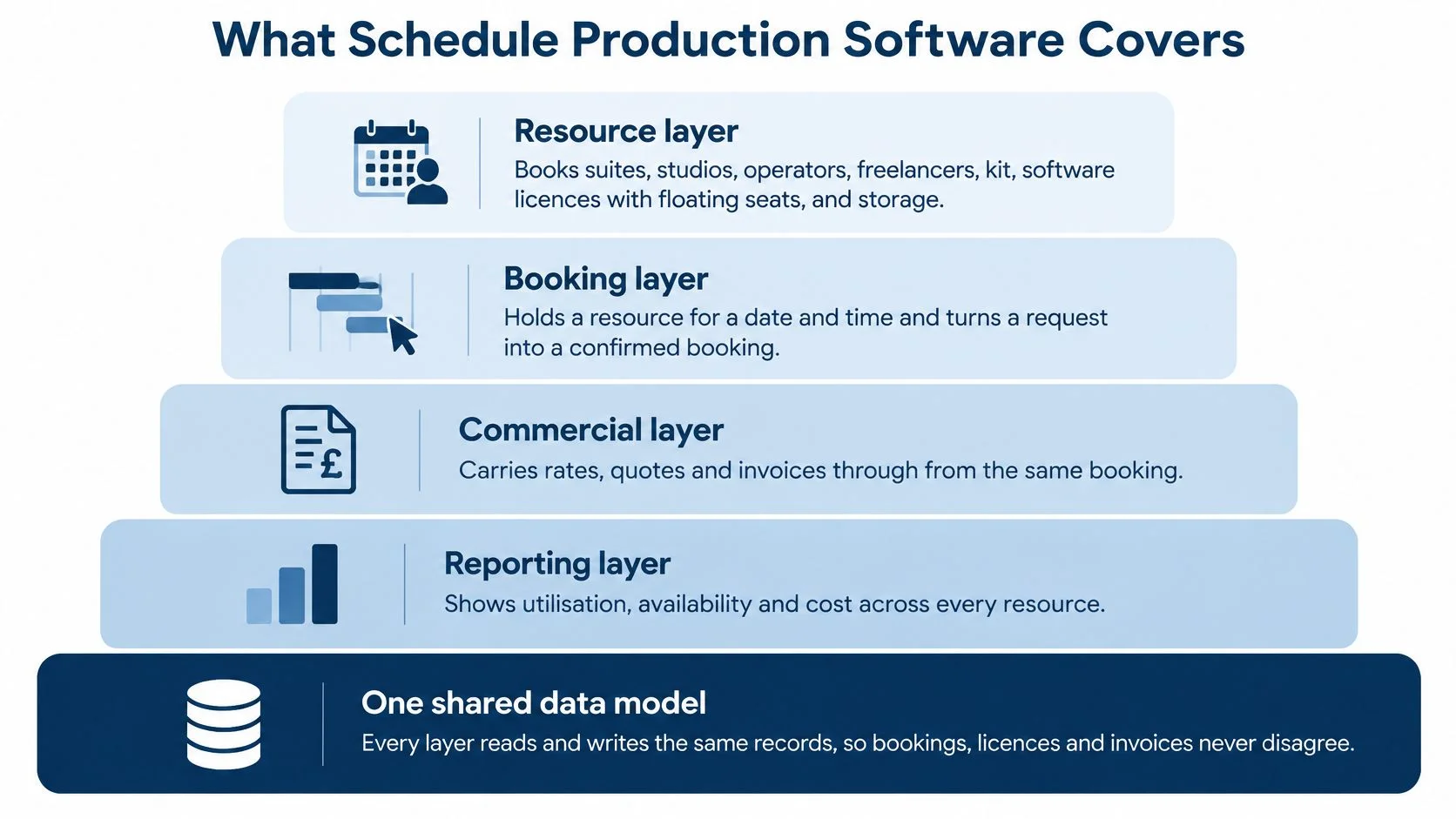
In freispace, the resource layer places edit suites, grading and dubbing theatres, studios, workstations, staff, freelancers, shifts, cameras, kit, software licences with floating seats, and server storage on a single live view. Above it sits the booking and planning layer, where Gantt timelines track dependencies and milestones, to-dos hold priorities and deadlines, and shift rotations handle multi-week patterns with individual swaps.
Next comes the commercial layer, which captures actual hours against bookings, tracks budgets against spend, and turns confirmed work straight into quotes and invoices. Finally, the reporting and sustainability layer pulls utilisation, financial variance, and automated CO2e calculations per project out of the exact same records.
Architecture rule: A feature checklist means very little if the features don't share one database. A standalone time tracker that forces finance to re-type hours into billing software is a different class of tool from one where a single booking drives every downstream number.
From Booking to Invoice in One Flow
Abstract feature lists make every platform look identical until you trace a single booking from request to paid invoice. Take a standard post-production job: a producer needs a colourist and an edit suite for a 60-minute documentary episode grade, plus one floating licence for the grading software.
The visual below traces that single job across seven connected steps, from initial client request to final invoice.
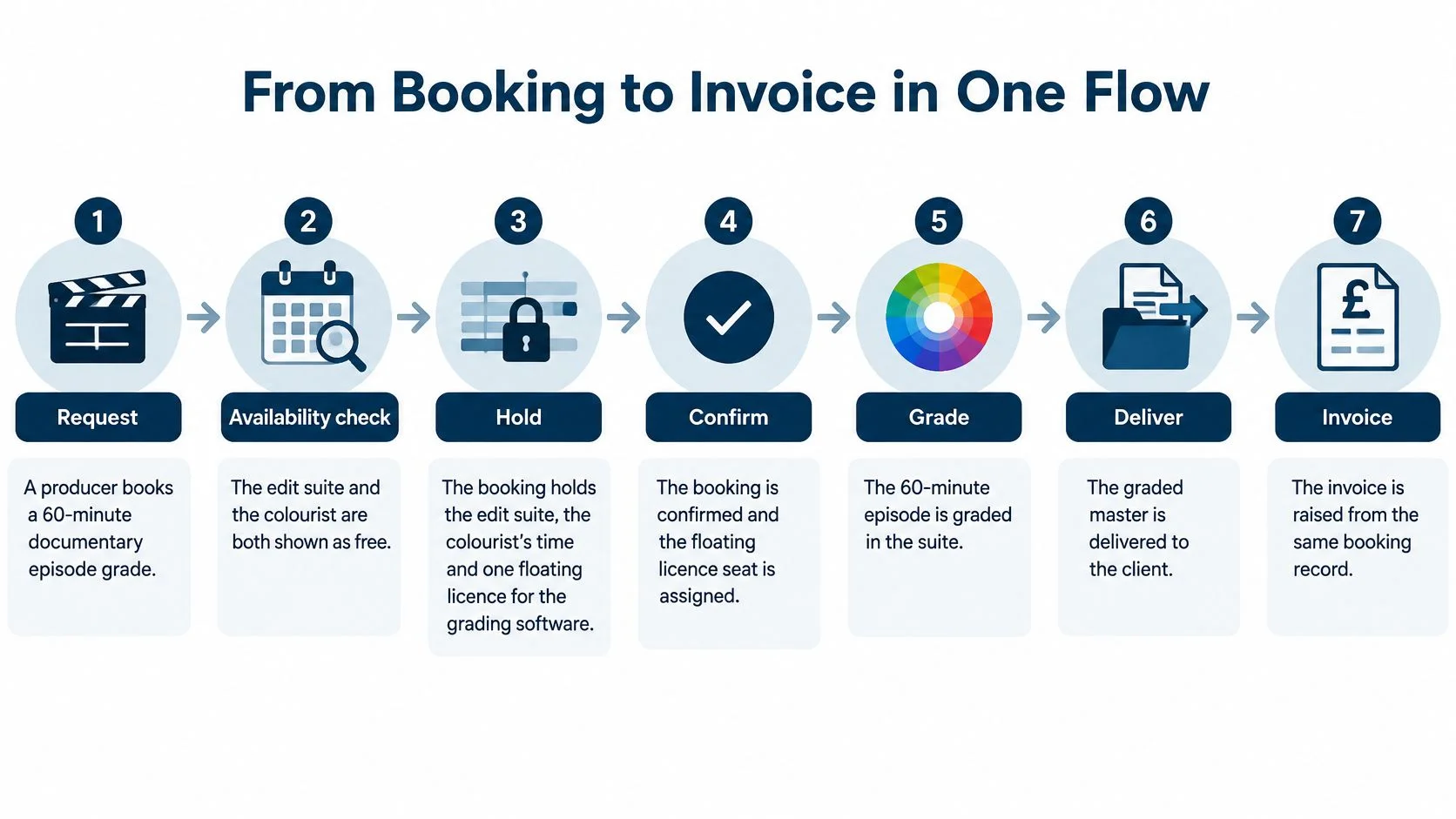
When the coordinator checks availability, the live timeline confirms whether the suite, the colourist, and a grading seat are all free on the requested dates. Confirming the booking ties all three to one project, so no other producer can claim the floating licence for an afternoon conform on the same day. Any linked prep jobs sit alongside the booking inside the team's post-production task management workflow, so assistant editors know exactly when media ingest is due.
During the grade, the colourist logs actual hours directly against that booking. Because freispace's booking-to-invoice workflow requires no re-keying between the schedule and billing, the booking itself holds the suite, operator, and kit, collects the hours worked, draws down the project budget, and becomes a line on the quote and then on the final invoice once the graded master ships. One record carries the job from request to payment. Finance never re-types a single hour.
What happens when a client adds a day
Real post-production schedules rarely survive first contact with a client review. Suppose the documentary director asks to extend the grade by one extra day to refine archival footage.
In a spreadsheet-and-accounting setup, that single request triggers three separate manual edits: moving the colourist and room on the calendar, adjusting the tracker spreadsheet for budget burn, and emailing finance so the final invoice doesn't go out with the old figure. Miss any one of those three steps and you either double-book the suite next morning or eat a full day of unbilled grading time. In a connected schedule, the extra day is added to the booking itself. The suite, operator, kit, and hours stay tied to the same project, so the additional time feeds the budget draw-down and flows into the quote and invoice without re-keying. The cost of the late change is visible before the invoice goes out, not after.
Before shortlisting vendors, map three exact handoffs inside your own facility:
- Confirmation handoff: The moment a booking is confirmed and locks suites, staff, and licences to the project.
- Timesheet handoff: The moment an operator logs actual hours or overtime against that booking rather than on a separate sheet.
- Billing handoff: The moment approved hours and kit rates convert into an invoice line without manual copy-and-paste.
Run your worked example through each vendor demo and watch for the gaps. If the demo shows the calendar in one browser tab and the invoice in another, the handoffs still belong to your team.
Efficiency, Budget Control and Carbon Tracking
A busy post facility needs one live operating picture. Without it, the planner is reconciling room availability, operator shifts, floating licences, budget burn and finance handoffs from several places. A shared schedule works like a control tower: it shows movements early enough to catch conflicts before they reach the room.
Operational efficiency shows up first in reclaimed planner hours. Coordinators stop updating tabs, chasing availability by email, and texting freelancers about shift changes. Planners can focus on bottlenecks, such as a grade room sitting idle while a colourist is booked elsewhere, or a dubbing theatre held for a job whose media has not arrived. Once suites, staff, freelancers, kit and licences sit in one view, availability questions are answered directly and status chasing drops.
Budget control moves from month-end hindsight to weekly steering. Instead of discovering on the final invoice that a drama episode burned hours in online edit, heads of post compare planned against actual hours every Friday inside a connected budgeting and reporting system. Overspend surfaces early, when scope can still be renegotiated or operators rebalanced. Producers, editors, operators and finance work from the same figures instead of waiting on one coordinator's memory. In my view, that shared view is the practical value: a late change shows its cost before the invoice does.
Treating carbon as a live planning constraint
Carbon reporting often sits in a spreadsheet nobody opens until after wrap, when the decision is already made. The BAFTA albert ACCELERATE 2025 report draws on data from more than 2,500 productions and records nearly 175,000 tonnes of production-related CO2 emissions in the UK during 2024, equivalent to the annual footprint of almost 40,000 UK citizens. That is why carbon tracking works best inside daily planning, where room load, staffing, travel and delivery choices are still flexible.
Geography makes that practical in the UK. As highlighted in the BAFTA albert 2025 report overview, approximately 60% of the UK screen workforce is based outside Greater London. Deciding whether to book a local freelancer, run a remote review, or bring crew on site becomes a routine scheduling call.
Carbon figures are most useful as an active planning constraint weighed alongside deadline risk and cost, not as a static number compiled weeks after delivery.
Because freispace calculates CO2e for each project from the same schedule, a change such as a longer render window or an extra review export can be weighed against its carbon footprint alongside cost and room load. Consolidating review sessions, batching overnight renders, or booking local operators becomes a measurable trade-off instead of guesswork. The trade-off matters: the cheapest room on paper may not be the best choice once overtime, kit use and carbon are considered together.
Selection Criteria and Published Prices
A feature checklist will not protect you from a poor contract. Before sitting through a polished demo, put every shortlisted system through the same commercial checks. The aim is simple: know what the tool costs, what it controls, and what happens if adoption stalls or you need to leave.
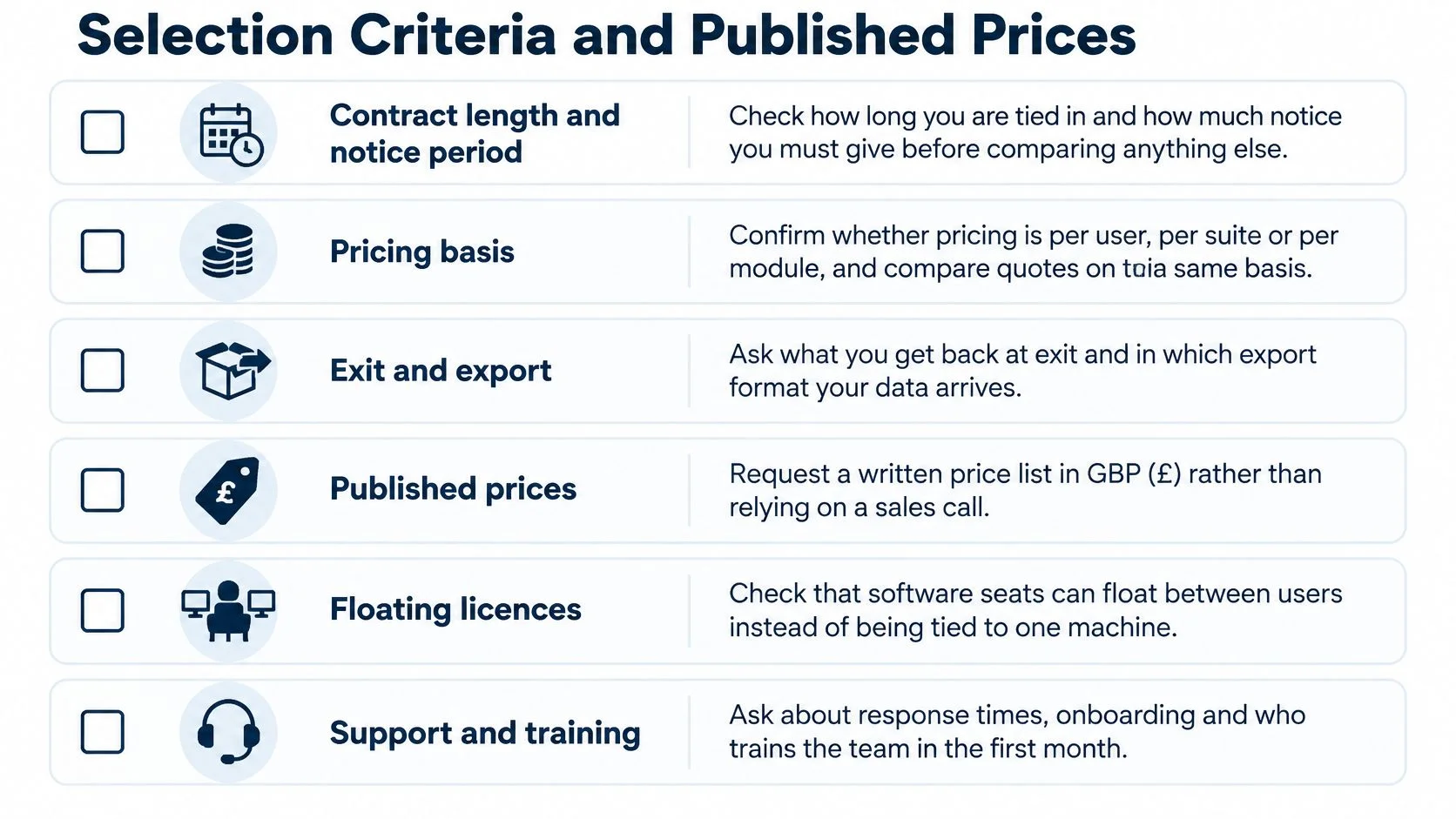
Start with contract length and notice period. An auto-renewing multi-year lock-in limits your options if planners revert to spreadsheets or the tool only fits one department. Check the pricing basis next. Some vendors charge per user seat, others per bookable suite, and others per module, so normalise every quote to your exact headcount and room count before comparing totals. Look at how other specialist scheduling sectors structure modular resource pricing too. Reviewing how Vanta Sports handles club fixtures shows how venue-and-staff platforms package conflict checks and recurring slots differently from simple seat-based apps.
Confirm exit and export rights in writing so you know what file format your historic projects, timesheets, and client records arrive in if you leave. Ask whether onboarding and workflow consulting are bundled or carry extra day rates. Verify SSO (single sign-on) and granular role permissions for freelancers, and ask for references from teams running a similar number of suites.
Published module pricing and scoring vendors
Opaque pricing slows buying decisions and makes side-by-side comparisons harder than they should be. With freispace, the full price list, including SSO, Shift Planning, and physical media modules, is published on the public pricing page without a sales call. The table below keeps the published figures that are stated directly.
| Plan or module | Price | What it adds | Who it suits |
|---|---|---|---|
| Flagship plan | €1,299 per month | Core scheduling, budgets, invoicing and reporting | Post houses running several projects in parallel |
| Shift Planning module | €300 per month | Multi-week shifts, shift roles and individual overrides such as shift swaps | Facilities working shift rotations across suites and staff |
| Physical media tracking add-on | Available September 2026 | Physical media tracking alongside the live schedule | Facilities holding vaults and physical assets |
Price is only useful when matched to the work that currently creates re-keying or blind spots. Score each platform out of five across the nine core features and your commercial checks. Give the heaviest weight to floating-licence clash detection, direct invoice linkage, and activity-based carbon tracking. Those three areas cause the most expensive workarounds when missing. A booking that holds the suite, operator and kit, collects hours, draws down the project budget, and becomes a quote line and then an invoice line removes several handoffs at once.
Don't buy on headline price alone: Say one subscription looks cheaper per month than a connected platform, yet still forces coordinators and finance to re-key timesheets into separate invoicing software. A few wasted admin hours erase that monthly saving quickly.
The cheapest monthly tier is rarely the lowest-cost option if you outgrow its missing modules and pay for another migration. A stronger test is whether the schedule can carry the live operational picture: suites, staff, freelancers, kit and licences in one view, with budgets and billing tied to the same bookings. That is the buying case to score, not the size of the first invoice.
Run a Two-Week Pilot Before You Buy
Product demos always run on clean dummy data with three edit suites and zero client changes. Never sign an annual contract until a candidate tool survives two weeks on a real job.
Pick one live multi-department project, such as a feature edit moving through colour grade, sound mix, and VFX conform. Load its actual suites, staff, freelancers, kit, floating licences, and delivery milestones into the trial environment, then run normal daily updates and time tracking for fourteen days. Ask planners to log every client date shift inside the pilot tool as well as your legacy sheet so you can compare results side by side.
Watch two concrete tests during the fortnight. First, check planned dates against actual progress and note whether the live timeline flagged a room, operator, or licence clash that your current spreadsheet missed. Second, at the end of week two, generate a client quote and draft invoice directly from the tracked booking hours and verify whether the numbers match approved timesheets down to the last fifteen-minute increment.
A plain go or no-go rule
Keep the final decision objective by writing down your pass criteria before day one:
- Proceed when: The pilot surfaces clashes your spreadsheet missed, generated invoices match tracked hours with zero manual re-keying, and planners plus operators report faster daily updates than their old tools.
- Pause when: Staff invent manual workarounds for routine bookings, floating licences still require a side tracker, or the total cost of mandatory add-on modules exceeds the admin hours saved against your baseline.
Your first step this week is simple: pick next month's busiest multi-department project as the pilot candidate and record your current baseline numbers before loading a single suite.
How to Implement Scheduling Software Step by Step
Most software rollouts fail during month one because teams try to recreate every quirky spreadsheet column on day one, or run old and new schedules side by side until planners burn out. Moving cleanly requires a short prep phase, one firm switchover date, and role-based training.
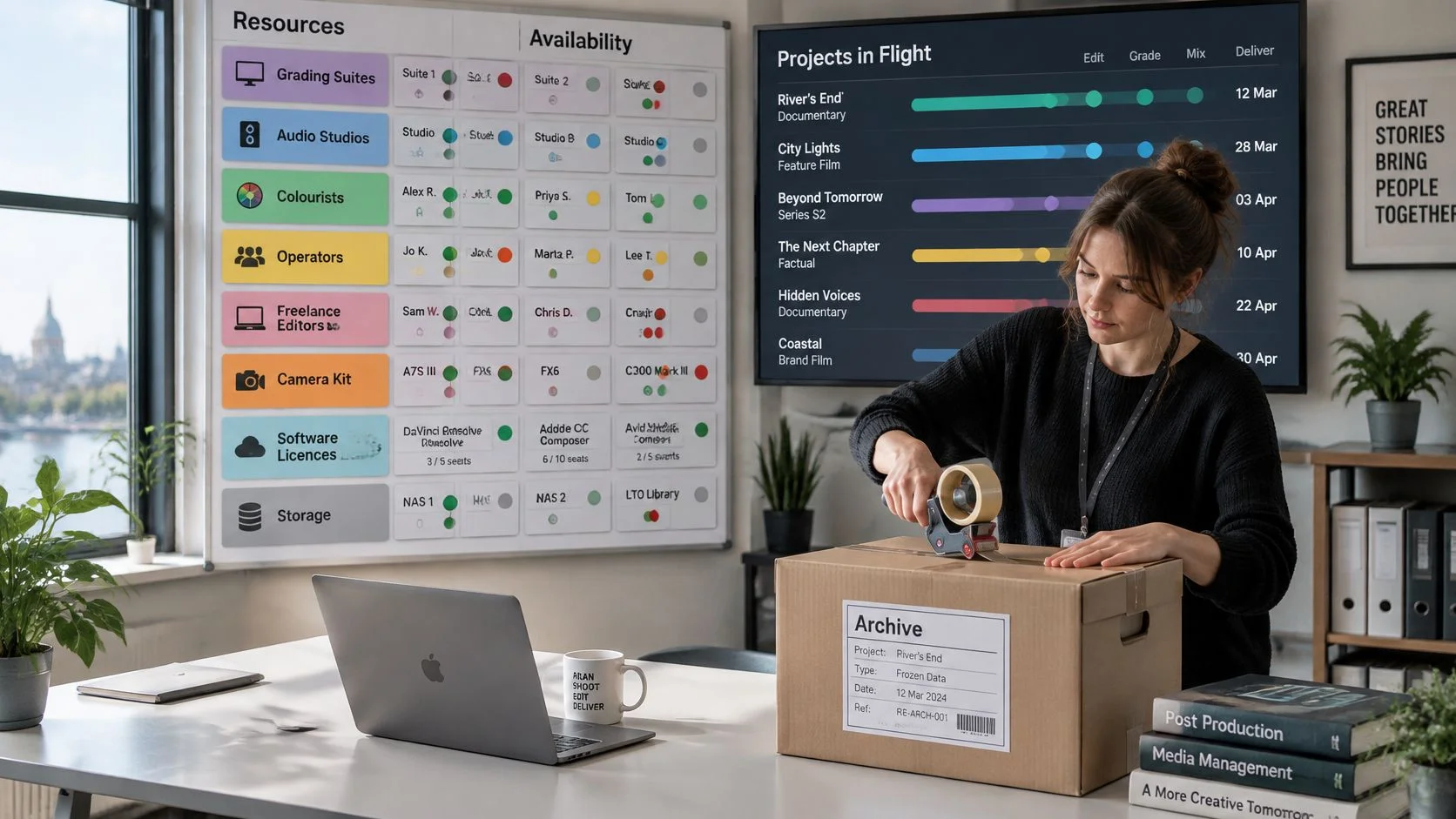
Seven steps from spreadsheet to live schedule
Audit every bookable resource first. List every suite, operator, regular freelancer, camera or kit item, floating software licence, and storage pool alongside standard working hours. Doing this upfront stops clashes caused by forgotten assets. Common slip: leaving out floating licences or storage partitions, which forces teams back to side trackers on week one.
Load active projects and freeze history. Import only jobs currently in flight with their real delivery milestones, and archive finished projects in your old system as read-only records. Keeping history out of the live workspace cuts migration time dramatically. Common slip: spending weeks importing two years of closed jobs nobody will ever reschedule.
Build templates for repeatable work. Create standard booking blocks with typical durations for common jobs like documentary grades, dubs, or VFX turnover passes so coordinators stop building timelines from scratch. Common slip: waiting until after go-live to build templates, which makes the new system feel slower than copy-pasting old spreadsheet rows.
Commit to one hard cutover date. Pick a clean Monday or start of the month and move every live booking across in one step instead of dual-running two calendars. Home Post Production moved its entire operation off a legacy scheduling system in 30 days, from 1 October to the end of that month, without dual-running. Common slip: allowing a "safety overlap" where bookings diverge between both tools within forty-eight hours.
Train every group strictly by role. Run separate short sessions: planners learn timeline edits and conflict handling, operators learn shift views and fast time logging, and finance learns budget burn and invoice generation. If your team lacks internal bandwidth for workflow redesign, our post-production consultants support workflow optimisation, change management, and AI implementation alongside onboarding. Common slip: putting everyone in a single two-hour walkthrough where editors zone out during invoicing screens.
Add integrations only after workflows settle. Connect external systems selectively once the core schedule runs smoothly. A documented REST API and an MCP server let your own internal tools and assistants read live schedule data without brittle manual exports. Common slip: over-customising fields and building complex webhooks before the team has spent two weeks using sensible defaults.
Hold a 30-day review against your baseline. Assign one named implementation owner to check real bookings, timesheet compliance, and template durations thirty days after cutover, then refine anything causing friction. Common slip: launching without a single owner, leaving minor configuration annoyances unfixed until staff drift back to spreadsheets.
A healthy rollout proves itself by the end of the first completed project: zero day-of double bookings, clean shift visibility for freelancers, and an invoice generated directly from tracked hours with no Friday afternoon detective work.
ROI Metrics to Track After Go-Live
Software ROI stays guesswork unless you record a clean before snapshot. Capture four to six weeks of baseline figures prior to go-live: weekly hours spent building and chasing schedules, double bookings discovered late, suite utilisation rates, and the average gap between final wrap and invoice issue.
Once the new schedule has run for a full billing cycle, calculate your net monthly return using one transparent formula:
Monthly ROI = (Planning hours saved x blended staff rate) + idle room revenue recovered + avoided late-delivery penalties - (monthly subscription + amortised onboarding cost)
Even modest gains in recovered grading or sound suite slots usually outweigh software fees quickly, because high-spec post-production rooms carry fixed rent, engineering, and hardware depreciation whether booked or empty.
Eight metrics for your monthly review
Track these eight operational and financial indicators straight from your schedule and timesheet data rather than relying on anecdotal impressions.
| Metric | How to measure it | Review cadence |
|---|---|---|
| Planning hours per week | Hours spent building and updating schedules, taken from timesheets before and after go-live | Monthly |
| Double bookings | Count of clashes on suites, operators or licences found in a period | Weekly |
| Suite utilisation | Booked hours divided by available hours for each room | Monthly |
| Billable hours captured | Tracked hours divided by hours booked for client work | Monthly |
| Invoice lead time | Days from final booking to invoice sent | Monthly |
| Budget variance | Planned cost minus actual cost for each project | At each milestone |
| Delivery slippage | Days between planned and actual delivery dates | Per delivery |
| CO2e per project | Estimated emissions calculated from the schedule and activity data | Per project |
Efficiency shows up first in planning hours and double bookings. Commercial health appears in suite utilisation, billable hours captured, and shorter invoice lead time. Budget variance and delivery slippage measure project control, while CO2e per project reveals whether operational tweaks like batched renders or remote reviews cut emissions.
A rising dashboard chart without a four-week pre-launch baseline tells you nothing. Assign one named owner to run a 30-minute review on the first Monday of every month, compare every row against your baseline, and adjust templates wherever variance creeps up.
Running suites, freelancers, floating licences, budgets, invoices, and carbon figures from one live timeline removes the daily guesswork that drains margin from busy post houses. You can inspect our public module pricing, test our booking-to-invoice flow on a two-week pilot project, and explore our REST API and workflow consulting options directly on freispace.