Thursday of week four in a six-week finishing block. The colourist is double-booked on another job, the client's second round of notes lands the morning after picture lock, and the sound mix is holding a suite that's already promised to someone else. None of that surprises anyone who's run a post house. What makes it expensive is that all three were knowable ten days earlier and none of them were written down anywhere a producer would look.
Most post teams don't lack risk awareness. They lack a register that lives in the same place as the schedule and the budget. Risk gets discussed on a Monday call, someone says they'll keep an eye on it, and by Thursday the plan is carrying a problem nobody owns.
Risk project management isn't a compliance document you produce for a client audit. It's how you decide which suite gets booked, which freelancer gets held, which date you refuse, and when you go back to a client with evidence instead of an apology. What follows is the working version: how to log risks, how to score them, what a usable register looks like, how buffers sit inside a Gantt, and how escalation protects the relationship rather than threatening it.
How to Identify and Log Risks Step by Step
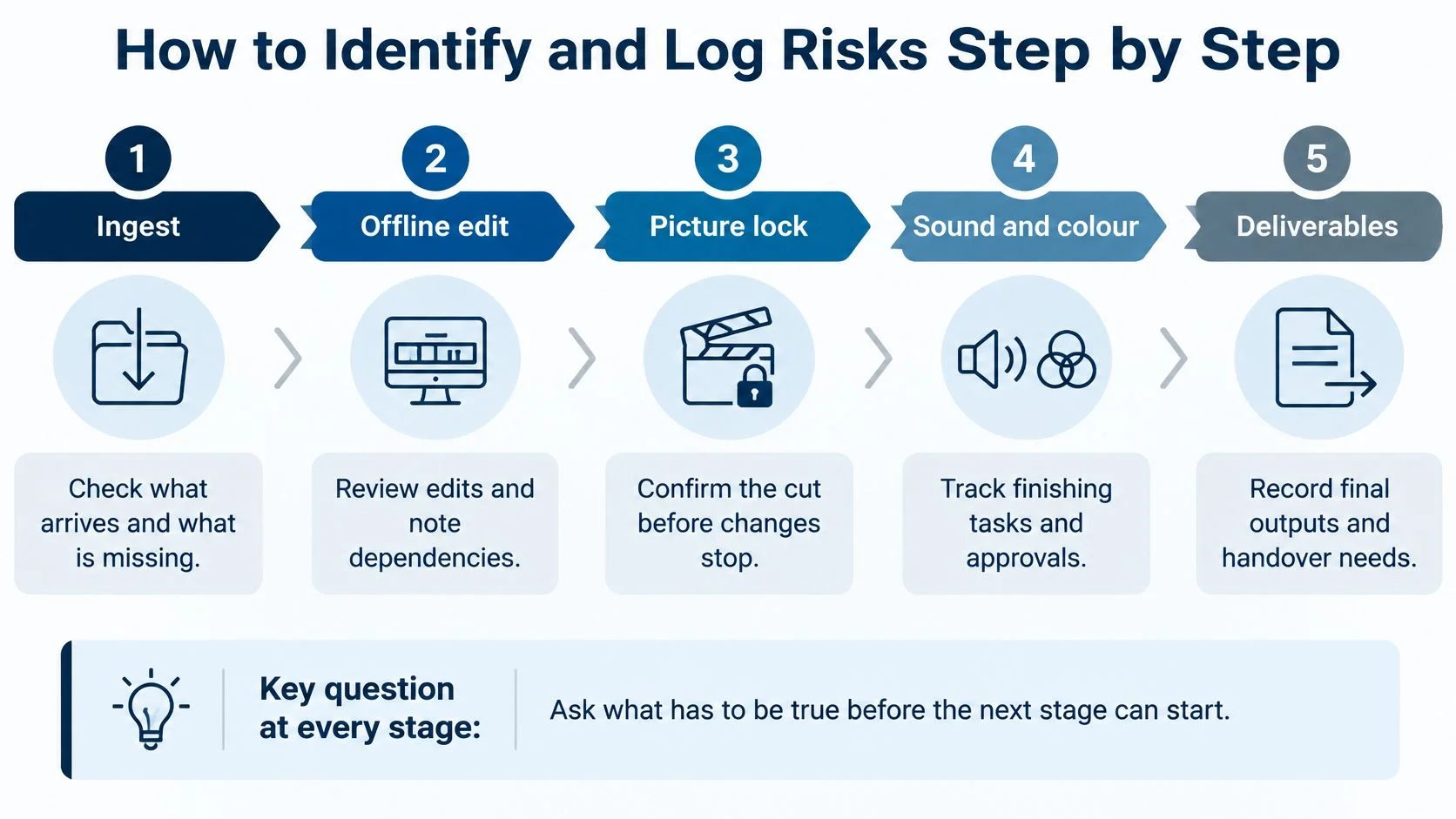
Start with the schedule, not with a blank register. A blank register invites entries like "client feedback may be delayed", and an entry that vague never gets acted on by anyone. Walk the plan stage by stage instead, and at each one ask what has to be true before the stage can finish.
The stages are predictable: ingest, offline edit, picture lock, sound and colour, deliverables. The risks inside them aren't, because they move with the client, the freelancer, the codec and the approval route. That's why the exercise is worth repeating on every job rather than copying last year's tab into a new project.
Six steps that produce a usable entry
1. Walk the schedule stage by stage. At ingest, ask whether the rushes are complete, correctly named and in a codec the edit can handle. At picture lock, ask who has signed the cut, by name. Working in order matters because a risk found at ingest is cheap to fix and the same risk found at colour is not. The common slip is jumping straight to the stages the team already worries about and missing the quiet one that fails.
2. Interview the people who own the handoffs. Editors, assistants, sound supervisors and the bookings coordinator usually know where slips begin long before a department head does. Ask each of them what they had to chase last time. Their answers are the raw material; the register is just the tidy version of it.
3. Sort every finding into a category. Use resource, client, technical, rights and AI, budget, wellbeing. Categories look like admin until you need to filter the register and show a client the three risks that are theirs to fix. Then they earn their keep.
4. Write each risk as cause, event and effect. One sentence in that order beats a paragraph of context. Because client notes arrive after the offline lock, picture lock slips three days, which pushes the sound mix into a suite that's already booked. That sentence tells a producer what to change, and when.
5. Give every entry an owner, a measurable trigger and a dated mitigation. The trigger is the part teams skip. "Colourist availability" isn't a trigger; "booking unconfirmed ten working days before the slot" is, because it fires on a date someone can check without judgement.
6. Log it and set the next review date. A risk with no review date is a note. The date turns the register into a rhythm, and the rhythm stops the same three problems turning up on every job with a fresh set of excuses.
Where the first pass usually breaks
Most first attempts fail in the same four places. Estimates go unchallenged, because the person who built the schedule is the person defending it. Scope changes get recorded informally, in a call or a thread, and never reach the plan. Escalation authority is unclear, so an owner who sees a problem has no route to a decision. And nothing gets reforecast when a dependency moves, which is how a two-day slip becomes a two-week one three stages later.
The gate is where you catch all four. At ingest, offline approval, picture lock, sound and colour completion, and delivery, confirm five things before the next stage starts: remaining scope, approved changes, resource availability, forecast cost and client acceptance criteria. A gate that doesn't confirm those five is a status update with a nicer name.
A colleague should be able to read one register entry and know whether to act this week. If they can't, the entry was written for the file, not for the schedule.
Handoffs carry most of the risk, and they're easier to see as dependencies before they harden into threats. If your plan doesn't show them explicitly, work through how project dependencies actually behave and map those first, because a dependency you can see is a scheduling choice and one you can't is a surprise.
Score Each Risk With a Matrix and Expected Impact
A colourist calls in sick on a Thursday in finishing week. The booking goes, and two days of suite time go with it in a market where you can't buy them back at short notice. The question worth asking isn't whether that was bad luck. It's what the loss would have cost if someone had priced it the week before.
Scoring turns a list of worries into a ranking. Every risk needs two numbers: probability, as a percentage, and impact, in pounds or days. Multiply them and you get an expected impact you can compare across risks that look nothing alike, which is the only reliable way to decide whether the colourist booking or the late approval gets attention first.
| Rating | Probability | Example impact | Expected impact |
|---|---|---|---|
| Rare (1) | 10% | £900 colourist delay | £90 |
| Unlikely (2) | 30% | £900 colourist delay | £270 |
| Possible (3) | 50% | £900 colourist delay | £450 |
| Likely (4) | 70% | £900 colourist delay | £630 |
| Almost certain (5) | 90% | £900 colourist delay | £810 |
The arithmetic is deliberately simple. A £900 colourist delay at 30% probability carries an expected impact of £270. That's lower than many would guess, and that's the point: a risk that is unlikely and small doesn't deserve the same meeting time as one that is likely and expensive.
Use a weighted impact, not a single guess
Teams plan for the optimistic case by default, so a single impact figure tends to be the one nobody argues with. Replace it with a three-point estimate. Take optimistic, most likely and pessimistic values and combine them as (optimistic + 4 × most likely + pessimistic) ÷ 6. A delay costing £600 at best, £900 most likely and £1,800 at worst weights to £1,000, and the same 30% probability now produces £300.
The gap between £900 and £1,000 looks small. The gap in attention isn't, because the weighted figure carries the spread rather than hiding it. And the spread is where the main problem sits, which is what APM's work on the conditions for project success demonstrates: it reports that nearly 80% of projects fail to wholly meet their planned objectives, while research it cites on 11,000 bridge, road and rail projects found only 0.5% delivered on time, to cost and with expected benefits. The same body of evidence identifies business-case optimism as high as 200% in some project classes.
The rule I'd set: anything above £1,000 of expected impact on an episode budget gets a named owner, a trigger and a line in the register. Below that, note it in passing and move on.
Reading the grid
Plot probability against impact on a 5 by 5 grid and three zones appear. Act now: Likely or Almost certain combined with impact above your threshold, which means a named owner and a mitigation date this week. Monitor: Possible, or Likely with small impact, reviewed each planning cycle but nobody's full-time worry. Accept: Rare with modest impact, documented so nobody relitigates it later.
Expected impact is also the bridge to the commercial conversation. When a client asks what a delay costs, a figure built from booked suite days and freelancer rates lands harder than a warning. The way ABS Insurance Brokers sets out gross profit in business interruption cover makes the same move: define the loss precisely enough to price it, then price it before the event rather than afterwards.
A Sample Risk Register You Can Copy
A working register needs eight columns and no more: ID, risk statement, category, owner, trigger, mitigation, expected impact, review date. Keep those columns identical across projects. The moment one production adds "notes" and another adds "status", your totals stop being comparable and the register turns into a diary.
| Risk | Category | Owner | Trigger | Mitigation |
|---|---|---|---|---|
| R-01 Freelance colourist double-booked in finishing week | Resource | Post supervisor | Booking unconfirmed 10 working days before slot | Hold a reserve colourist and confirm in writing |
| R-02 Client notes arrive after picture lock | Client | Producer | Notes received after the lock date in the approved schedule | Freeze the cut, book re-conform time, reissue the schedule with a revised lock date |
| R-03 Sound mix suite overbooked in the final week | Resource | Bookings coordinator | Two projects hold the same suite on the same day | Move one mix earlier, hold a second suite, confirm both in writing |
| R-04 Storage server runs out of space during finishing | Technical | Post engineer | Free space below 15% | Archive finished rushes and add a second storage tier |
| R-05 Crew overtime exceeds agreed hours two weeks running | Wellbeing | Line producer | More than the agreed hours logged across two consecutive weeks | Move a task or add a shift before the next milestone |
| R-06 Generated AI material used without clear rights | Rights and AI | Head of post | Any AI-generated asset in a client deliverable without documented source permissions | Record model and version, secure written permissions, name the human approver, check disclosure obligations |
The AI row needs more than one line
Teams get R-06 wrong because they treat "we used AI" as a single decision rather than a set of exposures. The 2025 CoSTAR Foresight Lab report on AI in screen production identifies legal, ethical and practical challenges that include use of copyrighted material without permission, loss of human creative control, insufficient reskilling, biased outputs, and high energy consumption and carbon emissions. Each of those is a separate register line with its own owner and its own evidence requirement.
For a working entry, record what the team needs before use: the model and version, source permissions for anything that went in, the human approver who signed off the output, any disclosure obligations to a client or platform, and an estimate of the compute footprint. A faster generation tool can add review rounds and legal checks, so log review time next to time saved. Otherwise you're measuring automation speed and calling it productivity.
The overtime row carries the same weight as a budget row
R-05 is a wellbeing risk, and it belongs in the same table as the money because it fails the same way. The trigger is objective: hours logged across two consecutive weeks. The mitigation is a scheduling decision, not a conversation about resilience: move a task, add a shift, or renegotiate the date before the next milestone. Treating it as an HR matter keeps it out of the plan, which is exactly where it needs to sit.
An entry that hasn't moved for three weekly reviews is either closed or escalated. Not "still monitoring". Closing costs nothing and keeps the register readable; leaving stale rows open trains everyone to skim past the ones that matter. Owners update trigger status in one line per risk during the weekly review, which takes about ten minutes on a job with twenty entries.
Building Risk Buffers Into Your Gantt and Resource Plan
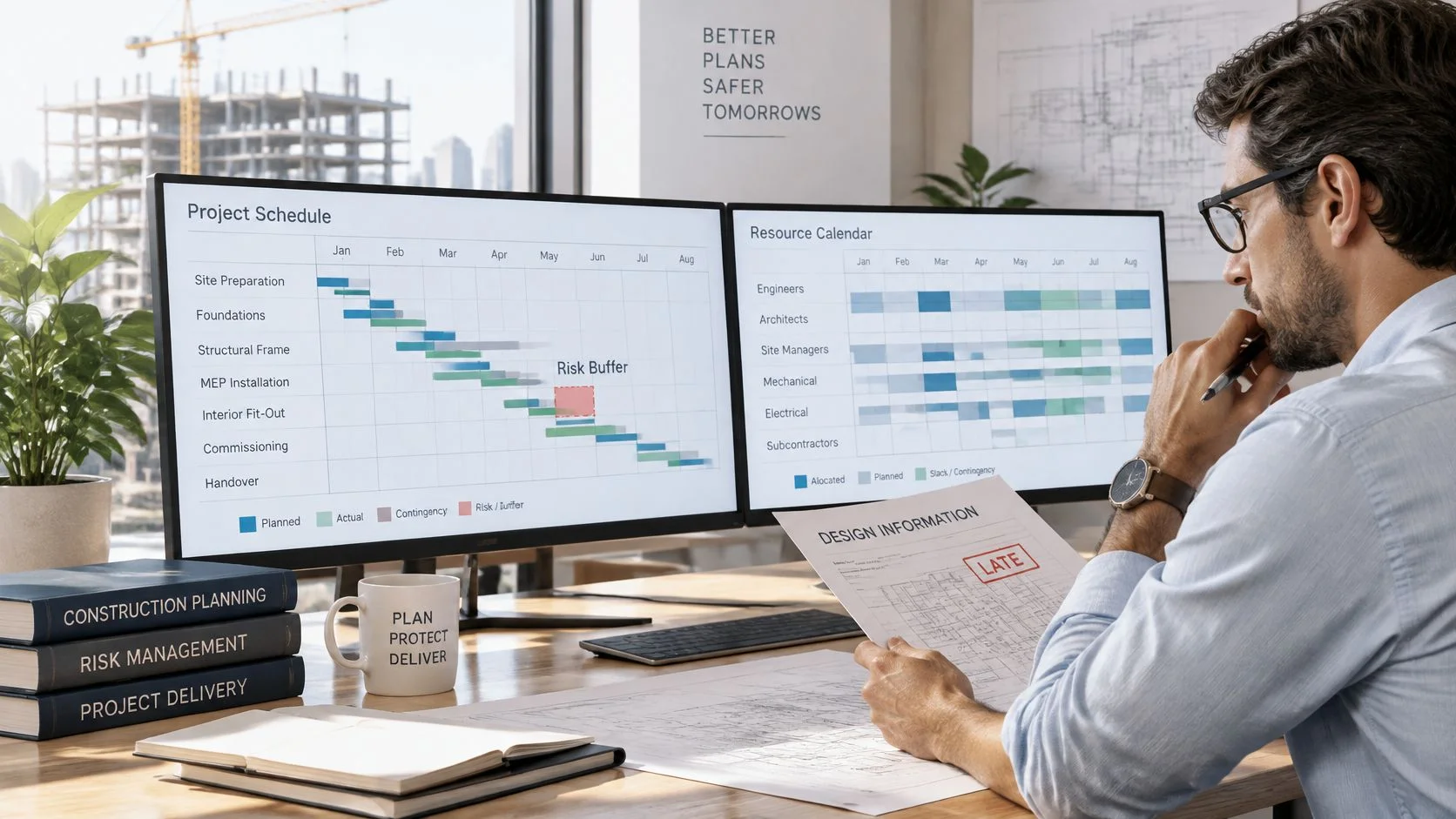
Late information is the most expensive thing in any plan. In UK construction, contractors' claims to extend schedules averaged 65.7% of planned duration, and late issuance of design information affected 19.0% of distressed projects, according to Property Week's analysis of construction overruns. The same analysis puts average claimed cost at £121 million per project, equivalent to 37.8% of capital expenditure.
Swap "late design information" for "notes that arrive after the offline lock" and the mechanism is identical, right down to the shape of the overspend.
Attach each risk to the tasks it can delay
A register entry that never touches the plan is a comment. Link each material risk to the tasks it could push, so a slip in one moves everything downstream without anyone remembering to update three separate documents. This is ordinary dependency logic applied to uncertainty: the risk doesn't need a new mechanism, it needs to be wired into the one you already have.
Put the buffer in as a named row
Take the expected impact in days from the weighted estimate and place it as its own phase before the milestone it protects. Two days in front of picture lock. Three days in front of the sound mix. On a Gantt-style plan with phases and milestones, the buffer shows up as a separate row, and that visibility is the whole point: the team can see the buffer and can see it being consumed.
A buffer with no name is padding. A buffer with a name, a date and an owner is a decision.
Run the resource check every week
Compare booked suite hours, colourist days and editor availability against capacity on a weekly cycle. Where a colourist sits on two projects in the same week, flag the conflict, move one booking and record the move in the register so the change has a history. Weekly rather than monthly, because suites are reserved weeks ahead and a conflict found in month-end reporting has usually already become a client conversation. Our guide to team workload management goes through the comparison in more detail.
The rule when a buffer runs out is the one teams break under pressure: if the buffer is consumed before its milestone, the plan changes, not the buffer. Extending a buffer mid-job without moving anything else is how a schedule loses credibility with the people who have to deliver it.
Escalation Triggers and Reporting Rhythm
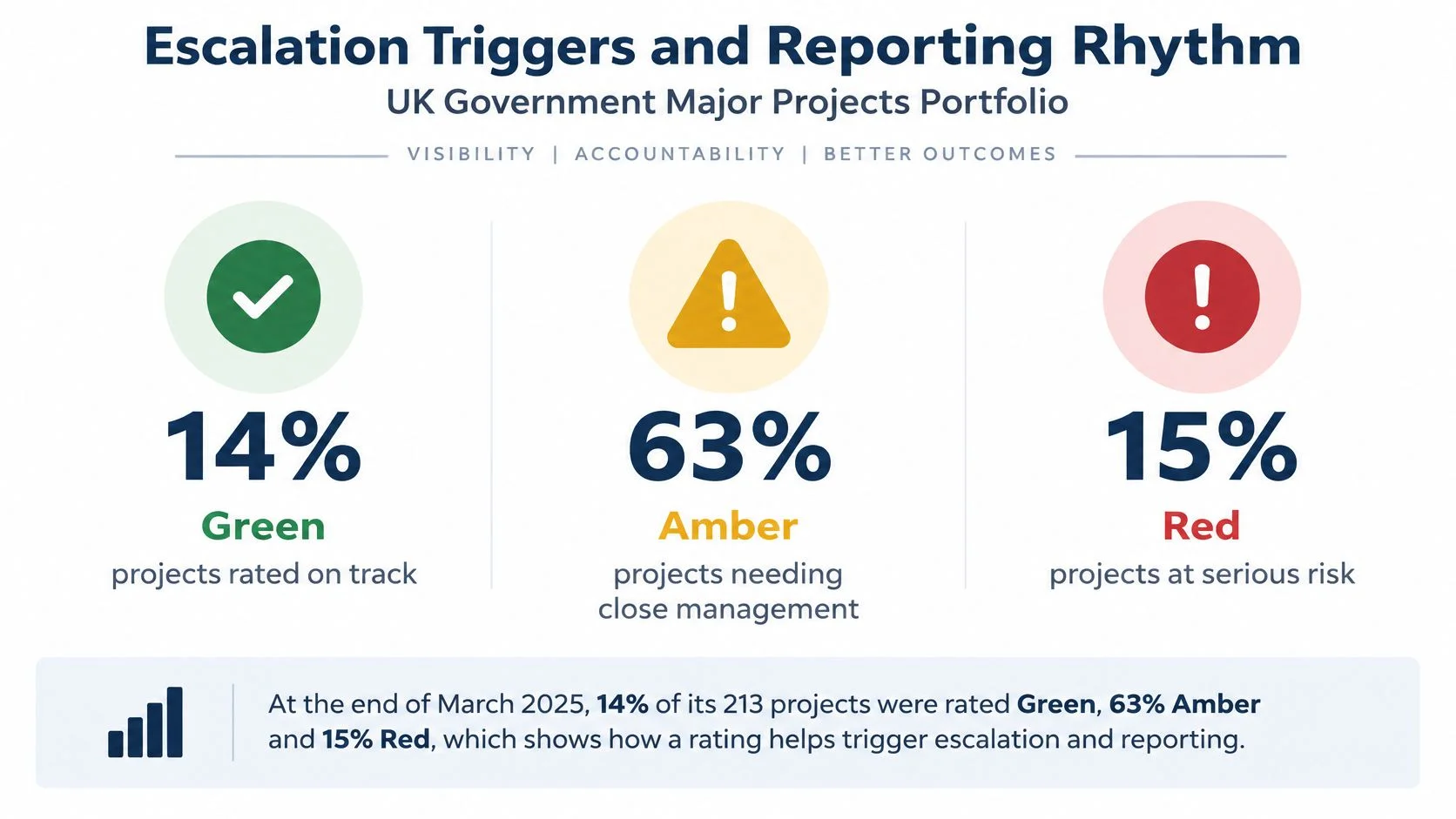
The UK Government Major Projects Portfolio annual report is the largest worked example of risk-based governance available, and the instructive part isn't its scale. At the end of March 2025 the portfolio held 213 projects with combined whole-life costs of £996 billion and monetised benefits of £742 billion. Only 30 projects, or 14%, were rated Green. Some 135, or 63%, were Amber: delivery considered feasible, with significant issues requiring active management. A further 31, or 15%, were Red, and those Red projects accounted for £198 billion in whole-life costs, more than double the £97 billion reported the previous year.
Look at the middle number again. A well-run portfolio of a country's biggest projects has nearly two thirds of its work in Amber. Amber isn't failure. It's the normal state of anything ambitious, and it only holds together if someone is actively managing it.
What each rating commits you to
| Rating | Meaning | Example trigger | Who acts | Reporting |
|---|---|---|---|---|
| Green | On track, routine management only | All milestones within 5% float | Task owner | Weekly |
| Amber | Feasible but needs active management | One milestone slips two or more days | Production manager | Twice weekly |
| Red | Plan cannot be delivered without change | Forecast exceeds approved budget by 10% or schedule gap over three days | Head of post with client contact | Same day |
Amber means the plan still works but needs management now. Red means the approved plan cannot be delivered without change, and that's a different conversation from "we're working hard on it".
Proving a plan is unachievable before the client sees a failure
This is the skill the standard guides skip. You don't make that case with adjectives, and you don't make it in a call where the client hears anxiety. You make it with the register and the time tracking: planned hours against actual hours, number of revision cycles, blocked tasks, resource conflicts, presented as a pattern rather than a complaint.
The escalation note has three parts. The evidence: three numbers and the tasks they touch. The options with their costs: move the date, cut the scope, add a resource, with a figure attached to each. The decision needed: one question, and a date by which it has to be answered. A note that only contains a warning gives the client nothing to choose between.
Escalate while the client still has options. A choice between three expenses is a relationship. A post-mortem isn't.
The rhythm that makes the colour mean something
Red items reach the head of post the same day. Amber gets reviewed twice a week in the production meeting. Green runs on a weekly note. That cadence is what converts a rating into management action; if nothing changes the day a project turns Amber, the colour is decoration and the team learns to ignore it within a month.
KPIs and Habits That Keep the Register Honest
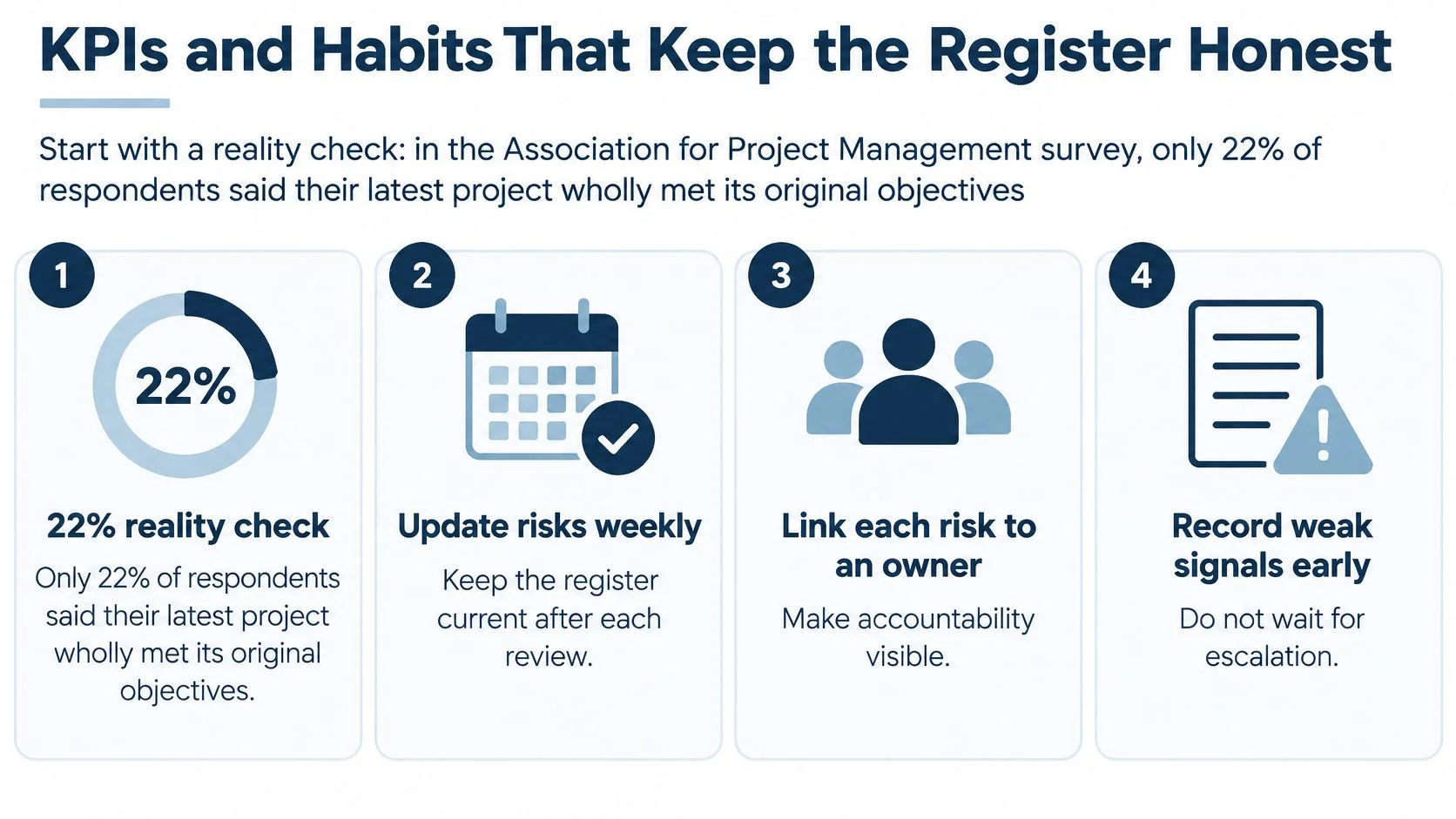
A register that never records a miss isn't being honest. The Association for Project Management's conditions for project success, built on a survey of more than 850 UK project professionals and thought leaders, found that only 22% said their latest project wholly met its original objectives. Around 12.5% failed to meet budget and roughly 16.7% failed to deliver on time. If your register shows a clean run across every job, the register is the thing to examine, not the projects.
The same survey identified five practices with the strongest and most consistent relationship to time, cost and quality outcomes: measurable goals and objectives, effective governance and decision rights, competent delivery teams, structured planning and review, and continuing commitment from sponsors and stakeholders. In a post house that becomes a control loop: baseline scope, milestones, dependencies, capacity and budget at approval; a named owner for every material risk; review of probability and trigger each planning cycle; escalation when a tolerance breaks. The project management principles behind that loop are worth reading once, properly, because decision rights are the part most studios get wrong.
| KPI | Target | What it shows |
|---|---|---|
| Share of risks with a named owner | 100% at every review | Accountability |
| Share of logged risks that became issues | Falling each quarter | Quality of identification |
| Days from trigger firing to action | Under 2 working days | Speed of response |
| Forecast accuracy at each milestone | Within 5% of actual | Reliability of the baseline |
| Planned versus actual hours by task | Within 10% | Quality of estimates |
| Revision rounds per deliverable | Falling each project | Cost of late change |
Read the numbers together
Falling issues combined with rising trigger-to-action time means the team is spotting problems but reacting slowly, which is a resourcing problem rather than a reporting one. Rising issues combined with fast action means identification improved and the process is working. Either combination tells you something. A dashboard of green ticks tells you nothing.
Four habits worth more than the KPIs
- Fifteen minutes on the same day each week. Owners speak only to their own rows, no slides, no walkthrough of the whole register.
- Close expired risks explicitly. An entry that has stopped being true should be closed with a line saying why, so nobody reopens it in three weeks.
- Hold a retrospective after each delivery. One question: which risk was missing from the register? The answer goes in as the first row of the next job.
- Keep every risk tied to work. If a row can't name the tasks, dates or people it touches, it's a sentiment rather than a control, and it will drift out of the plan within a fortnight.
Start Your Risk Register This Week
One decision is enough to start. Pick the live project with the most dependencies and log its top five risks ranked by expected impact. Five rows, not the whole slate. Each one needs a measurable trigger, a named owner and a mitigation with a date, and each owner confirms in writing. A risk allocated verbally hasn't been allocated.
Then hold the register against the approved plan. If the schedule has no buffer, the budget has no contingency, or the resource plan shows overlapping bookings, that's your first escalation. It goes out before the client sees a failure, not after, and it goes out as evidence with options rather than as a warning.
Where the data lives
If your schedules already run in freispace, the register has somewhere to sit: budgets show live plan-versus-actual on every project instead of a month-end spreadsheet, Gantt-style project planning carries phases and milestones that can hold buffer rows, and resource management covers suites, studios, personnel, resources and licences. If the team runs on a spreadsheet for now, keep the eight columns from the sample register so the data moves across later without being rebuilt from scratch.
The test that matters
At the next planning meeting, put the register first on the agenda and ask which risk was missed on the last job. Add it there and then. That single question, asked consistently, does more for delivery than any template, because it tells everyone in the room that being early is rewarded and being silent isn't.
freispace is built for the way post-production teams plan: Gantt-style project planning with phases and milestones that can carry buffer rows, live plan-versus-actual budgets on every project, and resource management across suites, studios, personnel and licences, so a risk's expected impact can be checked against real bookings in seconds. When the register, the schedule and the budget sit in one place, escalating early stops being an awkward conversation and becomes a routine part of the week. Have a look at freispace and see how it fits the way your studio already works.