
It's Monday at 9 a.m. and you're already reconciling. A producer's just moved a delivery, a freelance colourist can only do Thursday, and someone's booked Suite 2 for a grade that needs the licence seats Suite 4 is using. The answers exist, but they're split across spreadsheets, inboxes and one planner's memory.
That is the problem production scheduling programs are built to solve, not by making a prettier calendar, but by showing whether a plan can be delivered with the people, rooms and experience you've got. This guide builds that idea step by step, so you can judge any program against your own pain points rather than a feature list.
What a Production Scheduling Program Does
Say you're a post coordinator with three edit suites, two grading sessions and a freelance colourist who's only available on Tuesdays. The plan lives in four separate spreadsheets. Each file looks tidy on its own, but none of them knows what the others say, so a clash only appears when two people walk into the same suite.
A production scheduling program holds one schedule of people, rooms, kit, licences and tasks, and shows where they collide. Think of it as air traffic control for a post house. Each booking is a slot, each suite is a runway, each operator is a pilot, and the controller sees every clash before anyone takes off.

The building blocks in plain terms
You don't need jargon to use one well. You need five ideas working together.
- Resources: Anything you can book and run out of, such as suites, operators, freelancers, kit and licence seats.
- Tasks with durations: Named pieces of work, like a conform, grade or QC, each with an estimated length and an owner.
- Dependencies: The order tasks must happen in, so the grade can't start before the conform finishes.
- A timeline view: The whole job laid out against dates, so you can see what's late before it is late.
- Bookings that carry hours: A slot that records who worked, for how long, and against which project.
A calendar records, a program checks
Here's where readers often get confused. A calendar records what is booked. A program checks whether a booking is possible.
That check asks four plain questions. Is the suite free? Does the operator have the right skill and experience for this task? Are enough licence seats available? Does the budget still hold once you add those hours?
Practical test: Could you answer in five minutes which suite and which operator are free for a conform on Thursday, and whether that pairing works?
Say a client moves a delivery date two weeks earlier. In a calendar you drag one box and hope you remember the rest. In a program, the dependent tasks shift with it, the conflicts light up, and you see immediately which booking now needs a different room, person or day. If your current setup can't pass that Thursday test in five minutes, you've already found your reason to look further.
Core Features and the Question Each One Answers
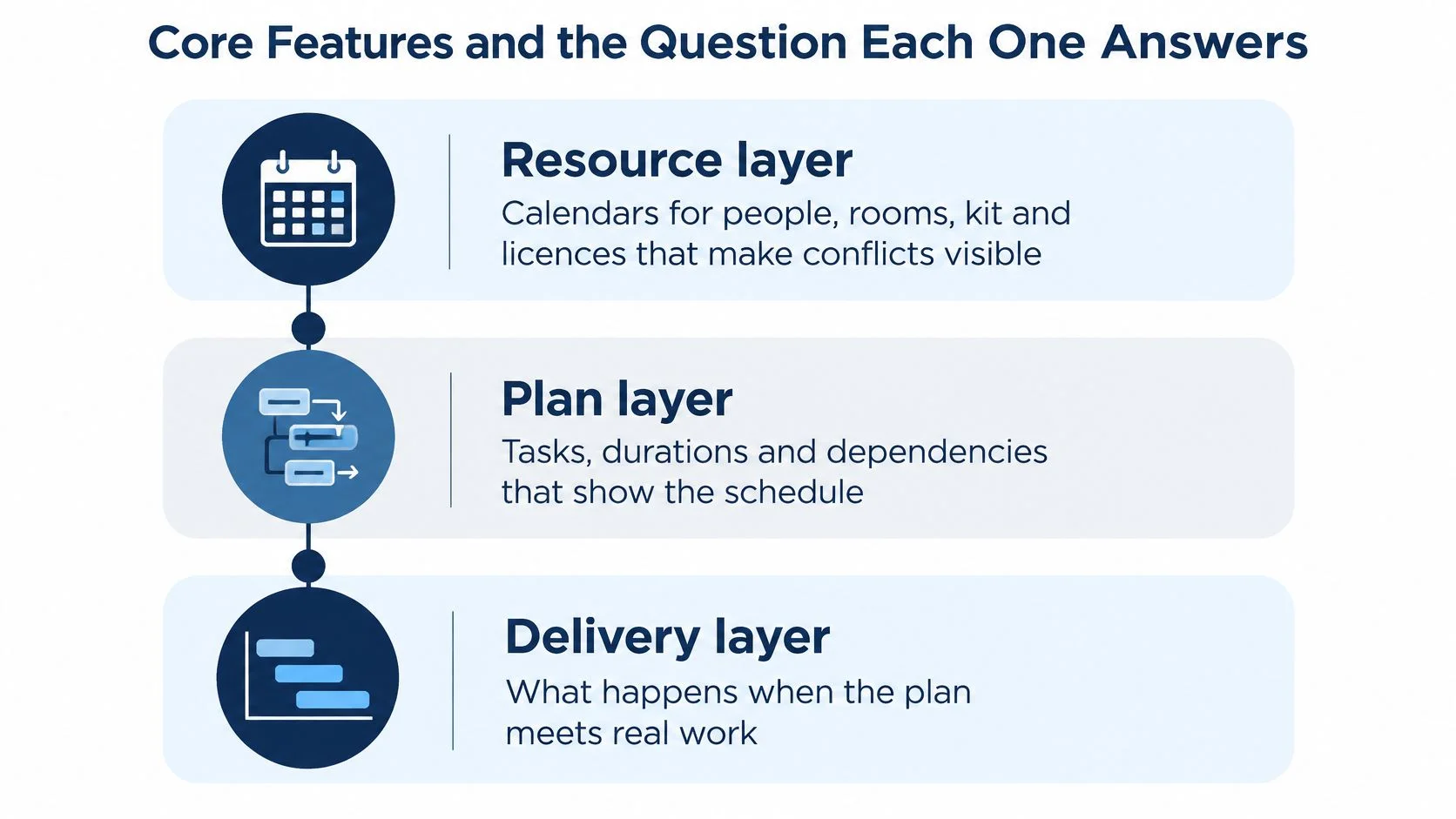
A feature list is a poor buying tool because it flattens three different jobs into one column. Separate the jobs into layers and the choice gets clearer. Each layer answers a different question, and teams often feel pain in one layer first.
The resource layer holds calendars for people, rooms, kit and licences. Its job is to make conflicts visible before a session starts, not halfway through it. "Free" is the minimum check. The better question is whether the person, room and kit are delivery-ready together: the operator has the right skill and enough time, the suite has the needed kit, and the licence seats exist for the software in use. If you cannot see a double booking, nothing above this layer can be trusted. freispace's resource management keeps suites, studios, personnel and licences in that layer, which is the single-pool view this check depends on.
From resources to plan to money
The plan layer holds tasks, durations and dependencies. When a date moves, this layer shows what else moves with it, which is why a Gantt-style view helps. You are looking at a chain of work leading to delivery, not just a set of bookings. This layer also carries the buffer that makes delivery realistic. Supervision, review and handover need reserved time; a plan with every hour allocated leaves those tasks to spill onto the same operators later. Good scheduling software protects that slack in the plan rather than hiding it in a hope.
The money and reporting layer turns bookings into hours and compares plan against actual spend. One record should feed billing, so nobody re-keys figures at month end. That is also where wider reporting sits, from utilisation to project carbon figures, because it is calculated from the same bookings. If the layers disagree, the schedule and the invoice tell different stories.
There is a balance between letting software move things for you and keeping a planner's hand on the decision. A useful parallel from another scheduling field is balancing automatic and manual posting, where automation handles the routine slots but a person still approves the exceptions. Post-production works the same way. Let the program flag clashes and shift dependent tasks, but keep human approval for moved deliveries, skill calls and changed estimates.
For a deeper look at how the resource layer works in practice, read this guide to software for resource scheduling and note how it treats rooms, people and licences as one pool. That single-pool idea is what separates a production scheduling program from a shared diary. A diary can show two bookings in the same suite. A program should stop the second one, or at least warn you before you save it.
Use the table as a lookup, not a shopping list
| Feature | Planning question it answers | Layer |
|---|---|---|
| Resource calendars | Who and what is free on each date? | Resource layer |
| Dependency-linked task plan | What moves when a delivery date slips? | Plan layer |
| Gantt-style project view | Where does each project stand against its deadline? | Plan layer |
| Bookings to hours and budget | What has this project actually used? | Money and reporting layer |
| Shift and rotation planning | Who covers night sessions next month? | Resource layer |
| Licence and seat tracking | Are there enough seats for the software in use? | Resource layer |
| Carbon tracking | What emissions does each project generate? | Money and reporting layer |
| Data access | Can our own tools read the schedule? | Across all three layers |
Don't try to buy every row on day one. That is the most common buying mistake, and it leads to a system nobody fully sets up.
Try a short ranking exercise instead. Write down the three pain points you already recognise, such as double bookings, budget drift or night cover. Mark which rows solve them, and treat the rest as later wins. A small team with two suites may only need the first four rows working well, while a larger facility running shifts will feel the absence of rotation planning within weeks. The right shortlist follows your pain, not the longest brochure.
Why UK Post-Production Teams Outgrow Spreadsheets
Scale makes a spreadsheet fragile, not careless planning. According to the British Film Institute official statistics for 2024, UK film and high-end television production generated £5.6 billion in combined spend, covering 191 films and 181 HETV productions in a single year. Inward investment and co-production together accounted for £4.8 billion, or 86% of total UK film and HETV production expenditure.
That mix matters on a Monday morning. International work brings multiple vendors, time zones, approval stages and delivery specifications, all landing on the same suites and operators. More projects don't just mean more rows. They mean more chances for one change to break three other bookings.
Volatility breaks a fixed plan faster than volume does
The same BFI figures show why a static plan ages badly. Domestic UK HETV spending fell 22% to £598 million, while inward-investment HETV spending increased 36% to £2.8 billion. A schedule built for one client mix can therefore break within a quarter, even if your total workload looks similar.
That's not an abstract market point. Different clients bring different approval routes, delivery specs and peak weeks. When the mix shifts, your bottleneck shifts with it, from online suites one month to grading or QC the next.
We saw the starting point for many teams in early 2022, when freispace ran qualitative surveys and found that the majority of companies relied on shared calendars or massive Excel spreadsheets to organise their processes. Those tools work until volume and change arrive together. Then the failure pattern is familiar.
- Version drift: Two people edit different copies of the plan, and nobody's sure which one is live.
- Head-held knowledge: One planner knows why a session was moved, so the schedule can't be read safely without them.
- Message chasing: Coordinators spend hours confirming by email what the schedule should already show.
- Unclear ownership: A task sits on the plan with no named owner, so it only gets picked up when it's urgent.
If that sounds familiar, compare your options against a purpose-built Excel scheduling alternative rather than adding another tab. The question isn't whether Excel is powerful. It's whether it can check skills, licences, dependencies and budgets at the moment you make a booking.
Three warning signs you can check this week
You don't need a consultant to diagnose this. Watch for these three signs over the next few days.
- Sign one: Two people are editing different versions of the same plan.
- Sign two: A clash is discovered on the morning of a session, not when it was booked.
- Sign three: A delivery date moves and the downstream tasks don't update with it.
Log the hours your team spends reconciling the plan for one normal week. That total is the cost any program has to beat.
That one-week exercise gives you a number you own. If reconciliation is eating several planner hours weekly, plus the cost of idle suites and late starts, you've got a business case in plain figures. If it isn't, a spreadsheet may still be serving you well, and spending money now would solve a problem you don't have.
Capacity and Skills Risk Most Schedules Miss
Headcount is not schedulable capacity. That's the assumption worth challenging first, because it sits underneath most late deliveries. A database may hold enough qualified people on paper, yet simultaneous productions, part-time patterns and unavailable freelancers can still make a plan impossible.
Say you've got four editors listed for next week. One is part-time, one's tentative pending a client decision, and one's already covering nights. Your real capacity isn't four. It's closer to one and a half, and a schedule that ignores that will look fine until Thursday.
Four states every person and resource needs
A good program tracks more than free or busy. It distinguishes states that change how you plan.
- Booked: Confirmed and committed, so other work must fit around it.
- Tentative: Held but not confirmed, so you need a fallback if it firms up or falls away.
- Unavailable: Leave, sickness, training or a contractual limit takes the resource out of the pool.
- Overtime: Possible, but at a cost to budget, energy and the following week's capacity.
Those states let you run a scenario test instead of guessing. If a key colourist becomes unavailable, can the conform, grade and VFX turnover still move, and which task should be resequenced first? A planner who can answer that in the software, before telling the client, is managing risk rather than reporting it.
For practical ways to keep that view honest week to week, see these notes on team workload management, especially the habit of reviewing load by discipline instead of one overall staffing percentage. A single percentage hides the problem. Grading can be saturated while edit has slack, and the average will tell you everything's fine.
Available is not the same as delivery-ready
The ScreenSkills Powering Production report found that 59% of respondents experienced skills shortages primarily as a lack of experience, while mid-level, delivery-critical roles including VFX supervisors, post-producers, production coordinators and producers were among the hardest to fill. It also found that 31% of Animation/VFX/Post-production respondents reported production delays linked to skills shortages, compared with 15% across the wider screen sector.
Read that carefully. The shortage usually isn't a missing person. It's a missing level of experience for work that has to be right first time.
Available capacity is a person with an empty slot. Delivery-ready capacity is a person with the right experience, plus time for supervision, review and handover.
That distinction changes how you judge a schedule. A plan at maximum utilisation can be the riskiest plan you've got, because it leaves no buffer for a senior to review a junior's work, no time for a proper handover, and no slack when a review round generates notes. The rework still happens. It just happens late, when it's most expensive.
It's a similar trade-off to the one explored in this comparison of hiring an editor or using AI, where the cheaper or faster option on paper can cost more once you factor in revisions and supervision. In scheduling terms, don't just count the slot. Count the checking, mentoring and correction time the slot will need.
So ask any program for a constraint view, not just a calendar. It should show which skill becomes the bottleneck, the date when that capacity runs out, and the buffer hours you've set aside for supervision and review rounds. It should also flag single points of failure, where only one person can do a delivery-critical task. If it can't show you that, it's telling you who's free. It isn't telling you who can deliver.
How to Evaluate a Program Before You Buy
The best evaluation uses your own data, not a vendor's sample project. Sample data is designed to behave. Your data has the awkward freelancer, the suite that can't run a particular job, and the client who always moves the date, which is exactly what you need to test.
Build one realistic test and use it with every vendor. A ten-day finishing schedule works well, with two suites, three operators, one freelance grader and a delivery date you'll deliberately move during the demo. Keep it small enough to run in an hour, but complete enough to expose weak conflict detection and broken dependencies.
Run the same demo, score it the same way
Use the table below as your scorecard. Run each test live, watch what the software does without prompting, and score each row from one to five.
| Criterion | Test in the demo | Red flag |
|---|---|---|
| Resource conflict detection | Book the same suite twice on one day | Warns only after saving, or does not warn at all |
| Capacity by skill | Filter colourists by skill and status | Shows only headcount totals |
| Dependency handling | Move a delivery date and watch downstream tasks | Dependent tasks stay where they were |
| Budget plan versus actual | Log an overrun and check live variance | Variance reconciled only at month end |
| Booking to invoice | Follow one booking to its quote and invoice line | Figures re-keyed between schedule and billing |
| Approval and audit trail | Change an estimate and check the change history | No record of who changed what |
| Integration and data access | Confirm the API or export covers the full schedule | Exports limited to PDF |
| Onboarding and migration | Ask for a timeline and whether old and new systems run in parallel | Requires long dual running |
Treat two rows as disqualifiers rather than low scores. If conflict detection only warns after you've saved, or doesn't warn at all, the program won't prevent the clashes you're buying it to prevent. If dependent tasks stay put when a delivery moves, you'll be back to manual chasing within a month.
Other red flags are serious but sometimes fixable. PDF-only exports might be acceptable if you'll never connect other tools, though the need for custom reporting usually surfaces later. Month-end variance might be tolerable for a very small facility, but it'll frustrate anyone who's ever discovered an overrun too late to act.
Three questions to ask in every demo
Scores don't cover ownership and cost, so ask these out loud and write down the answers.
- Data ownership: Who owns the schedule data if the contract ends, and in what format do you get it back?
- Migration behaviour: What happens to live bookings while you switch, and is there a period where neither system is authoritative?
- Price drivers: Which parts of the price depend on user numbers or modules, so you know what growth will cost?
Then do a cost check before the demo ends. Ask for a three-year cost sheet covering licence fees by user or module, onboarding and migration fees, and the internal planner hours needed during parallel running.
Compare that three-year total with the weekly reconciliation hours you logged earlier, priced at your planner's real cost. A program that can't beat your current hidden cost isn't a bargain at any licence price.
Be honest about the internal hours too. Migration isn't free just because no invoice arrives for it. If your lead planner spends weeks cleaning data and retraining colleagues, that time belongs in the comparison, and a good vendor will help you estimate it rather than wave it away.
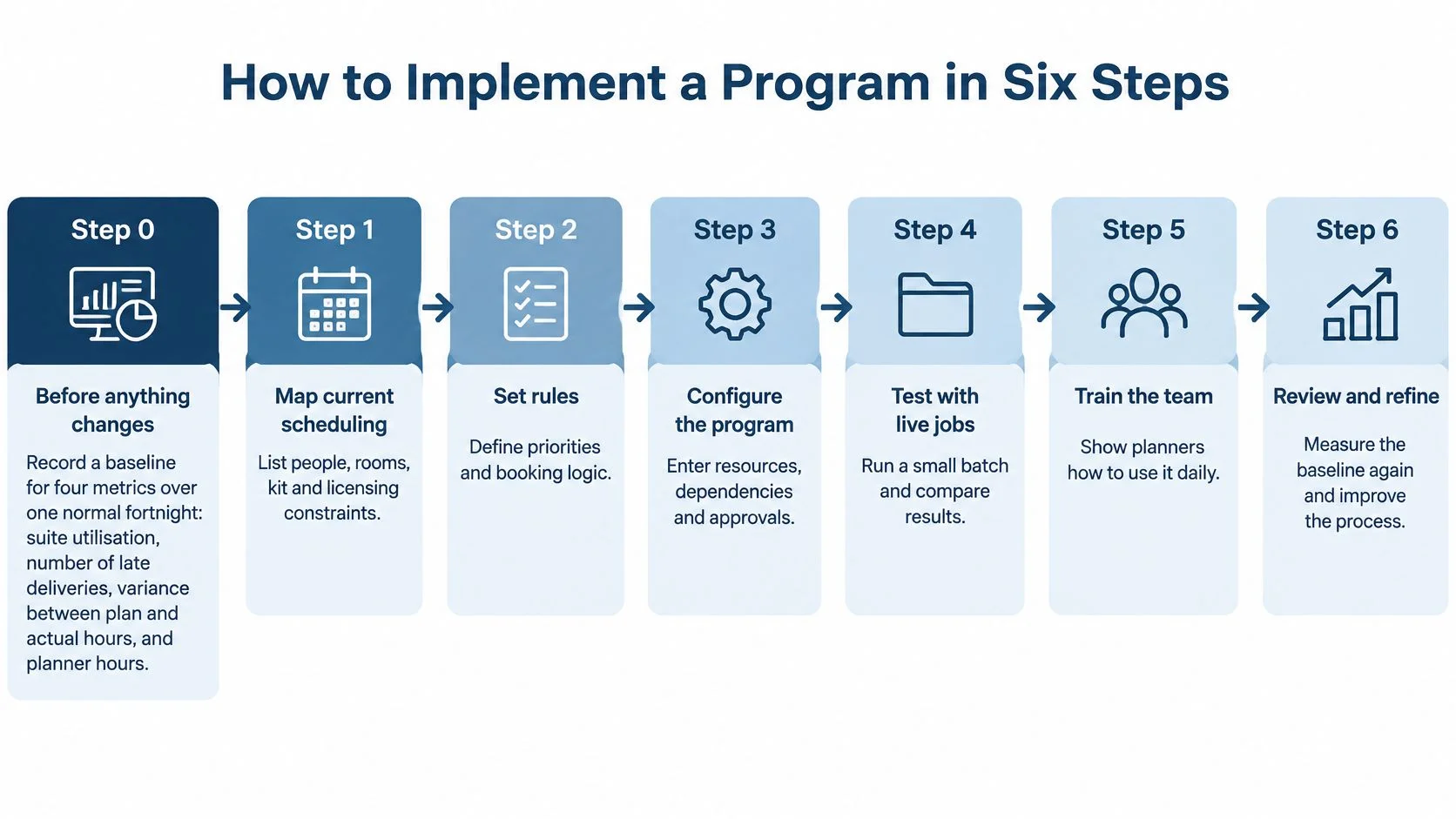
How to Implement a Program in Six Steps
Implementation fails more often on habits than on software. Teams load messy data, skip the trial, and then blame the tool when the first busy week exposes the gaps. These steps are ordered to prevent that, starting before anything changes.
Step 0 and steps 1 to 3
Step 0. Record a baseline before anything changes. Over one normal fortnight, measure four things: suite utilisation, number of late deliveries, variance between planned and actual hours, and planner hours spent reconciling the plan. Without those numbers recorded first, you can't show a return later, because you'll be arguing from memory.
Step 1. Map the current process. List every resource, handoff and approval in the order work flows, not the order the handbook says. You can't schedule what you haven't listed, and this step usually surfaces steps that only exist in one person's head.
Step 2. Load real availability. Enter calendars for people, suites, kit and licences using actual availability rather than contracted hours. This is the most common slip. A colourist contracted for five days who's only bookable for three will break your first schedule if you load the contract instead of reality.
Step 3. Build one template from a finished project. Copy tasks, durations and dependencies from a job that ran to plan, including the review rounds and handovers that really happened. Don't build it from memory, because memory edits out the buffers that made the job work.
Steps 4 to 6
Step 4. Run a parallel trial on two live projects for about two weeks. Keep the old spreadsheet read-only so the team can compare outputs without creating two live versions. Two projects are enough to expose bad templates and missing resources, while keeping the risk contained if something's wrong.
Step 5. Set approval rules. Name who signs off a moved date, a new booking and any estimate built from historical data, and record the reason for each override. Historical data can encode rushed working patterns, so an estimate that looks evidence-based may repeat an unsustainable week. Human approval keeps that visible.
Step 6. Train the team and review weekly. Show each role only what they'll use daily, then review three things every week: conflicts found, variance between plan and actual, and planner hours. Adjust the template based on what those reviews show, because your first template will be wrong in small ways and that's normal.
Adoption rule: The first month decides whether the program sticks. Protect it.
Be honest about the trade-off in step 4. Parallel running costs planner time for a fortnight, and it can feel slower than just switching. But teams that skip it often return to spreadsheets within a quarter, because the first unexplained clash destroys trust in the new system. A short, controlled trial is cheaper than a failed rollout.
Also resist loading every historical project. You need clean resources, one good template and two live jobs, not an archive. Old data with inconsistent naming will pollute your capacity view and slow everyone down. Start narrow, prove the workflow on real work, then widen it once the team trusts what it sees.
Finally, keep the baseline from step 0 somewhere visible during those weekly reviews. It's easy to drift into judging the program by whether the screen feels nice. The four baseline metrics keep the conversation grounded in whether suites are better used, deliveries are more reliable, estimates are closer and planners are spending less time reconciling.
Real-World Use Cases and What They Return
Programs earn their keep in specific situations, not in general. These three scenarios cover the patterns most UK post teams recognise, each with a different pain point at its centre. Deadline pressure across the sector isn't easing, since according to the British Film Institute figures reported by Sectorial's post-production services profile, UK film and high-end television production spend reached £6.8 billion in 2025, including £2.8 billion in feature-film production spend.
Three scenarios, three different risks
Scenario one, the double-booked post house. Say a mid-size facility runs six suites and double-books grading sessions every month because the plan is split across two files. The named pain isn't effort. It's that neither file can check the other, so clashes surface at the session. One live schedule with conflict detection removes that class of error, and suite utilisation is the metric that proves it.
Scenario two, the documentary producer across time zones. Here the risk isn't a missing room. It's a missing approval, because freelance editors hand work to reviewers who wake up hours later. A dependency-linked plan with named owners shows which approval is blocking the next task, so the producer chases the right person instead of sending a general reminder. Late deliveries and plan-versus-actual variance are the metrics to watch.
Scenario three, the finishing team on streaming windows. This team works to fixed delivery slots where one slipped date can trigger a contract penalty. Their risk is a quiet drift early in the chain that only becomes visible at QC. A timeline view with dependencies makes that drift visible while there's still time to resequence work or add capacity. Planner hours matter here too, because manual tracking of penalty dates is exactly the kind of reconciliation that eats senior time.
Putting a price on the return
Use a clearly labelled hypothetical with your own figures, rather than believing anyone's generic savings claim. Say a suite sits idle for two days a month because a gap was never spotted in time to fill it. Across six suites, that's twelve suite-days a month of lost capacity, which you can price at your own daily suite cost to get a monthly figure for your business case.
Then track how the four baseline metrics move over a ninety-day period after go-live.
- Suite utilisation: Should rise as gaps get spotted and filled earlier.
- Late deliveries: Should fall as dependencies and blocked approvals become visible sooner.
- Plan versus actual hours: Should narrow as templates learn from real durations.
- Planner reconciliation hours: Should drop as one live schedule replaces merged files.
One timing point matters more than people expect. The baseline must be taken before go-live, not in week one after it, because a return can only be shown against a number recorded before the change. Measure afterwards and you'll have a nice chart with nothing honest to compare it against. Measure before, and ninety days later you can state plainly what improved, what didn't, and whether the program has paid for itself yet.
Shortlist Programs Against Your Own Pain Points
Start with a decision method, not a vendor list. Write down your top three pain points, such as double bookings, budget drift or a plan that lives in one person's head. Those three, not a feature count, should decide your winner. A program that scores brilliantly on features you will never use has told you nothing about the problem costing you suite-days.
Shortlist three to five programs and run the same ten-day demo schedule through each one. Score every vendor on the same scorecard, and treat any red flag on conflict detection or dependency handling as a disqualifier. Identical tests are what make the comparison fair. Let each vendor run its own polished demo and you are comparing presentations, not products.
Then add one test most scorecards miss. Ask each vendor to show you a week where a suite sits free but the operator who can run it does not. A calendar answers "who is available". A schedule worth buying answers "who is delivery-ready", which means the operator, the kit, the floating licence seat and the handover buffer all line up on the same day.
Where freispace fits against common pain points
freispace is an AI-native post-production scheduler that places suites, staff, freelancers, kit and licences on one live schedule, and links each booking to its quote and invoice without re-keying. Judge it the same way you would judge anything else, with a demo check for each claim.
| Pain point | Common workaround | How freispace addresses it | Demo check |
|---|---|---|---|
| Double-booked suites | Plan split across two files | One live schedule for suites, staff, freelancers, kit and licences | Book the same suite twice on one day |
| Budget drift | Overruns found at month end | Booking linked to quote and invoice, with live plan-versus-actual | Log an overrun and check the variance updates |
| Re-keyed billing | Figures copied from schedule to invoice | Booking becomes the invoice line without re-keying | Follow one booking through to its invoice line |
| Dependence on one planner | Plan held in one person's head | Shared live schedule across the team | Change an estimate and check the change is visible to others |
| Skills and handover gaps | Schedule shows who is free, not who can run the job | Shifts, shift roles and rotation patterns sit alongside the bookings | Assign a shift role and see whether coverage is obvious |
| Migration risk | Long dual running | Home Post Production moved its whole operation off a legacy system in 30 days with no dual running | Ask for a migration estimate based on your own data |
On that last row, the example is worth reading precisely. Home Post Production moved its whole operation off a legacy scheduling system in 30 days, from 1 October to the end of that month, without dual-running. A switch that fast depends on how clean the existing data is, so ask any vendor for an estimate built from your own suite list, staff records and project history. Thirty days on tidy data is realistic. Thirty days on four years of duplicated bookings is a risk dressed as a win.
Close with a dated next step, not a vague intention. Choose the program that clears every red flag and scores highest on your three pain points, then book a review thirty days after go-live to check the four baseline metrics you recorded beforehand. If they have not moved, you will know early enough to fix the template, the training or the choice itself.
If double bookings, budget drift or a plan that lives in one person's head sound familiar, put your ten-day test schedule into freispace and run the same checks described above, from booking a suite twice to following one booking through to its invoice line. You will see your suites, staff, freelancers, kit and licences on one live schedule, with delivery-ready capacity and review buffers visible rather than assumed.