
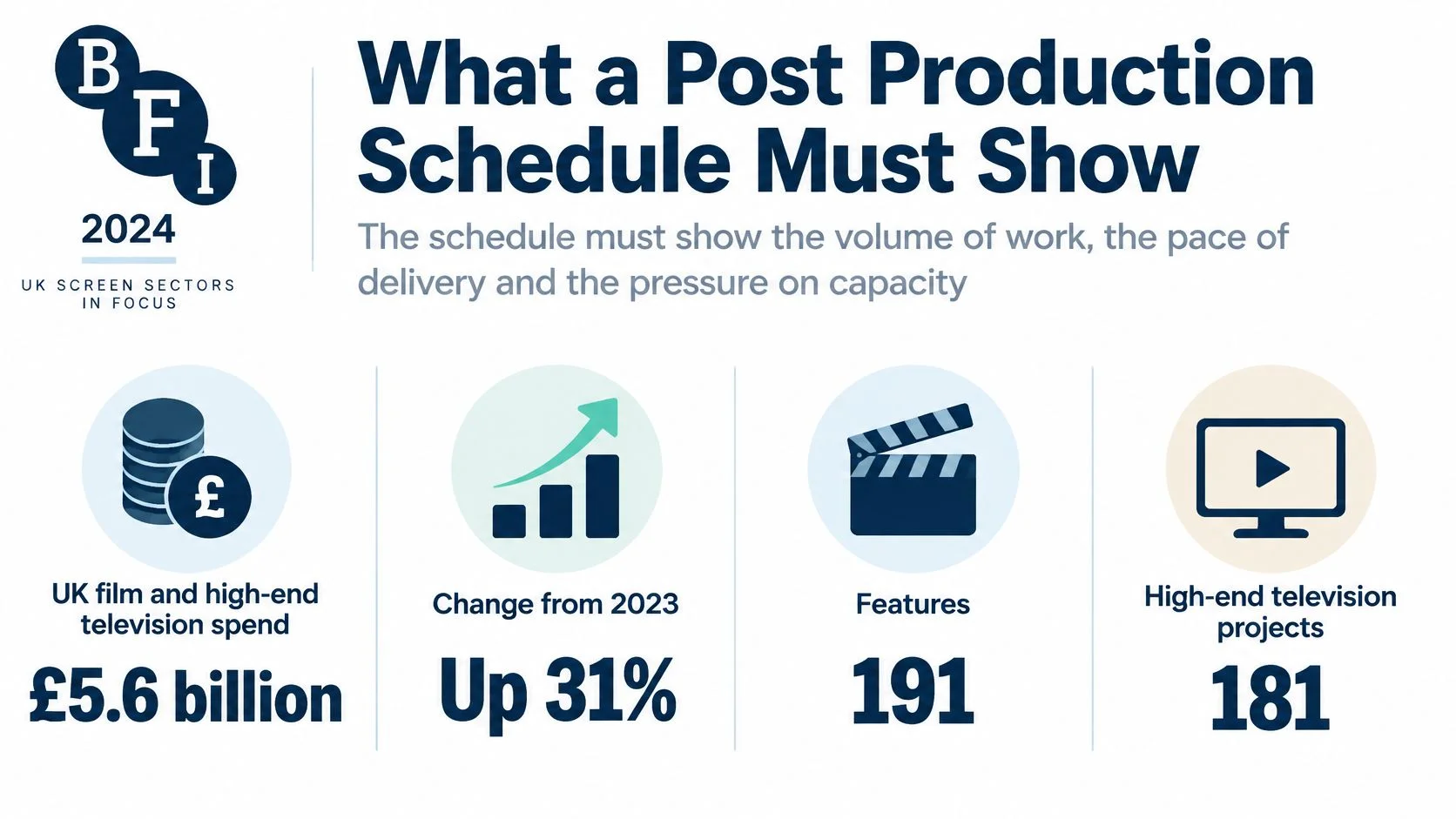
UK film and high-end television production spend reached £5.6 billion in 2024, up 31% compared with 2023, according to the BFI's official production statistics. For a post house, that activity means overlapping commitments competing for the same finishing rooms and specialists, not just more projects to put on a calendar.
What a Post Production Schedule Must Show
Say you're finishing a high-end television episode while another show already holds your editor on selected afternoons. The colourist has a gap, but the suite needs a maintenance slot. The client wants delivery protected without committing to when they'll return notes.
A tidy calendar won't resolve any of that. Your post-production schedule must name the work, its owner, the resource it needs, the planned hours and the approval that releases the next task.
Name the constraint, not just the department
A shooting schedule groups work around locations, cast and day or night requirements. A post schedule coordinates assets, decisions and specialist capacity. Writing colour into a date range doesn't secure the colourist, the calibrated room or the approved conform.
Each booking needs enough detail for the person accepting the handover to act without chasing the producer:
- Input: Identify the media, cut version or approved asset being handed over.
- Capacity: Name the operator, room, equipment and licence required together.
- Effort: Separate working hours from the elapsed window containing them.
- Acceptance: State who signs off the output and where that decision is recorded.
Include peripheral work if it consumes the same people. If a campaign team uses ClipNova's cartoon video maker for an animated promotional insert, its review, rights checks and finishing handover still need an owner. Generating an asset doesn't remove its approval work.
Keep elapsed time honest
The production schedule example below uses a hypothetical one-hour episode with shared editorial capacity and protected finishing blocks. It follows the work through delivery, then tests what happens when approvals and availability change.
The heading uses the familiar six-week label, but the detailed plan spans 42 working days. Those aren't equivalent: on a five-day working week, this is longer than six calendar weeks. Don't compress the booking grid just to preserve a label.
Quieter industry utilisation doesn't remove short specialist bottlenecks. The useful test is whether the people receiving each handover can accept it.
Booking test: If the receiving department can't name the approved input and the available operator, the handover isn't ready.
Annotated Six-Week Episode Schedule
Six-week post schedule for a one-hour episode
| Phase | Hard dependency | Owner | Buffer or share |
|---|---|---|---|
| Ingest and prep, days 1–3 | Offline media delivered | Assistant editor | Cannot overlap assembly |
| Assembly, days 4–10 | Ingest signed off | Editor | Editor also on show B some afternoons |
| Fine cut, days 11–20 | Director notes in | Editor and producer | Notes batched twice a week |
| Picture lock, day 21 | Client approval recorded | Post producer | Lock is a gate, not a review meeting |
| VFX, days 18–28 | Selected shots only; finals after lock | VFX supervisor | Provisional work isolated; approved finals due before picture approval |
| Conform and grade, days 22–28 | Picture lock | Colourist | Five booked days within the window; day 29 held unbooked |
| Sound editorial, days 22–32 | Picture lock | Sound editor | Parallel with grade, not with mix |
| Mix, days 33–36 | Approved picture and dialogue | Mixer | Theatre exclusive; no second mix |
| QC and fixes, days 37–39 | Mix delivered | QC lead | Two QC days plus a one-day fix loop |
| Master and deliver, days 40–42 | QC pass | Post producer | Versions and stems listed on the matrix |
These are illustrative working-day windows, not industry-standard durations. The episode is assumed to have manageable VFX requirements, available source media and a client who accepts the stated review arrangements. A different deliverables list can require a materially different plan.
The opening gate protects editorial
Ingest and prep occupy days 1–3 because the assistant must verify the media, sync, project structure and access before assembly begins. That isn't spare time to reclaim when the client asks for an earlier cut. Starting editorial on an incomplete or unverified project creates troubleshooting work inside an expensive editor booking.
The assistant can remain available during assembly for support and late-media handling. That overlap doesn't mean assembly starts before the ingest sign-off. It means the assistant's work continues after the initial gate has passed.
The editor's sharing arrangement also needs a precise interpretation. Assembly and fine cut together occupy days 4–20, with reduced availability on selected afternoons. A budget containing 21 editor-days cannot fit entirely inside that window with one shared editor; it must include pre-schedule editorial work, extend the window or add approved editorial support.
Don't hide that mismatch in a long bar labelled fine cut. Establish which work the allowance covers before issuing the booking.
Parallel work needs stable inputs
VFX begins on day 18 only for shots already selected for provisional work. The supervisor tracks those shots against the current cut and records what would need redoing if the edit changes. Nothing becomes a final turnover merely because an artist has started it.
Grade and sound editorial can run alongside each other after picture lock because they use different specialists and facilities. Their teams still need a controlled exchange of approved picture versions. If a VFX final replaces a shot during finishing, the colourist and sound editor need to know whether duration, framing or sync has changed.
The mix stays after sound editorial. The mixer needs approved picture and dialogue assets, not a promise that someone will upload them during the session.
Hold capacity where recovery is possible
The colourist has five exclusive working days inside the finishing window, rather than an uninterrupted booking across every date. Day 29 remains unbooked as colour contingency, subject to an agreed release rule. That protects a late replacement or correction without charging the project for a deliberately stretched grade.
QC has its own correction loop. The QC lead checks the finished assets, the responsible departments address failures, and the post producer confirms the corrected files have passed before mastering proceeds.
Keep those gates when adapting the example. Change durations to suit the episode, but don't remove acceptance checks to make the table shorter.
How to Build the Schedule from Deliverables
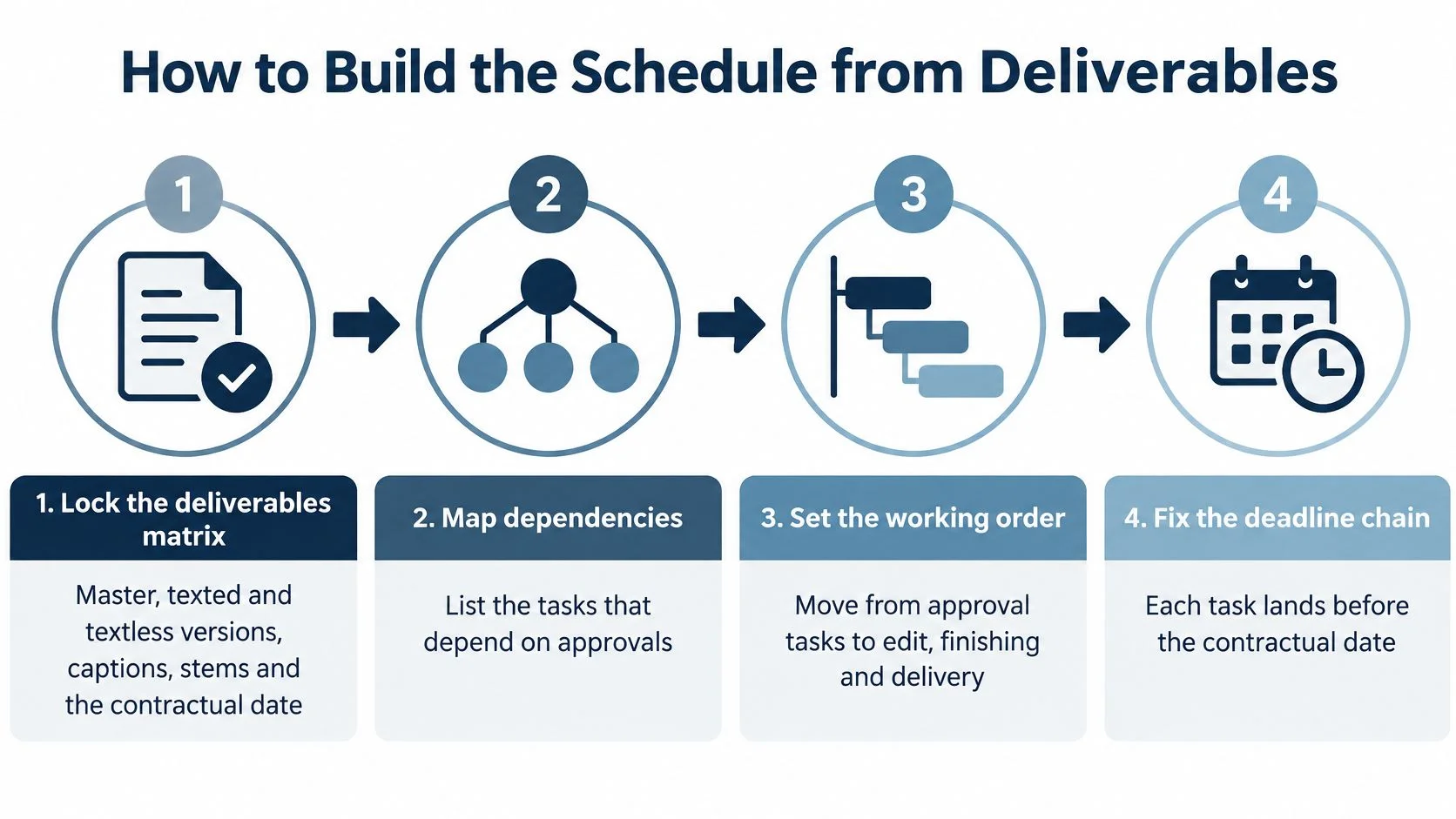
Start with the files the client will accept, not the rooms the facility would like to sell. A useful deliverables matrix connects every output to its specification, approval owner and contractual delivery requirement.
Establish the work before assigning dates
Lock the deliverables matrix.
List the master, texted and textless versions, captions, audio stems and any platform-specific outputs. Give each an acceptance specification and an approval owner. This prevents a late discovery that the quoted finish doesn't include the files needed for delivery.List the tasks that create those outputs.
Include ingest, assembly, fine cut, picture lock, conform, grade, VFX, sound editorial, mix, QC and mastering. Add caption preparation, version checks and transfer verification where the matrix requires them. A phase without its supporting work understates both labour and elapsed time.Mark the hard gates.
Identify which decisions release downstream work. Editorial lock releases final shot turnovers; approved picture and dialogue release the mix. Record approval against a specific version so that a message saying approved can't be attached to the wrong cut.Group tasks by simultaneous resource need.
A supervised grade needs the colourist, suite and reviewer available together. An unattended export may need a workstation and licence but not continuous operator attention. This distinction prevents you from reserving an expensive specialist for work an assistant can prepare.
Set a working pattern people can deliver
Apply the agreed hours and working week.
As a starting assumption for this hypothetical plan, use an eight-hour working day, a five-day week and a separate 30-minute lunch, then reconcile those assumptions with each person's agreement. The Timewise shorter-working-day blueprint supports that filming-day pattern and recommends locking episode scripts approximately two weeks before filming so the shooting schedule can exist at least a full week ahead. That's the shooting analogue: secure the necessary decisions before treating bookings as settled, rather than importing filming guidance as a universal post-production contract.Attach contingency to the vulnerable handover.
Hold recovery time where a delay can still be absorbed, such as after grade and before approved picture is required. Give that hold a release owner and an expiry condition. An unnamed buffer at the end won't help when the mixer has already moved to another show.Issue a controlled revision with named risks.
Record the revision, approval assumptions and person responsible for each unresolved risk. Preserve planned hours as the baseline, record actual hours against completed work, and revise the remaining-hours forecast. Don't overwrite the original estimate or you'll lose the evidence needed to understand the variance.
A working-hours field should describe productive booked time, not just the gap between arrival and departure. If a reviewer can attend only part of a session, reserve a distinct review appointment rather than assuming the whole finishing day is supervised.
Make exceptions visible
Contractual obligations, holidays, location differences and realistic availability belong in the plan before anyone accepts the dates. Remote teams may share a working day without sharing enough review hours to clear a decision. A freelancer's confirmed absence is a constraint, not an inconvenience to resolve later.
Keep an exception log alongside the schedule:
- Unconfirmed approval: Name the decision-maker and the latest useful response point.
- Unsecured resource: Record whether the booking is a hold, an option or confirmed.
- Incomplete asset: Identify the missing item and the department affected.
Customising the example means changing effort, availability and sharing arrangements while preserving the acceptance gates. The resource view must then prove that the bookings can be staffed.
Load People Suites and Budget
Read a resource-loading table as a conflict check, not a utilisation target. If another producer has already confirmed the same colourist or theatre, your project doesn't acquire capacity because its bar looks more urgent.
Resource load for the episode example
| Role or resource | Days on this job | Utilisation in window | Also committed to | Contingency |
|---|---|---|---|---|
| Editor | 21 effort-days across the full editorial allowance, including work outside the displayed window | About 80% during shared editorial bookings | Show B on selected afternoons | Notes batched, no seventh day assumed |
| Assistant editor | 15 allocated days across prep and support | About 70% during shared bookings | Shared ingest pool | One day overlap with assembly after ingest approval |
| Colour suite and colourist | 5 | 100% inside the block | Two other grades queued after | Day 29 held unbooked |
| VFX artists | Days 18–28, with effort allocated by shot | About 60% during the window | House reel | Finals only after picture lock |
| Mix theatre and mixer | 4 | 100% exclusive | No second mix that week | Cannot be split |
| QC | 2 staffed QC days within a wider shared window | About 50% | Float across shows | Fix loop protected before mastering |
| Floating licence seats | Full post window | One seat per active editor | Other shows share the pool | Do not book seats you do not hold |
All allocations are hypothetical. Effort-days, elapsed windows and utilisation measure different things: an effort-day is labour, a window is availability over time, and utilisation describes how much of that availability the project occupies. Don't multiply them together unless their definitions match.
Expose conflicts before confirming the quote
Expand the Gantt to show named resources beneath the phase bars. Mark picture lock, mix start and QC pass as milestones, then inspect the bookings around them. A licence shortage can block an assistant just as effectively as a missing workstation.
If you compare workforce management software using HR Management 365's guide, test the options against real shared-resource cases. A staff rota alone won't prove that an operator, room and floating licence are free together.
The money view should sit beside those bookings. For each phase, record planned hours and the applicable contracted rate or approved rate band. Don't substitute an invented market rate for the facility's actual charging basis.
Let extra notes change the forecast immediately
Take a separate hypothetical edit allowance of 21 days at eight hours, giving 168 planned hours. Six additional note sessions lasting three hours each add 18 hours, taking the forecast to 186 hours before any other change. That edit allowance must be reconciled with the available editorial window before the producer promises a lock date.
Record the extra sessions when they're accepted. Waiting for month end leaves the producer negotiating creative changes without knowing the current commitment.
Keep the financial view readable:
- Hours: Compare budgeted effort, recorded effort and the estimate to complete.
- Suite or licence cost: Identify exclusive bookings, shared charges and chargeable holds.
- External freelancer cost: Separate confirmed commitments from provisional options.
Draw down the budget when a booking is confirmed, then reconcile that commitment against timesheets without counting both as separate costs. The financial management of projects guide provides a useful framework for keeping commitments and actuals distinct.
A task with no named resource isn't scheduled. It's work you're still hoping somebody can accept.
Replan When Capacity or Approvals Slip
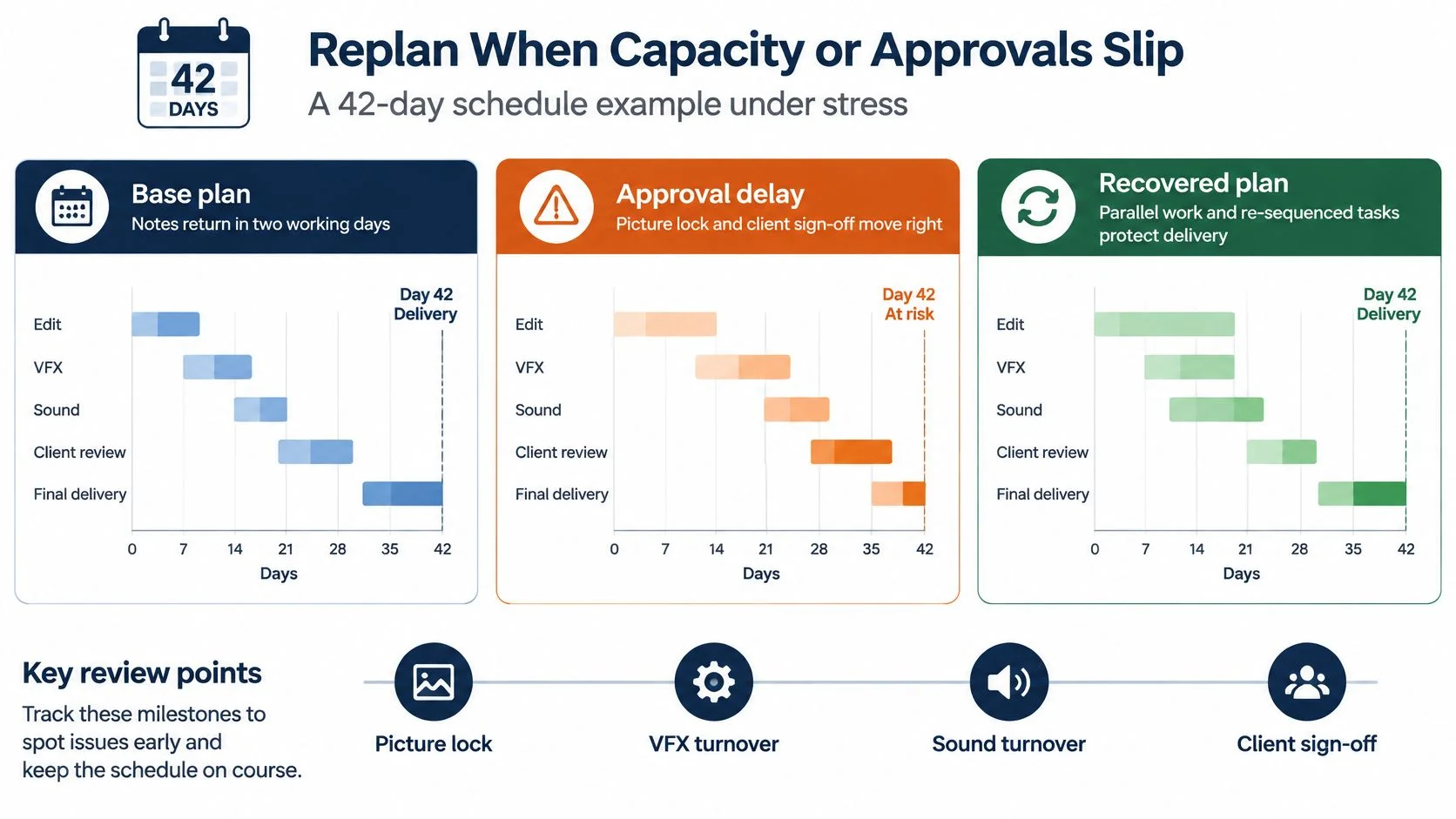
For this hypothetical episode, test delivery at working day 42 in the base plan, around day 52 under constrained capacity, and day 63 after an interruption. These are scenario targets, not predicted industry lead times. Confirm them only after rebuilding the affected bookings.
Three states for the same episode
| State | Approval latency | Specialist capacity | Cost effect |
|---|---|---|---|
| Base | 2 working days | As loaded in the example; delivery day 42 | Holds the plan |
| Constrained capacity | 5 working days | Colour and mix at about half; target delivery around day 52 | Extra suite week or authorised overtime |
| Interruption | Gate frozen for 10 working days, then approval rechecked | Editor already on show B; target delivery day 63 | Idle time, then a crush and contractual penalty risk |
The constrained scenario doesn't work by sliding every bar to the right. The colourist and mixer may become available on different dates. The post producer must obtain new commitments and calculate the delivery date from those bookings.
Full utilisation makes recovery harder
When every specialist hour is committed, a late turnover doesn't merely lose its original session. It joins the queue behind work that other producers have already confirmed. You may recover editorial time and still miss the mix because the theatre is unavailable.
Interruption planning has a practical industry basis: the BFI's production reporting records that the Film and TV Production Restart Scheme enabled 640 UK film and television productions representing £1.9 billion in production budgets within its first year. Illness and interruption can stop a production even when the creative work and funding remain in place.
Don't mark blocked work as progressing in parallel to preserve the delivery date. A sound editor can organise available material during a picture delay, but that doesn't make final sound turnover complete.
Rewrite the assumptions, not just the deadline
At picture lock, VFX turnover, sound turnover and client sign-off, update these fields for each affected workstream:
- Available people: Confirm who can accept the revised booking.
- Daily throughput: Record the hours they can give this project.
- Approval latency: Agree when the decision-maker will respond.
- Recoverable delivery: Calculate the earliest date supported by the revised chain.
The capacity planning guide is useful when deciding whether to move work, add capacity or renegotiate delivery. Buying more labour only helps when the remaining work can be divided without introducing extra supervision or inconsistent outputs.
For the interruption state, test split delivery if the contract and client permit it. Texted and textless masters might be handed over separately, but neither should be represented as accepted until its own checks are complete.
Unapproved creative changes stay outside confirmed bookings. Record the request, estimate its effect and obtain an owner's acceptance of the cost and date consequences. Otherwise the producer is approving overtime by accident.
Tips for Automation and Lower Carbon
Automate the administrative consequences of a decision, not the decision itself. A moved picture lock can trigger alerts and proposed booking changes, but someone still needs to confirm that the new operator and room are acceptable.
Keep updates attached to the work
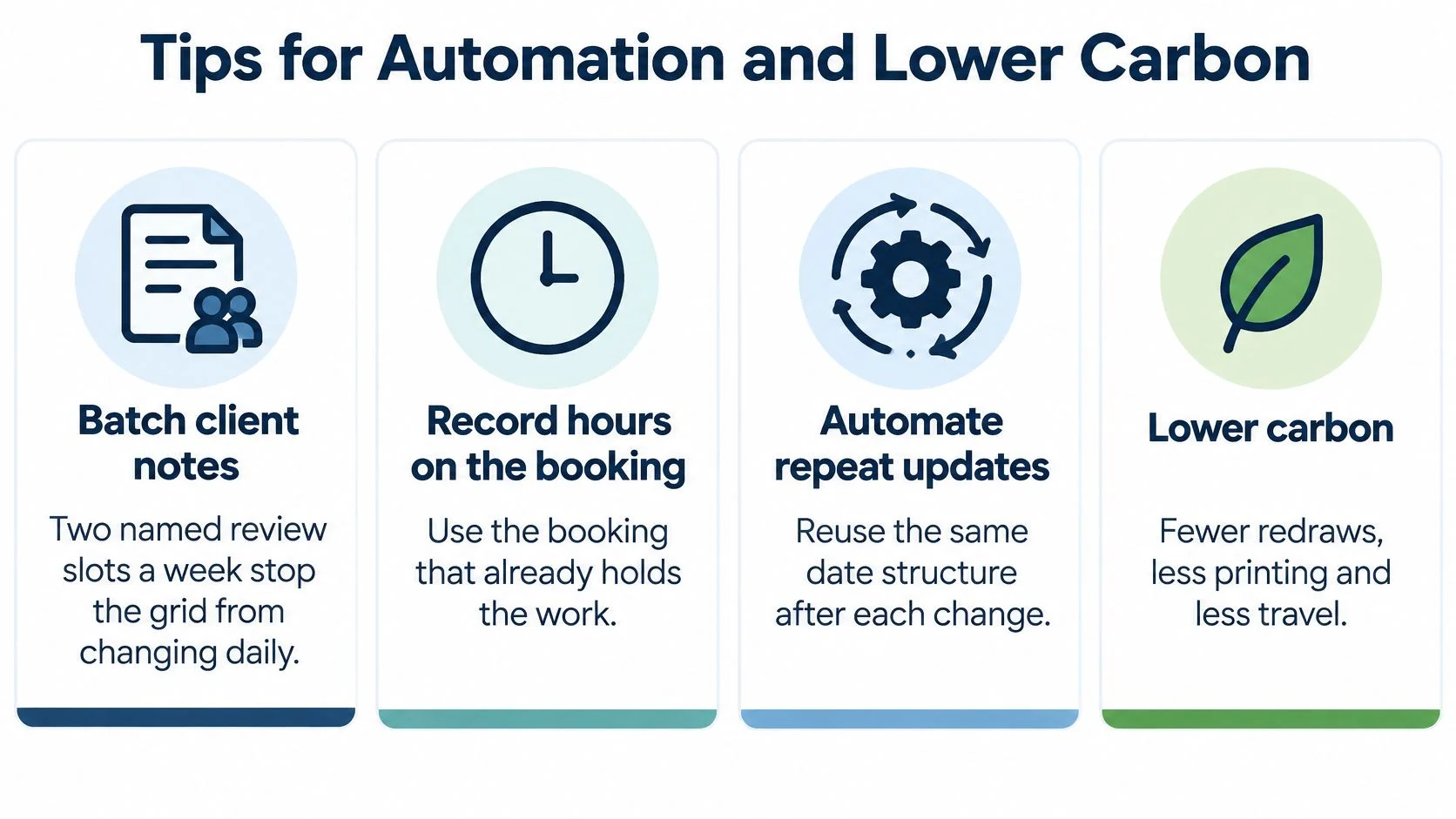
Give client notes named review slots rather than accepting an indefinitely open stream of amendments. For this example, use two review slots each week and specify when notes must arrive to make the next editorial session. Urgent exceptions should have a producer, not just an urgent email subject.
Record hours against the booking that already identifies the project and work. Use the approved record for downstream financial administration instead of asking an assistant to reconstruct the week from messages. The practical value of workflow automation is fewer disconnected copies, not fewer clicks.
- Override the assignment: When a freelancer swaps a shift, change that occurrence without rebuilding the underlying rotation.
- Connect existing tools: Use documented interfaces and controlled access rather than repeatedly exporting spreadsheets.
- Validate automated changes: Keep a human approval step before revised dates become external commitments.
A cutover needs a clear boundary. Home Post Production moved its whole operation off a legacy scheduling system in 30 days, from 1 October to the end of that month, without dual-running. The practical lesson is to validate active bookings and assign responsibility for the switch, rather than maintaining competing schedules indefinitely.
Put carbon choices inside bookings
The UK screen industry produces nearly 175,000 tonnes of CO2 annually, according to albert's ACCELERATE 2025 report. That makes travel, energy use and unnecessary processing operational decisions, not subjects to leave until the final report.
A remote picture-lock review can avoid travel, but reserve time to distribute secure review files and check playback. A planned render window can reduce unnecessary machine uptime, but it needs enough recovery room for a failed job. Avoiding duplicate exports saves processing only if everyone can identify the approved deliverable.
Treat generated audio with the same discipline. If you're testing Vocuno to separate stems for your next remix, schedule a listening check before those stems enter a finishing workflow. Check separation artefacts, sync and the intended use; don't confuse separated material with approved delivery stems.
A crushed schedule can reduce travel while increasing overtime and compute demand.
Choose between alternatives while the booking can still change. Keep the assumption visible, whether that's a remote review, a local specialist or an overnight render, so the producer can assess the delivery consequence alongside the environmental one.
Run the Example as One Live Schedule
A personal spreadsheet can describe a project well and still fail as the facility's source of truth. Once the editor, producer and bookings manager maintain separate versions, nobody can tell whether an empty afternoon is available or merely missing from their copy.
Move the episode into a shared operational schedule with controlled editing rights. Give the post producer responsibility for the project chain and the bookings team responsibility for confirming facility capacity. Reviewers should see the decisions they owe without needing access to unrelated commercial information.
Require the booking to carry the commitment
The booking should connect the room, operator and kit to the project, carry the hours worked and expose the financial commitment. Its approved details should remain usable when the producer prepares the quote and invoice. Retyping those details creates another opportunity to charge the wrong duration or omit an agreed service.
Before publishing a revision, check that it answers the questions people ask:
- Editorial: Which cut and notes belong to the next session?
- Finishing: Which assets have passed their release checks?
- Bookings: Which holds can be released, and who can authorise that?
- Finance: What has been committed, worked and approved for billing?
Check plan versus actual while there's still an opportunity to change the remaining work. A project can be within its invoiced spend and already exceed its likely completion cost because confirmed freelancer bookings haven't yet appeared as actuals.
Choose a system that joins the records
Our freispace schedule brings suites, staff, freelancers, kit and licences into one live view, with phases and milestones visible in Gantt-style planning. A booking holds the suite, operator and kit, collects worked hours, draws down the project budget and becomes a quote line and then an invoice line without re-keying. Project carbon emissions are calculated from that same schedule, so the environmental record doesn't depend on a separate reconstruction.
The decision isn't whether the calendar looks more polished. It's whether a changed handover reaches the people, bookings and financial records affected by it.
Recreate the episode's ten phase rows in one shared schedule. Invite the editor, colourist and mixer to challenge their inputs and availability before confirming the plan. Refuse any task that has no owner or gate, and resolve any effort allowance that doesn't fit its working window.
freispace connects post-production resource bookings with project planning, worked hours, billing and carbon tracking. Visit freispace to put this production schedule example into a live shared plan and test it against your team's actual availability.