Only 3% of UK firms in the lowest management-score decile had tested or used AI, compared with 37% in the highest, according to the Office for National Statistics' Management and Expectations Survey, covering businesses with at least 10 employees. That association doesn't prove that better management causes adoption. It does challenge the idea that buying more capable software is enough to improve an operation.
In post-production, the practical question is whether a coordinator can see what's ready, what's blocked and who must decide next. Process and workflow management gives scarce coordination skills a repeatable structure, so control doesn't depend on whoever remembers the most.
What Process and Workflow Management Means in Post
Say a factual episode arrives with an agreed delivery date, an incomplete media package and a client who hasn't named the final approver. The editor can begin assembling material, but the producer can't yet promise that every downstream booking is safe.
Think of a kitchen pass. The process is the house recipe and the standard route from order to service. The workflow is tonight's order, with these ingredients, these people and this deadline.
Process management means designing repeatable stages, ownership and rules. Workflow management means running a particular job through that structure while accounting for live capacity, dependencies and approvals.
The distinction matters when something changes. A process might require picture approval before final mixing; the workflow records whether this episode has that approval and what happens to the dubbing booking if it doesn't.
Turn the delivery path into visible handoffs
A stage name alone isn't a control. Each handoff needs an owner and evidence that the next person can safely begin.
Post-production stages, owners and controls
| Stage | Owner | Typical failure | Control |
|---|---|---|---|
| Brief and schedule lock | Head of post or producer | Scope agreed in email only | Written stage list, delivery date and named approver |
| Ingest and conform prep | Coordinator or data wrangler | Missing media found days later | Checklist with codec, reel and storage location |
| Offline edit | Editor | Version confusion across suites | Single task state and version note on the schedule |
| VFX | VFX supervisor | Shot list drifts from the cut | Dependency link from picture lock to each shot |
| Sound | Sound supervisor | Mix booked before picture is stable | Gate preventing final mix until picture status is set |
| Grade | Colourist | Suite double-booked | Room, person and licence on one schedule |
| Client review | Producer | Approval sits in a thread | Named approver, due date and blocked-task alert |
| Master and delivery | Finishing or post producer | Late technical reject | Delivery checklist tied to the contractual date |
This isn't a rule that every stage must happen in strict sequence. An editor can supply selected material for sound preparation while other scenes remain open, provided the team records which material is approved and which is provisional.
The head of post should insist on a clear completion condition for each stage. Offline isn't done merely because the booking ended. It's done when the agreed output exists, its version is identifiable and the receiving department knows what remains unresolved.
Use the record to make decisions
Scheduling, time capture and budget control become useful together. If an approval moves, the planner should be able to identify the affected booking and the producer should be able to assess the cost, without rebuilding the story from email.
Scheduling, time tracking and budget control are management practices, not administrative leftovers. Their value comes from reusing the same operational record to make decisions.
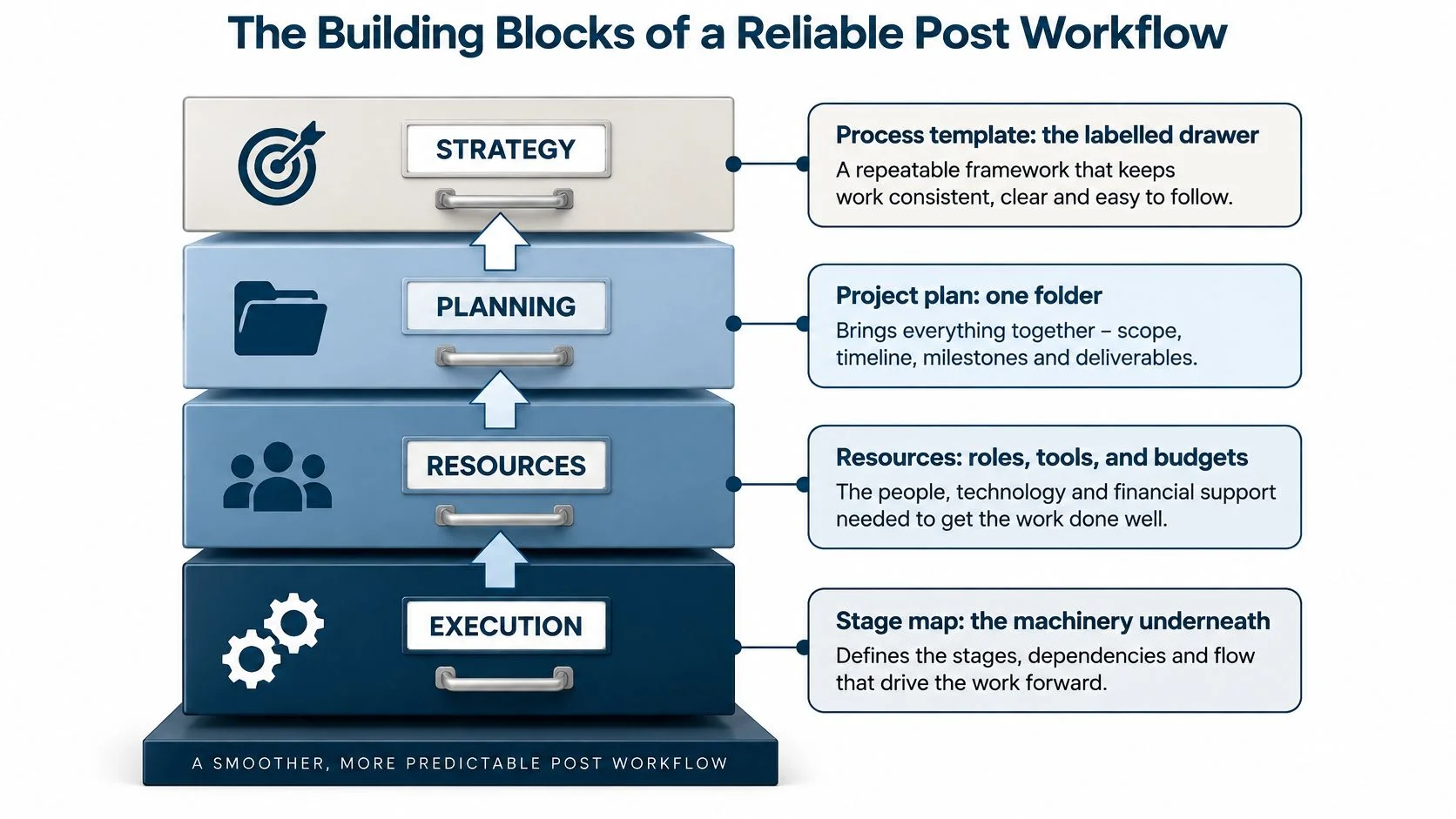
The Building Blocks of a Reliable Post Workflow
A filing cabinet offers a useful model. The process template is the labelled drawer, the project plan is a particular folder, and resources are the people, rooms and tools assigned to its work. The execution record tells you what happened, rather than what everyone hoped would happen.
Underneath those layers sits the stage map. Without it, you can organise bookings neatly and still miss the handoff that makes a booking usable.
Define the work before arranging the diary
Task state comes first. Use an agreed vocabulary such as not started, in progress, blocked, in review and done, alongside planned duration. Blocked must mean something different from work nobody has started yet, otherwise the coordinator can't tell where intervention is needed.
Next, connect dependencies. A task might wait for picture approval, a replacement shot, client notes or an available software seat. Record the actual prerequisite rather than drawing a connection between every neighbouring task.
Then attach resources. Include edit suites, grading and dubbing theatres, staff, freelancers, shifts, cameras, kit, floating software seats and storage where relevant. Book the requirement once, rather than maintaining an artist calendar that disagrees with the room calendar.
A production schedule example is a useful starting point for translating a stage list into bookings. Test it against a real handoff: can the receiving operator see both their assignment and the condition that permits them to start?
Add authority, cost and exception handling
Approvals need a named person, not merely a shared inbox. Record who can approve the work, what they're approving and who covers their absence. A reply saying looks good shouldn't accidentally become authority to master an unapproved version.
Money and time need to meet at task level. Capture hours against the work that consumed them, separating planned effort from additional client changes and internal corrections. Otherwise a revision appears only as a longer bar on the schedule, with no explanation of its financial effect.
Exceptions should reach someone who can act. A blocked-task notification belongs with the person responsible for resolving the block; an overallocation alert belongs with whoever can change the assignment.
Keep resource states distinct:
- Committed means the capacity has been assigned to work.
- Available means the resource can accept a suitable booking within its working constraints.
- Overallocated means assignments exceed the resource's usable capacity.
A green calendar doesn't establish that a mix is ready. The theatre may be available while the approved picture isn't.
A one-person boutique still needs these distinctions, but not separate dashboards for every responsibility. The owner can approve, schedule and finish the job from a compact view, provided those decisions remain distinguishable.
List which of these pillars currently exist only in someone's head. Those are the first fields to make explicit, not an invitation to add every field a software package offers.
Where UK Post Teams Lose Time and Control
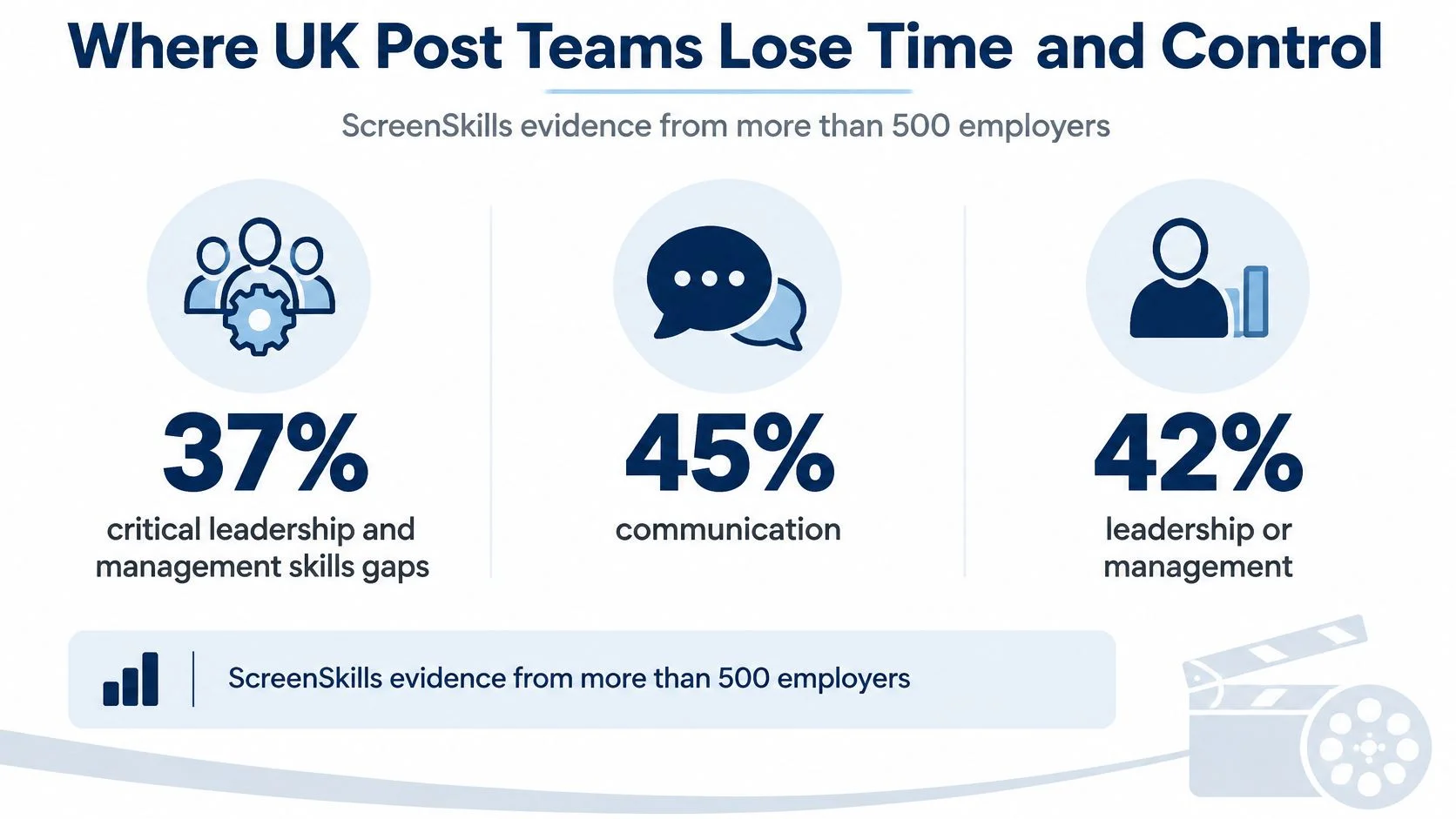
Among more than 500 screen-sector employers surveyed, 37% reported critical leadership and management skills gaps, while production-management gaps included communication at 45% and leadership or management at 42%, according to ScreenSkills' Powering Production report. The report also identifies post-producers and production coordinators among shortage roles.
For a studio, that's a reason to protect coordination capability rather than assume another experienced planner will always be available. When seniors move from cutting into scheduling, allocation and escalation, they need a shared operating method, not just a larger inbox.
Recognise the failure behind the familiar workaround
In early 2022, our qualitative surveys at freispace found that the majority of companies relied on shared calendars or massive Excel spreadsheets to organise their processes. Those formats can hold useful information. Trouble starts when colleagues need relationships the document doesn't reliably expose.
- The full calendar shows that a suite is occupied, but not whether it's a firm booking, a hold or a session awaiting media. The planner has to ask before accepting another job.
- The coordinator-owned spreadsheet contains the detail, but only its author understands the colour codes and hidden assumptions. Cover becomes a reconstruction exercise.
- The repeated chase message asks for status because nobody trusts the recorded state. Operators spend time reassuring colleagues instead of updating a dependable record.
- The unexplained delay treats another creative pass and an unavailable colourist as the same problem. A producer can't choose the right response without knowing the cause.
- The idle booked room remains reserved while approval sits unanswered. The studio carries the booking cost without advancing the job.
These aren't interchangeable problems. More capacity won't resolve an absent client decision, and a firmer approval deadline won't make a missing specialist available.
Make escalation survivable
Say the finishing operator spots a replacement shot that doesn't match the approved cut. If ownership is unclear, they may message the editor, who forwards the question to a producer, who assumes the coordinator is handling it.
The delay comes from the route to a decision, not from the technical correction itself. Set an escalation owner and attach the unresolved issue to the affected task so the receiving department can see why it can't proceed.
Practical rule: A covering coordinator should be able to find blocked work and its decision owner without interviewing the person they're covering.
Document the repeatable path, including exceptions that recur. That gives a new coordinator something reliable to operate while they learn the judgement calls that can't be reduced to a template.
Metrics That Prove Delivery Is Under Control
Workflow KPIs for a post slate
| Metric | What it isolates | Reading band | First action |
|---|---|---|---|
| Schedule variance by stage | Creative rework versus a late handoff | Investigate a missed stage commitment or exhausted handoff allowance | Re-sequence tasks that don't depend on the slip |
| Tasks blocked by external approval | Chase-work and decision delay | Escalate when waiting threatens dependent work | Contact the named approver before the downstream booking |
| Resource utilisation | Scarce suites and specialists | Review when committed work consumes recovery and contingency capacity | Reserve capacity or shift non-critical work |
| Revision-cycle count | Unplanned creative loops | Review revisions outside the agreed scope after picture lock | Separate client change from an internal quality miss |
| Forecast versus contractual delivery | Whether the job will make the date | Any forecast past the contracted day | Re-plan the critical path that day |
| Hours versus budget | Cost of the slip | Investigate when actual hours and remaining effort exceed the agreed allowance | Trace hours to the stage that consumed them |
Set reading bands against your own contracts, stage allowances and working patterns. They're management triggers, not universal industry benchmarks.
Read a bad row before blaming the schedule
Suppose offline is late, but the editor's recorded hours remain within the planned allowance. The blocked-task record shows that work stopped while the producer waited for consolidated client notes.
Adding another editor isn't the obvious answer. The producer should first resolve the approval, then the planner can move independent work and check whether the next specialist booking remains usable.
The need for that distinction is practical: 35% of screen employers identified ability to organise work as a skills gap, and 30% identified planning and organisational skills, according to ScreenSkills. Measurement should help colleagues diagnose these problems, not create another reporting obligation they have to remember.
Use consistent project management principles to define the baseline, record changes and assign corrective action. Don't replace yesterday's plan with today's forecast, because that removes the evidence needed to understand the slip.
Protect productive time rather than celebrate busyness
High utilisation alongside a rising blocked-task share is a warning, not a success story. People can be fully assigned while essential decisions remain unresolved.
Film, television, radio and photography businesses generated £54 of output per hour in 2024, compared with £47 across the UK economy, according to DCMS productivity estimates. That broad measure isn't a studio performance target, but it underlines why protecting productive work matters more than producing attractive dashboards.
Record exceptional disruption separately. For a New York-based collaborator facing unreadable media, MDrepairs' information on data recovery in nyc is a relevant recovery resource; the workflow should still identify the affected assets, recovery owner and delivery consequence rather than classify the incident as ordinary editing variance.
Choose three KPIs for the Monday meeting as a manageable starting point. Give each an owner and an action, and leave the rest off the agenda until those measures are maintained reliably.
How to Build the Workflow in 90 Days
Treat this as a proposed rollout envelope for a multi-show company, not a promise or a minimum implementation period. The managing director should assign a sponsor who can resolve policy decisions, alongside an operational lead who can test the workflow against actual bookings.
Keep the pilot narrow enough that the team can explain every correction. Importing an entire slate before agreeing what blocked means only spreads an unresolved design choice.
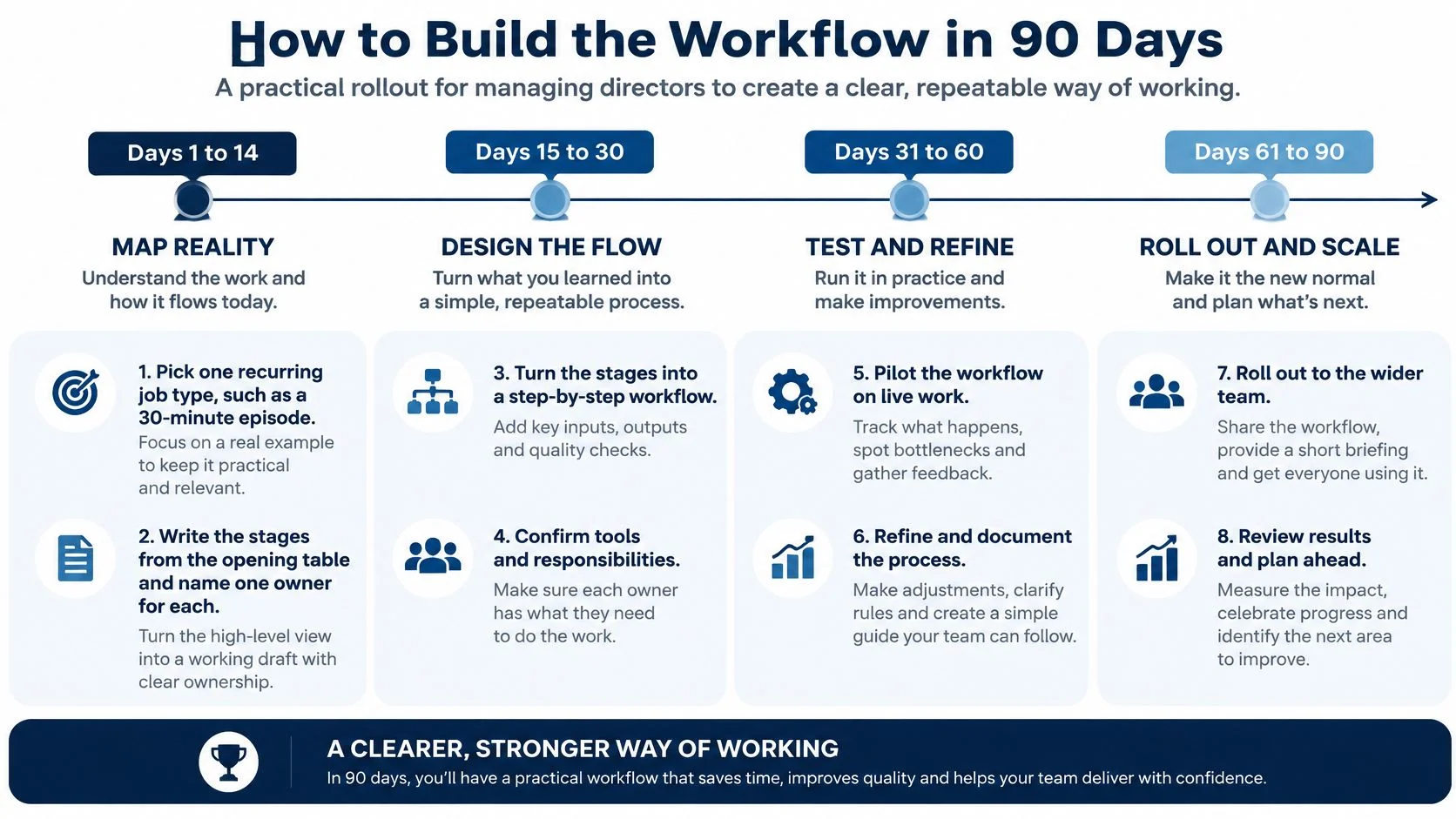
Days 1 to 14
- Choose a recurring job type. Use a familiar factual episode or repeatable finishing package. Avoid the unusually complicated commission everyone already treats as an exception.
- Assign stage owners. Write the delivery stages and identify who owns each handoff. Separate responsibility for doing the work from authority to approve it.
- Inventory the requirements. List suites, people, freelancers, licences and storage. Include the resources that currently get booked through private messages.
- Locate the existing status. Mark whether each decision lives in an inbox, sheet or someone's memory. Preserve useful information before changing its home.
Ask an operator to walk through the map with the planner. A neat management diagram can omit the conform check or transfer step that makes the next session possible.
Days 15 to 45
- Build task templates. Add planned durations, outputs and genuine dependencies. Don't copy accidental delays from the last job into the standard process.
- Agree approval authority. Specify who can accept a client note, release a downstream task and approve changed scope. Name absence cover.
- Configure actionable exceptions. Start with blocked work and overallocation. Test who receives each alert and what they're expected to do.
- Pilot on a live job. Keep the old calendar available during this proposed pilot, but nominate the authoritative booking record. Log corrections instead of fixing them in conflicting places.
The correction log is a design tool. If users repeatedly misunderstand a state or miss a handoff, revise the template or training before expanding access.
Days 46 to 75
- Centralise resource booking. Move the pilot's rooms, people and licences onto the agreed schedule. Remove side bookings that conceal commitments.
- Capture time against tasks. Make additional work identifiable without forcing artists to write essays. Distinguish approved changes from internal corrections.
- Review variance with the head of post. Compare the forecast with the baseline and assign a response. Record whether the problem was creative change, approval delay or capacity.
Don't confuse a clean import with an operationally usable workflow. The test is whether someone can recognise a problem and take the right action.
Days 76 to 90
- Cut over deliberately. Import open jobs, freeze the spreadsheet for new bookings and train coordinators on the agreed templates. Keep archived records accessible without allowing them to become competing live schedules.
Protect shows already at picture lock from unnecessary replanning. Transfer the remaining commitments and unresolved issues without rewriting their production history.
Keep holiday-approval redesign out of the same cutover window unless it's essential to booking accuracy. Changing unrelated rules together makes it harder to identify what caused confusion.
Go or no-go: expand when owners, durations and a tested exception alert are live. If those controls still require someone to explain them from memory, stay on the pilot.
Governing Human and AI Work Together
Automation isn't the workflow. A faster transcription or prep pass is useful only if colleagues can trust its output, establish permission to use it and identify who accepted it.
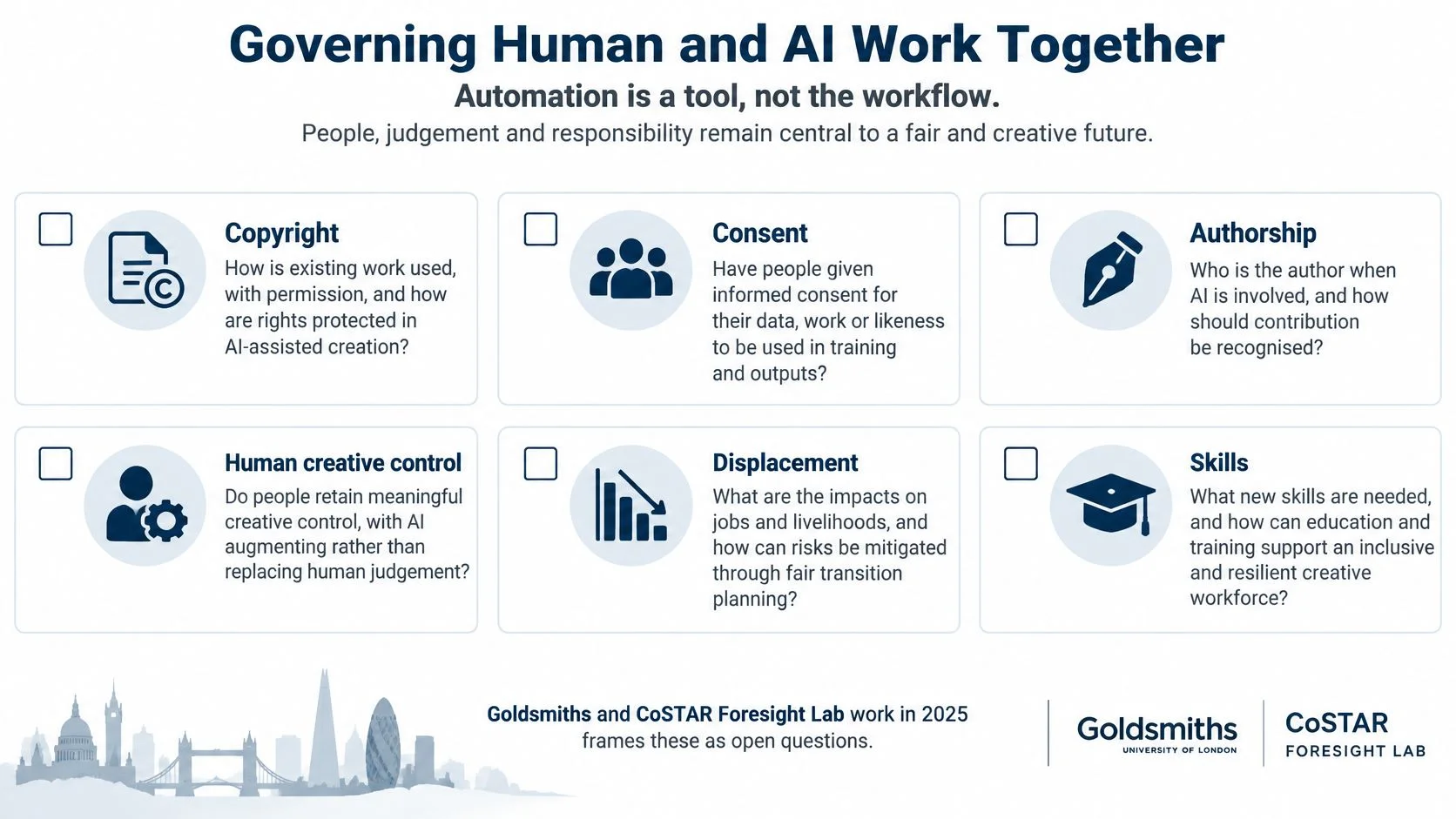
The 2025 Goldsmiths and CoSTAR Foresight Lab report identifies copyright, consent, authorship, human creative control, displacement and skills as significant legal, ethical and practical challenges across production, including post-production. Those questions belong in the operating rules, not in a discussion postponed until after delivery.
Put a human gate around assisted work
Adopt an explicit house policy for AI features, including those enabled inside familiar creative applications. An operator shouldn't have to guess whether a software update changes what client material they're permitted to process.
AI control layer for post tasks
| Work | AI may | Human gate | Record |
|---|---|---|---|
| Schedule draft and clash check | Propose bookings | Coordinator accepts or rejects | Who accepted and when |
| Status summary | Draft from task data | Head of post uses it in the weekly review | Source tasks, not a free-text guess |
| Edit, grade or mix decision | Assist inside an approved creative tool | Named creative lead approves | Version and approver |
| Asset prep or transcription | Produce a first pass | Operator checks before it enters the cut | Tool used and review sign-off |
| Rights and client material | Never decide permission | Producer confirms consent | Permission, authorship and disclosure note |
| Render, storage and energy choice | Flag heavy jobs | Producer weighs cost and carbon | Decision and reason |
Keep a tool register with the relevant version and approved uses. Store rights and permission metadata with the asset record so a later operator doesn't mistake technical availability for permission.
Broader AI transformation insights from AI Video Detector can help frame organisational questions, but they don't replace a studio's task-level approval rules. The producer still needs to decide what may enter this client's production.
Count the checking and correction work
Consider a hypothetical prep pass that saves an editor half a day. The output enters the cut, but nobody records who checked it, and the producer later discovers that the client hadn't permitted that use of its material.
The team must identify affected assets, replace the output and repeat review. The initial saving can disappear into correction and coordination, even though the assisted task itself finished faster.
Don't make a carbon-aware choice a detached reporting exercise either. Put render and storage options beside the production decision, with the producer recording why the chosen approach is appropriate.
Give operators room to raise uncertain cases without being penalised for slowing a task. Otherwise they have an incentive to conceal the very exceptions management needs to see.
Apply a simple policy test: if a task has no named human approver and no permission record, it isn't ready to automate. An enterprise assistant belongs behind those gates, not above them.
Sample Workflows from Real Post Operations
The following episode schedule is illustrative, not a claim about a particular production. It shows how a planner can preserve useful work when a decision stalls, rather than treating the entire episode as either on time or late.
A factual episode with a blocked note
Suppose the offline runs across four weeks. Book the suite and storage together, then give the review points explicit outputs rather than putting client review in the diary.
| Illustrative period | Main work | Booking or gate | What can continue |
|---|---|---|---|
| Week 1 | Ingest and assembly | Suite, editor and storage confirmed | Assembly using checked media |
| Week 2 | Picture development | Mid-week review with named approver | Approved sequences and agreed changes |
| Week 3 | Notes and selected VFX | Shot dependencies linked to identified cut versions | Unaffected scenes and approved shots |
| Week 4 | Sound prep and delivery forecast | Confirm scope of sound work and compare forecast with contract | Preparation using stable material |
In this scenario, a client note becomes blocked on day 16. The planner asks the sound supervisor to identify preparation that can proceed on unaffected scenes, while the producer resolves the disputed sequence.
That isn't permission to start the final mix on unstable picture. The planner records the boundary, protects the unresolved material and updates the delivery forecast.
A slate that needs capacity beyond billable work
Demand planning needs a different conversation from episode planning. Screen Global Production reported that film and television release volume fell 13% between 2022 and 2025, while VFX and post-production workforce capacity reportedly declined from 45% in 2023 to 30% in 2025.
Those reported measures shouldn't be converted into a utilisation target for an individual studio. A managing director needs to examine the actual mix of upcoming work, scarce skills and freelance availability.
Place the following alongside client bookings:
- Billable commitments with a clear distinction between confirmed work and provisional holds.
- Protected learning blocks for shadowing, supervised practice and transferring knowledge from experienced operators.
- Subcontract cover for roles the studio can't safely cover internally.
- Availability risks identifying freelancers whose participation isn't yet confirmed.
- Recovery allowance for technical disruption, absence and unavoidable changes.
Maximum billable utilisation removes room for mentoring and recovery. Keeping capacity available costs money, so the managing director should make that investment visible and compare it with the consequences of losing a critical capability.
Implementation pace is a separate decision. Home Post Production moved its whole operation off a legacy scheduling system in 30 days, from 1 October to the end of that month, without dual-running; that business example isn't a reason to impose the same cutover method on every team.
Which problem matches next month: an episode that needs a dependable template, or a slate that needs protected learning and cover? Choose the planning response to match.
Leave the Spreadsheet on Purpose
Stay on a shared calendar only while a single coordinator can reliably identify every owner, dependency and contractual date without consulting another file. Once colleagues need separate records to establish whether a booking is safe, plan a controlled move rather than adding another hidden tab.
The cutover checklist is about operational readiness, not software configuration. Use the Post-production stages, owners and controls table as the reference, and make each decision explicit.
Agree the cutover conditions
- Confirm the episode template that will govern recurring work.
- Name the approvers and their absence cover.
- List bookable rooms and licences so resources don't disappear into side calendars.
- Export open jobs with their current commitments and unresolved issues.
- Identify the historical archive that will remain read-only.
- Choose the Monday KPIs and assign responsibility for maintaining them.
- Write the AI approval rule before assisted output enters live work.
- Reserve a training block in the new schedule.
- Tell clients what changes in status updates and approval requests.
- Set the booking cut-off after which the old sheet accepts no new commitments.
Use workflow automation for agreed, repeatable actions, not to conceal unresolved responsibility. An automatic reminder can chase a decision; it can't establish who has authority to make it.
Match the tool to the operating requirements
Our software, freispace, is purpose-built resource and project planning software for media companies, designed to reduce time spent planning. Its scope includes project planning, task and resource management, budgeting and controlling, billing and invoicing, CO2e tracking, physical media tracking and the orgAI enterprise assistant for post-production.
Our consulting comes from post-production professionals with experience in workflow optimisation, change management and AI implementation. That support can help a team put the checklist into practice, but no tool replaces the named owners who accept handoffs and resolve exceptions.
This week, pick the show and write its delivery stages. Give those stages owners, confirm the cutover conditions and stop adding bookings to the spreadsheet on the agreed date.
freispace combines media-focused planning software with consulting from post-production professionals to help teams put clear ownership, resource bookings and workflow controls into daily use. Visit freispace to compare that scope with your cutover checklist and book a working session around one live show, rather than a generic demo.