In the creative world, long hours are often worn like a badge of honour. But let's be honest, managing a heavy workload effectively isn't about logging more time—it's about making the time you have count. The real secret sauce is a solid framework built on three pillars: strategic prioritisation, intelligent resource allocation, and smart automation. This guide is designed to cut through the noise and give post-production heads and studio managers a practical roadmap that actually works.
Beyond Burnout: The Real Cost of Poor Workload Management

We've all been there. The late-night render checks, the weekend revisions, and that constant feeling of being busy without actually moving the needle. This gap between hours clocked and tangible progress is a silent killer for any studio's budget and morale. It’s not just a feeling; it has a real-world cost that hits everything from project timelines to keeping your best people on board.
The problem is usually systemic. When priorities are a mess, your most talented artists get pulled in a dozen different directions, never getting the chance to sink into deep, creative work. Without a proper system for assigning tasks, you might unknowingly overload your go-to people while others have downtime, creating frustrating bottlenecks and brewing resentment.
The UK Productivity Gap
This isn't just a studio-level challenge; it's reflected on a national scale. In the UK, the average employee is physically present for a full eight-hour day but is genuinely productive for just 2 hours and 53 minutes. That’s a massive disconnect, highlighting a widespread issue with how we structure and manage work. In fact, overall productivity is still lagging 24% behind where it was before the 2008 crisis.
But there's good news. 77% of Millennials report that flexible schedules seriously boost their productivity, proving that smarter work design is the key. You can find more workplace productivity insights on how the UK is adapting.
The true measure of workload management isn't how busy your team looks, but how much meaningful work gets done without sacrificing their well-being. It's about creating a sustainable rhythm, not a constant sprint.
This guide will give you the tools to bridge that productivity gap. We’re moving beyond theory to give you concrete strategies you can put into action right away to start managing your team's workload effectively.
Here's a quick overview of the core strategies we're about to dive into, giving you a clear roadmap for what's ahead.
Three Pillars of Effective Workload Management
| Pillar | Core Principle | Key Benefit |
|---|---|---|
| Strategic Prioritisation | Distinguishing urgent tasks from important ones to focus on high-impact work. | Reduces reactive "fire-fighting" and aligns team effort with project goals. |
| Intelligent Resource Allocation | Matching the right skills to the right tasks based on capacity and expertise. | Prevents team burnout, improves quality, and maximises efficiency. |
| Smart Automation | Using technology to handle repetitive, admin tasks and streamline communication. | Frees up creative talent to focus on their craft, not on manual processes. |
By mastering these three areas, you can build a more resilient, productive, and ultimately, a happier team. Let's get started.
Mastering Prioritisation When Everything Is Urgent
Client feedback, new project briefs, internal revisions… when they’re all marked ‘urgent,’ how do you possibly decide what comes first? In any busy post-production studio, this is the daily reality. The sheer volume of requests can feel like a tidal wave, forcing you into a constant state of reaction rather than strategic action.
The only way to get ahead is to move beyond a simple to-do list and start using proven prioritisation frameworks. These aren't just abstract theories; they are practical mental models that bring clarity and logic to the chaos. They empower you to make defensible decisions under pressure, ensuring your team’s precious time is channelled into the tasks that actually move the needle. Getting this right is crucial for keeping momentum and protecting team morale when the deadlines are looming.
The Eisenhower Matrix In Practice
One of the most effective tools I’ve seen in action is the Eisenhower Matrix. It's brilliant in its simplicity. You're forced to categorise every task based on just two criteria: urgency and importance. This immediately helps you cut through the noise and separate genuinely critical work from the distractions that can completely derail a project.
Here’s how it typically plays out in a studio:
- Urgent & Important (Do First): This is for the real fires. Think of a critical render error that’s blocking the entire pipeline for a project due at the end of the week. This is your drop-everything-and-fix-it-now quadrant.
- Not Urgent & Important (Schedule): This is where strategic work lives—the stuff that drives long-term success. Things like planning the resourcing for a new feature film, or taking the time to properly train your junior compositors.
- Urgent & Not Important (Delegate): These are the tasks that scream for immediate attention but don’t actually need your specific expertise. A classic example is forwarding an asset query from a client over to the data I/O team. Quick to handle, but easy to delegate.
- Not Urgent & Not Important (Delete): Be ruthless here. These are the time-sinks that add little to no value. That might mean politely declining a meeting that isn’t relevant to your current projects.
By slotting tasks into this matrix, a VFX Supervisor can calmly see that the render error is the absolute top priority, while that minor client tweak on a project due next month can be scheduled for later without any drama.
Managing Expectations With The MoSCoW Method
Another powerful framework, especially for wrangling client expectations and stopping scope creep in its tracks, is the MoSCoW method. It’s perfect for getting you and your client on the same page about what is absolutely essential for a project to succeed.
MoSCoW is an acronym that sorts requirements into four simple categories: Must have, Should have, Could have, and Won't have. This shared language creates instant clarity and alignment, heading off misunderstandings before they can fester.
Picture a client review for a TV commercial. The "Must haves" are the core deliverables – the final graded shot, for instance. A "Should have" might be an alternative colour treatment for them to look at. A "Could have" could be a minor animation tweak if there’s spare time in the schedule. And a "Won't have" is that new visual effect they just thought of that was never in the original scope.
Using this framework gives you a structured, non-confrontational way to handle feedback without blowing up the budget or timeline. For a deeper dive into keeping projects on track, check out our guide on powerful task management strategies.
Building a Dynamic Resource Allocation System
Let’s be honest, effective workload management isn't about perfectly filling a calendar. It's about getting the right artist on the right task without nudging them towards burnout. A dynamic system for allocating resources is your best defence against this chaos. It forces you to move beyond just asking "who's free?" and instead start asking, "who's best for this, and do they actually have the capacity?"
This all starts with a brutally honest audit of the talent you already have in-house.
You need to map out your team's unique strengths, looking far beyond their job titles. Who’s your secret weapon for complex green screen shots? Who has that special touch for dramatic colour grading that clients always rave about? Documenting these specialisms gives you a rich, practical database of skills to draw upon, which is the bedrock of smarter allocation.
Mapping Skills to Reality
Once you know what everyone is brilliant at, the next step is building a resource calendar that reflects real life, not wishful thinking. This isn't just about blocking out time; it’s about respecting individual capacity and protecting those crucial periods of deep work. A senior animator might be technically "available" for eight hours, but they won't produce their best work if they're constantly being pulled into meetings or hit with minor queries.
Your calendar has to show not just who is working, but what their genuine, productive capacity is on any given day. This more realistic view helps you make better decisions, especially when a deadline is looming. You can dive deeper into building these kinds of schedules in our guide to advanced resource management techniques.
A great resource plan ensures that your senior talent isn't constantly firefighting. It strategically reserves their expertise for high-impact work, which in turn creates clear opportunities for junior artists to step up and develop their skills on less critical assignments.
This flowchart shows a simple way to categorise tasks before they even hit the schedule, helping you manage the workload from the get-go.
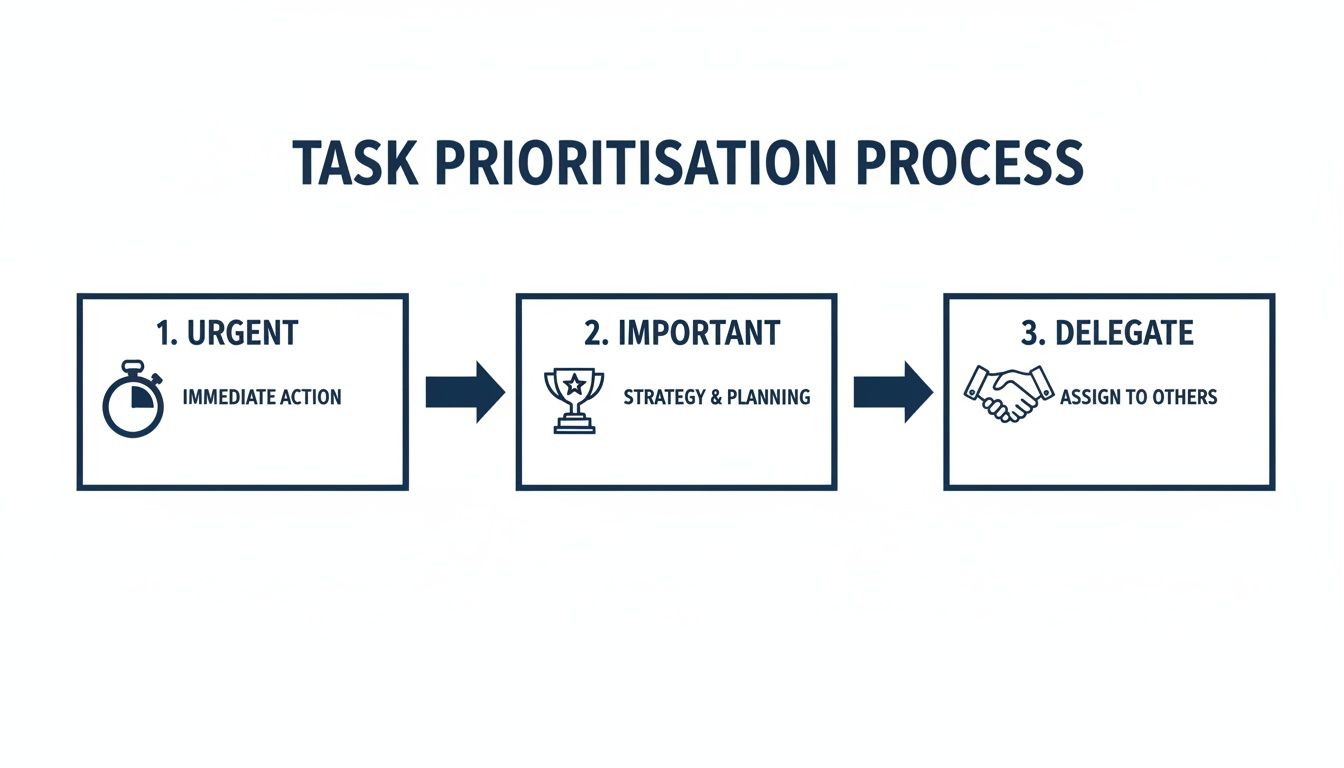
By deciding first whether a task is urgent, important, or a prime candidate for delegation, you can allocate your team's time far more intelligently.
A Real-World Allocation Scenario
Picture this: a fast-turnaround commercial lands on your desk. The temptation is to throw your best people at everything and hope for the best. A dynamic system stops you from doing that.
Your skills audit shows a mid-level artist is strong in rotoscoping and has available capacity. They get that task. This frees up your senior VFX lead to focus solely on the complex CG integration. Not only have you protected your senior talent from overload, but you've also given the mid-level artist a chance to own a key part of the project.
This kind of efficiency matters. Take a look at the UK, where London’s output per hour is over 50% higher than in other regions. This is partly down to dense creative networks that allow for quicker task handoffs and smarter resource allocation. With the national average sitting at just £46.92 per hour, there's a clear need for more efficient allocation everywhere.
And when your internal capacity is stretched thin? You might consider bringing in flexible support. Exploring the best virtual assistant agencies can be a great way to handle administrative or specialised tasks, creating a repeatable workflow that boosts your team’s output while protecting everyone's well-being.
Let Automation Handle the Busywork
Manual check-ins, repetitive status updates, and endless admin tasks are the silent productivity killers in any creative studio. Getting on top of your workload isn't just about big-picture strategy; it's about clawing back those precious hours lost to tedious, low-value work. This is where simple, smart automation becomes your secret weapon, letting you build a workflow that practically runs itself so your team can focus on their craft.
The goal here isn't to code some complex system overnight. Instead, think of it as setting up a series of small, helpful tripwires. By creating simple ‘if-then’ rules, you build a self-regulating pipeline that keeps everyone in the loop without constant manual pestering. This doesn't just save time—it massively reduces the mental load on your entire team.
Start with Smart Project Templates
A great starting point is to build out standardised project templates in a tool like freispace. Let's be honest, your workflow for a feature film looks nothing like a 30-second commercial. By creating a unique template for each major project type, you establish a consistent, repeatable process from day one.
These templates can come pre-loaded with everything you need:
- Standard task lists: All the usual steps, from ingest to final delivery.
- Default dependencies: Task B can’t kick off until Task A is signed off.
- Role assignments: Automatically assigning the 'Colourist' role to all grading tasks.
Doing this brings immediate order to new projects. It ensures no critical steps are ever missed and everyone knows the game plan without needing a kick-off meeting for every single job.
Simple Rules, Big Impact
Once your templates are solid, you can layer on simple automation rules that handle all the nagging for you. The real power is in their simplicity. Digging into different business process automation examples can give you some great ideas for how to cut down on manual effort.
Here are a few practical ‘if-then’ scenarios you could set up in minutes:
If a task status changes to ‘Complete’...
- Then automatically notify the next artist in the pipeline that their task is ready to start. This one rule alone can eliminate the endless "Is this ready for me yet?" email chains.
If a task is overdue by more than one day...
- Then send an automatic heads-up to the project manager. This proactive flag lets you get ahead of potential delays before they snowball into real problems.
The best automations are invisible. They don't replace creative decisions; they just handle the predictable, administrative noise in the background so your team can stay in a creative flow for longer.
These small, incremental automations really add up. They slash the need for constant status meetings and empower your team by giving them the right information, right when they need it. This shift lets your producers manage by exception—focusing their energy only on the tasks that genuinely need their attention, rather than policing the entire project board. It's about letting technology handle the logistics so your people can handle the magic.
Tracking KPIs That Actually Measure Productivity

Let’s be honest: are ‘hours logged’ really telling you the whole story? If you're managing a studio, just looking at timesheets is a surefire way to misunderstand your team's real capacity and performance. It's a classic vanity metric.
To really get a grip on workload, you need to track Key Performance Indicators (KPIs) that reveal the true health of your pipeline. This is about shifting your focus from activity to actual output and efficiency.
When you start tracking the right data, workload management stops being a daily guessing game and becomes a strategic, proactive process. You can spot a looming bottleneck in the roto department weeks before it becomes a crisis, all by keeping an eye on the right numbers.
Moving Beyond Hours Logged
Relying on timesheets alone often ends up rewarding inefficiency. An artist who takes twelve hours to finish a task that should have taken six looks more "productive" on paper, but we know that's not the reality. We need to measure what actually moves the needle.
Here are three powerful KPIs that give you much deeper insight:
Task Completion Rate vs. Estimate: This is a big one. It compares the actual time taken against your initial bid. If you're seeing a consistently high variance, it's a red flag. It could mean your estimates are unrealistic, or there's a hidden obstacle slowing your team down.
Resource Utilisation Rate: This shows you what percentage of an artist's available time is spent on billable project work. It’s the best way to see who is genuinely at capacity and who might have room to take on more, preventing burnout for your usual go-to people.
First-Pass Approval Rate: This is a crucial indicator of quality and communication. A high rate means your team is nailing the brief the first time around, which saves countless hours on painful revisions and endless client feedback loops.
Tracking these doesn't have to be a massive administrative headache. A simple dashboard can visualise this data, giving you an at-a-glance view of your studio's operational health. For a more advanced way to measure project progress against your plan, you can also explore the calculation of earned value.
Your goal isn't just to track data; it's to ask better questions. A low First-Pass Approval Rate isn't a team failure—it's a prompt to ask, "Are our project briefs clear enough?"
The Link Between Output and Wellbeing
Pivoting from hours to output isn't just a theory; it’s a proven strategy for success. The landmark UK four-day week pilot program demonstrated that when companies focused on results, 71% of employees reported a reduction in burnout while productivity was fully maintained.
It proved that managing workload effectively is about creating a smarter, not a longer, workday. This data-driven mindset is the key to building a sustainable, creative, and highly productive studio environment.
Got Questions? We've Got Answers
Even with the best game plan, switching up how your studio manages its workload is going to stir up some questions. It’s a big shift, moving from a reactive, fire-fighting mode to a more proactive and strategic one. Here are some of the most common hurdles studio managers run into, along with some straight-talking advice to smooth out the transition.
How Do I Get My Creative Team to Adopt These New Processes?
Trying to get creatives on board isn't about laying down the law; it's about showing them you're protecting their most valuable asset: their creative energy. Frame any new process as a shield against the admin grind and pointless interruptions. Nobody likes a top-down mandate dropped on them out of the blue.
Instead, start small. Pick a single team that’s open to new ideas or a specific project and run a little pilot program. Pitch it as an experiment to cut down on admin noise and endless meetings. When they see the results for themselves—clearer priorities, fewer shoulder taps, actually leaving on time—their success story will do the selling for you. Be open about why you're making the changes. It’s all about helping everyone do better work with less stress.
Adoption comes down to one thing: proving the new way is genuinely easier. When your team realises a process or a tool is saving them from headaches, they'll become its biggest advocates.
What Is the Biggest Mistake to Avoid When Managing Studio Workloads?
The most common trap is confusing being busy with being productive. So many studios still operate as if long hours and a frantic pace are badges of honour. That’s a fast track to burnout, expensive mistakes, and watching your best people walk out the door. Effective workload management is about focusing on impact, not just activity.
A classic symptom of this is piling all the critical tasks onto your top performers without a second thought for their actual capacity. It feels like a quick fix, but it creates a dangerous dependency and burns out your most valuable artists. Another major blunder is packing schedules to the brim with zero wiggle room. Post-production is unpredictable by nature—client feedback gets delayed, renders fail, tech gremlins show up uninvited. A schedule without any buffer time is a schedule that's guaranteed to break. Always plan for the unexpected.
Can These Strategies Work for a Small Studio with a Tight Budget?
Absolutely. In fact, smaller studios often get the biggest bang for their buck because every minute and every pound counts. The core ideas, like strategic prioritisation, don't cost a thing to implement. They're about changing your mindset, not buying fancy software. You can start using mental models like the Eisenhower Matrix or MoSCoW method today, for free.
When it comes to tools, many modern platforms offer free or very affordable plans that are more than enough for smaller teams. You don't need a massive, all-singing, all-dancing system from day one.
The trick is to start simple:
- Automate just one repetitive task, like pinging the next artist in the chain when a shot is ready.
- Track one or two really meaningful KPIs, like 'Task Completion vs. Estimate'.
This isn't about a massive, overnight revolution. It’s about making small, steady improvements that buy you some breathing room and chip away at the chaos. The ROI from preventing just one missed deadline or stopping a key artist from burning out will easily cover the cost of any tool you decide is worth the investment.
Ready to stop guessing and start strategically managing your studio’s workload? freispace provides the tools to prioritise tasks, allocate resources intelligently, and automate your workflow, giving your team the clarity and focus they need to do their best creative work. See how freispace can transform your studio's productivity.