

The client has moved picture lock, the colourist's booking is still in a shared calendar, and the delivery spreadsheet hasn't caught up. The coordinator is checking messages to find out which dates are real before anyone can confirm the mix.
In early 2022, freispace's qualitative surveys found that the majority of companies surveyed relied on shared calendars or massive Excel spreadsheets to organise their processes. That setup can leave a studio dependent on whoever remembers the booking history, with repeated updates across email, calendars and departmental trackers.
A Gantt chart gives the team a shared timeline instead. Horizontal bars show when work starts and finishes, while dependencies connect the edit, VFX, grade, mix, QC and delivery stages.
A useful studio schedule should answer more than what's booked. It should show what can move, what can't, and who needs to decide.
The benefits of Gantt chart planning come from using that timeline to make decisions, not just replacing spreadsheet cells with coloured bars. A polished chart won't rescue unrealistic durations, missing approvals or freelancers who haven't confirmed availability.
For heads of post, managing directors and coordinators, the practical wins are clearer conversations and earlier choices. Each benefit below connects to work on the studio floor, with an implementation approach and a quick change you can make without rebuilding your entire planning process.
1. Clear Visualisation of the Project Timeline
A Gantt chart places each task against a time axis, making its start, duration and finish visible. The UK government's project-management guidelines identify Gantt, or bar, charts as a planning tool for displaying project activities against time and establishing a delivery schedule.
For a series, group each episode's offline, VFX, online, grade and mix beneath an episode summary. The coordinator can then see whether episodes are progressing through the pipeline or accumulating at the same department.

Make the view readable before making it detailed
The managing director needs to see delivery exposure, not every assistant-editor task. Keep the detail underneath expandable phases so departmental teams and senior stakeholders can use the same underlying plan without reading the same screen.
- Group deliberately. Use episodes for episodic work and phases for standalone projects.
- Colour consistently. Give departments stable colours, with a separate indicator for overdue or blocked work.
- Choose the right scale. Use a close view for immediate bookings and a wider view for the series pipeline.
The same sequencing principle applies when establishing realistic timelines for basement finishing projects: individual activities need context within the whole job. In post-production, that context includes approvals and handovers, not just booked sessions.
Quick win: Collapse the detailed tasks and review the project summaries together. If the head of post can't identify the next handover and final delivery without an explanation, simplify the view.
The trade-off is maintenance. Don't add detail merely because the software allows it. Add a task when someone needs to own, book, approve or monitor it.
2. Mapping Task Dependencies and the Critical Path
Say the client delays picture lock. Your sound team may still be able to prepare sessions, but the final conform and mix need the agreed picture version. A dependency-aware Gantt chart distinguishes work that can continue from work that must move.
A project dependency describes a real relationship between activities. With the appropriate links and scheduling settings, moving picture lock can recalculate downstream dates rather than leaving the coordinator to repair each booking manually.
Practical rule: Link tasks because the work requires it, not because they sit next to each other in the task list.
Protect the chain that determines delivery
The critical path is the longest dependent sequence determining the earliest possible finish under the current schedule assumptions. Activities on that path have no spare scheduling time, or float, before they affect completion.
Suppose VFX approval is holding up the final conform. Adding another colour suite won't solve that constraint. Agreeing a reviewer's availability, clarifying acceptance criteria or prioritising the outstanding shots may help more.
Build the logic around genuine handovers:
- Approval gates. Separate picture submitted for approval from picture approved.
- Permitted overlap. Allow sound preparation or VFX work to begin before final lock where the workflow supports it.
- External constraints. Record broadcaster deadlines and vendor commitments explicitly rather than hiding them in task names.
Quick win: Trace the final delivery backwards through its predecessors. Ask each department whether the links reflect how work happens.
Review the critical path whenever approvals or scope change. It isn't a permanent label attached to the busiest department. Also check resource availability: a logically possible sequence can still fail if the required operator is booked elsewhere.
3. Resource Allocation and Capacity Planning
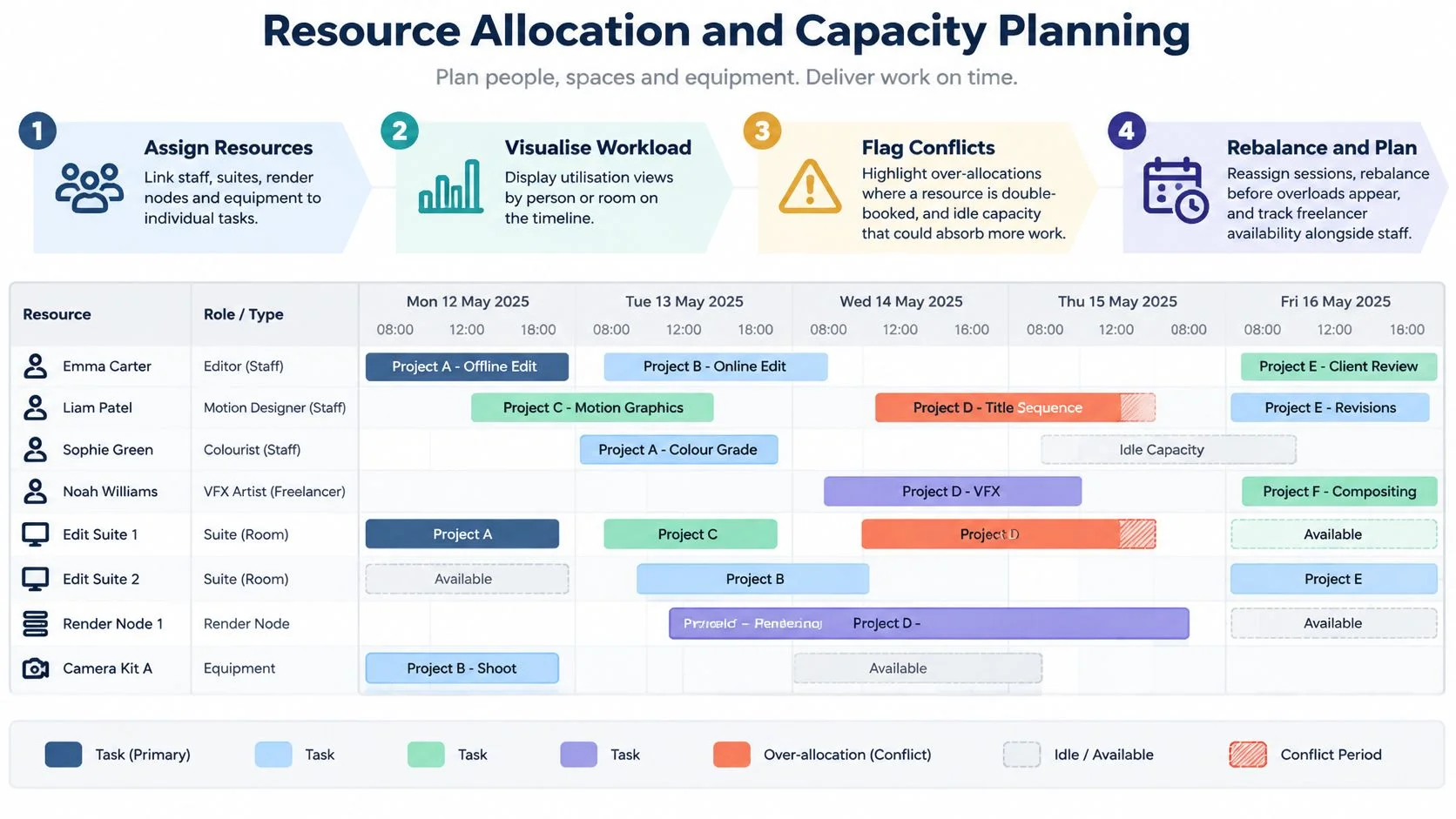
A colour session needs more than an empty rectangle in the diary. It may require the right colourist, a suitable suite, an available licence and prepared media. Assigning those resources to scheduled tasks lets a planner check whether the booking is feasible.
The Wellingtone State of Project Management report found that 44.3% of respondents used Excel for resource planning, while 5.49% used dedicated resource-management software. A structured schedule is an opportunity to connect availability with project dates rather than maintaining separate records.
Separate elapsed time from working effort
A bar covering a review window doesn't mean the editor is working throughout that window. Equally, a short delivery task may need several people working together. Effective capacity planning connects the timeline to effort, working calendars and actual availability.
Suppose a colourist appears on overlapping projects. Before moving either session, check whether the overlap represents active grading, unattended processing or a client approval hold. Those require different decisions.
- Assign at task level. Name the operator and suite against the session, not merely against the overall project.
- Distinguish booking status. Keep provisional freelancer holds separate from confirmed availability.
- Include preparation. Allow for media checks, conform preparation and handovers, not just attended sessions.
Quick win: Review the upcoming resource view with the department leads and resolve overlapping confirmed bookings before discussing new requests.
A basic Gantt chart doesn't automatically detect overloads. For that, you need resource assignments and availability data, plus a workload view or conflict rules. Without those, the chart is a useful conversation starter, not proof that capacity exists.
4. Improved Communication and Stakeholder Alignment
The client thinks their feedback deadline is flexible. The mixer thinks the session is confirmed. The coordinator knows the booking depends on approval, but that condition exists only in an email thread.
A shared Gantt view gives everyone a place to check dates, responsibilities and conditions. Open University research on project-management practice identifies Gantt charts among widely used project-management aids, supporting their role as a familiar communication format.

Share the decision, not just the diagram
Before a review, send the client a read-only view showing submission, feedback, revision and approval windows. Explain the consequence of late feedback in plain language: keeping the current delivery requires approval before the downstream booking is committed.
Internally, use the same schedule to resolve exceptions. The managing director doesn't need a recital of every completed task. They need to know which commitment is at risk, who owns the decision and what alternatives remain.
- Name a schedule owner. Department leads supply updates; the coordinator maintains the agreed schedule.
- Set an update rhythm. Match it to how quickly bookings and approvals change.
- Control the audience. Give vendors and clients relevant views without exposing unrelated bookings or commercial information.
Quick win: Replace the next departmental status round-up with a review of changed dates, unresolved approvals and decisions required.
Sharing access alone won't create alignment. An outdated export can be more misleading than no export, so label snapshots clearly and state when they were issued. Keep discussion against the relevant task where possible, rather than letting the reason for a date change disappear into chat.
5. Early Detection of Schedule Risks and Bottlenecks
A delayed VFX turnover is manageable while there's time to change the plan. It becomes harder when the online editor, colourist and client are already committed to dates that no longer work.
A Gantt chart helps the coordinator compare the original plan with current expectations. The NIHR Gantt charts and timelines guidance explains their value for showing timelines, progress, dependencies and resources, while warning that task duration doesn't reliably represent workload or effort.

Watch the queue, not just the late task
Suppose several projects converge on final grading in the same delivery window. None may be late yet, but the combined demand can exceed the available colour capacity. Review that concentration before accepting another booking.
Save an approved baseline, then retain the distinction between the original commitment and the latest forecast. Replacing the original dates whenever work slips removes the comparison you need.
A chart can show a plausible sequence while hiding an impossible workload. Check both before promising delivery.
When a risk appears, choose a specific response: bring preparatory work forward, split a handover, confirm additional capacity or negotiate a revised milestone. Don't shorten the next task until the bars fit.
Quick win: At the production review, ask which upcoming handover has the least room for uncertainty. Check its inputs, approver and fallback arrangement.
Buffers help when they cover identifiable uncertainty, such as vendor turnaround or client review. Hidden padding scattered through every task makes it harder to understand where the schedule is exposed.
6. Progress Tracking Against Plan
Booked, started, submitted and approved are different states. Treating them as interchangeable makes a project look healthier than it is.
A Gantt chart becomes useful for progress tracking when the team agrees what each status means. For offline, completion might require client-approved picture lock; for a VFX shot, it might require an accepted final version in the correct location.
Measure accepted outputs
Say an episode's edit is marked nearly complete, but the outstanding work includes an unresolved structural note. The percentage tells the coordinator little about whether online can start. A clear approval state and forecast completion date are more actionable.
Use progress measures suited to the work:
- Editorial. Track review submissions, outstanding decisions and approved versions.
- VFX. Separate work in progress, submitted shots and accepted finals.
- Sound. Distinguish preparation, premix, attended review and approved masters.
- Delivery. Record export, QC, correction and recipient acceptance separately.
Summary bars can give management a phase-level view, but they shouldn't conceal a blocked handover. Keep the next required output visible beside the forecast finish.
Quick win: Ask each department to define its completion criteria and update the schedule at an agreed point before the production meeting.
Avoid assuming that marking a predecessor complete should automatically mean the next task has started. The next operator may still need media, a confirmed booking or an explicit handover. Software can support status changes, but the production process must define what triggers them.
The benefit is a more defensible forecast. Instead of asking whether the team feels on track, the coordinator can identify what has been accepted, what remains and whether the remaining work still fits the available time.
7. Linking Schedule to Budget and Cost Control
Extending the mix changes more than a finish date. It may mean additional engineer time, suite occupancy, revised freelance commitments and less availability for another project.
When tasks connect to resource bookings, rates and recorded time, the production manager can assess those consequences before approving the change. A Gantt chart alone isn't a cost-control system, but its task structure can provide the connection between the plan and the budget.
Compare options before moving bookings
Suppose late editorial changes require additional sound work. The team could extend the attended session, complete suitable preparation elsewhere or agree a narrower revision scope. Each option has different scheduling and commercial consequences.
The production manager should compare the forecast cost to complete, not just the spend already recorded. An apparently healthy budget can still be insufficient for the work remaining.
- Use matching task structures. Keep phases consistent across scheduling, time recording and budgeting.
- Separate effort from duration. Don't cost an entire approval window as continuous operator time.
- Record change scope. Connect additional work to the instruction that caused it.
- Distinguish internal and client rates. Extra cost and additional billable revenue aren't the same thing.
Commercial check: Before accepting a revised date, confirm who pays for the extra work and whether the resources are actually available.
Quick win: Choose a project with active revisions and compare planned effort, recorded effort and remaining effort by phase. Investigate the differences before adjusting the forecast.
This takes disciplined time recording. If everyone logs hours against a project-wide miscellaneous category, the schedule won't explain why the grade exceeded its allowance or whether the remaining mix budget is realistic.
8. Milestone and Client Delivery Management
Start with the delivery commitment and work backwards. Include the approved master, QC, corrections, exports, mix approval, grade approval and the inputs each stage needs.
Milestones mark significant outcomes, while tasks represent the work needed to reach them. Understanding key project milestones helps avoid a common mistake: putting a client review symbol on the chart without allowing any time for the client to review.
Give approval its own working window
For a broadcast delivery, separate master preparation from technical QC and any correction cycle. Then check the recipient's requirements before finalising the sequence, including the versions, accompanying material and acceptance process.
Client review needs an owner, an agreed submission format and a feedback deadline. If several stakeholders must approve, identify who consolidates their notes so the editor isn't working from conflicting instructions.
- Plan backwards. Test whether realistic activity durations fit before confirming the deadline.
- Protect contingency. Put recovery time where corrections or external approvals could affect delivery.
- Define acceptance. Distinguish files uploaded from files received and accepted.
- Schedule close-out. Include required handover, archive and commercial administration.
The coordination principle also appears in a casework and fume hood upgrade guide: a visible completion date needs supporting work and checks behind it. In a studio, final export is not the whole delivery process.
Quick win: Inspect the next client delivery milestone and name the person responsible for confirming acceptance.
Working backwards may reveal that the requested deadline isn't achievable under the current assumptions. That's a useful result. Present the choices clearly: change scope, secure suitable capacity, accelerate a genuine approval step or move delivery. Don't disguise the problem by removing QC or assuming instant feedback.
8 Benefits of Gantt Charts for Post-Production Workflows at a Glance
| Benefit | Primary Gain | Key Visual Feature | Best For | Main Effort Required |
|---|---|---|---|---|
| Clear Visualization of the Project Timeline | Shared overview of task timing | Horizontal task bars across a time scale | Seeing phases, overlaps, and gaps across a project | Grouping and filtering tasks to keep the chart readable |
| Mapping Task Dependencies and the Critical Path | Shows how delays affect delivery | Linked tasks and highlighted critical path | Protecting deadlines and prioritising dependent work | Maintaining accurate task dependencies |
| Resource Allocation and Capacity Planning | Balances workloads and prevents resource conflicts | Resource assignments and workload indicators | Coordinating staff, suites, and equipment | Keeping effort estimates and availability current |
| Improved Communication and Stakeholder Alignment | Gives stakeholders one shared schedule | Shared timeline with owners and status fields | Aligning teams, clients, and external partners | Updating the chart and managing access |
| Early Detection of Schedule Risks and Bottlenecks | Creates time to respond to schedule pressure | Baseline comparisons and at-risk task indicators | Spotting delays and bottlenecks before delivery | Updating progress accurately and reviewing against the baseline |
| Progress Tracking Against Plan | Makes project status measurable | Completion indicators and actual dates | Reporting whether tasks and phases are on track | Defining completion and updating progress regularly |
| Linking Schedule to Budget and Cost Control | Connects schedule changes to financial impact | Time-phased costs and planned-versus-actual hours | Monitoring spend and making time-cost trade-offs | Recording task hours and maintaining accurate cost data |
| Milestone and Client Delivery Management | Keeps external deadlines and approvals visible | Milestone markers and linked delivery tasks | Planning client reviews and fixed delivery dates | Working backwards from deadlines and adding contingency |
From Gantt Theory to a Live Studio Schedule
The strongest benefits of Gantt chart planning come from connecting decisions. A visible timeline gives the team context, dependencies explain the consequences of change, and resource assignments show whether the proposed work can happen.
Progress updates then test the forecast against accepted outputs. Cost information makes the trade-offs explicit, while milestones keep the team focused on what the client needs to receive and approve.
Build a shared schedule, not another reporting layer
A Gantt chart only pays off when it becomes the studio's single live source of truth. That doesn't mean everyone needs an identical view. It means departmental planners, coordinators and management work from the same underlying bookings, task dates and approvals.
If the coordinator still has to reconcile the chart with a separate suite diary and an unofficial freelancer spreadsheet, the studio hasn't resolved the underlying problem. It has added another document to maintain.
Start with a live project that has meaningful handovers but manageable complexity. Agree the phases, assign owners, confirm resources and save the approved baseline before using it for production decisions.
- Keep ownership clear. Decide who can change a commitment and who must be consulted.
- Test a change. Move a provisional approval date and inspect the downstream effect.
- Validate capacity. Confirm the required people, rooms and equipment, not just the task sequence.
- Review the result. Check whether the team can make a booking or delivery decision without consulting competing records.
Connect the plan to studio operations
Our Gantt-style planning at freispace sits alongside a single live schedule showing suites, staff, freelancers, kit and licences. Budgets show live plan-versus-actual on every project rather than waiting for a month-end spreadsheet, while a documented REST API and an MCP server let your own tools and assistants read the schedule.
Those connections matter because scheduling decisions don't stop at the edge of the chart. Moving a session changes resource demand, remaining effort and potentially the project's commercial position.
Keep the initial implementation focused. Build a schedule the coordinator trusts, then extend the detail where it helps a department make a better decision. Don't make perfect task granularity a condition for replacing conflicting records.
Use the ROI calculator on the site to compare your current software and productivity costs, then trial the Gantt-style planner on a live project this month. Judge the trial by whether your team can explain a changed delivery date, confirm capacity and understand the budget consequence from the same plan.
We offer Gantt-style project planning connected to resource scheduling, time tracking and budget control. Visit freispace to compare your current costs with the ROI calculator, then test the planner on an active edit, grade or mix project with your coordinator and department leads.